Associate III
May 8, 2024
Solved

Signal delay MEMS Studio BUG

  • May 8, 2024
  • 1 reply
  • 864 views

I think signal delay library does not work on MEMS Studio.

I made an example code to show temperature values from a nucleo-L476RG and x-nucleo-IKS01A3 setup.

The code should show the actual value and a delayed one:

aesteban_0-1715168691138.png

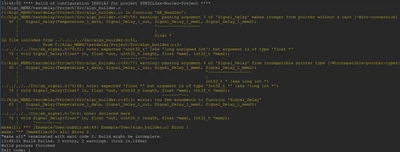
But it gives the following error:

aesteban_1-1715168772554.png

This exact situation was replicated on AlgoBuilder software and worked without any issue.


Any idea how could I work this out?

Thanks in advance

This topic has been closed for replies.
Best answer by Miroslav BATEK

Hello @aesteban 

indeed it is issue in the Signal Delay function block. We will fix it in the next version of MEMS Studio.

For now you can apply attached patch. Just replace the signal.json file in you MEMS Studio installation folder (c:\Users\USERNAME\AppData\Local\STMicroelectronics\MEMS Studio\release\Library\) by the one in attachment.


1 reply

Miroslav BATEKBest answer
ST Employee
May 13, 2024

Hello @aesteban 

indeed it is issue in the Signal Delay function block. We will fix it in the next version of MEMS Studio.

For now you can apply attached patch. Just replace the signal.json file in you MEMS Studio installation folder (c:\Users\USERNAME\AppData\Local\STMicroelectronics\MEMS Studio\release\Library\) by the one in attachment.