Hi @khonsaiho ,
To connect the sensortile.box PRO with the MEMSstuio sw via USB cable you need to program the board with the
DataLogExtended.bin fw
which you find in C:\Users\xxxxx\AppData\Local\Local\STMicroelectronics\MEMS Studio\firmware\mems-studio\steval-mkboxpro
Click firmware upgrade from memsstudio,
put the board in DFU,
select DFU interface,
search for the device,
and load the DataLogExtended.bin binary into the path,
then PROGRAM.
Now reboot the board, always connect it in usb,
in CONNECT select communication : serial,
CONNECT the board.
so you should see the sensor data in mems studio.
about the BLE communication, there is no example ready, you need to create the fw by the algobuilder.
click ALGOBUILDER
click FIRMWARE SETTINGS
Select the toolchain/IDE used
select TARGET SensorTile.box Pro BLE
You need to create in algobuilder a design with SensorHUB connected with the block needed (MotionFX 9x/quaternion example), then connect the display/fusion (or what you need)
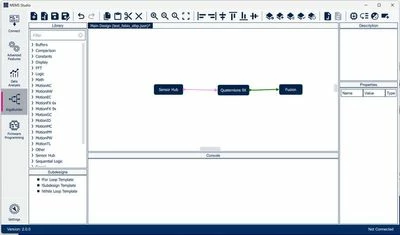
click to INITIALIZE PROJ, GENERATE CODE, BUILD
then PROGRAM TARGET (the board must be in DFU).
Now restart the board
you need to do bluetooth pairing between the board and pc.
in windows add a new bluetooth device (remember to set the Bleutooth device discovery to ADVANCED).
You should see algob device in new device, do the pairing with 123456 as the code.
Now in memsstudio, click CONNECT, Connection Type "bluetooth" and you can see the board.
This way you should be connected via BLE to memsstudio.
You can edit the C code you created with your toolchain but you should not edit the bluetooth part.
