
ajean.625
Visitor II
October 30, 2019
Solved

Hi every one I cannot open the file .prj created by edesign suite with designspark? it says unatended file format Thank you

  • October 30, 2019
  • 3 replies
  • 1750 views

..

This topic has been closed for replies.
Best answer by M. Palano

Hello,

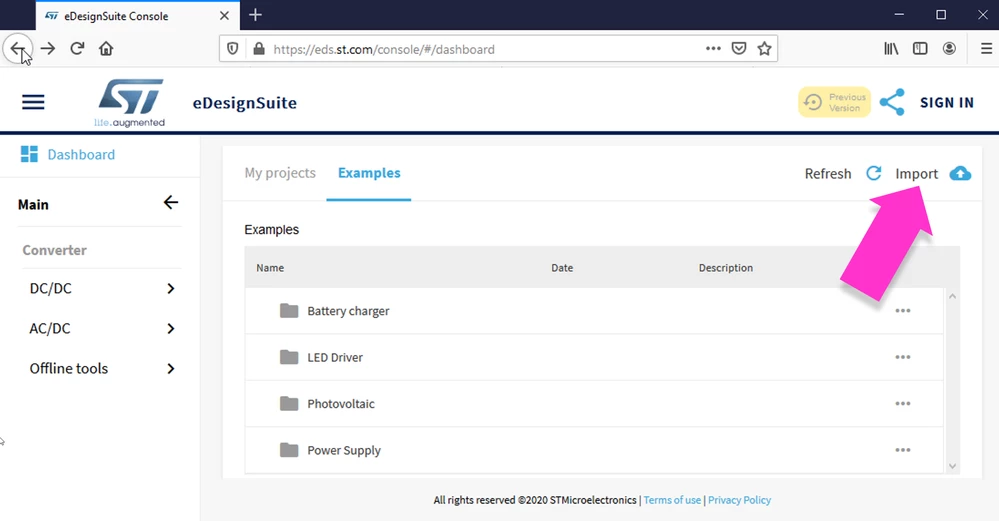
on the left-side menu of the Main window of eDsesignSuite, click on `Dashboard`, it opens the section from where you can open previously saved project or load examples we provide or import `. prj` files => at the top-right corner of the Dashboard section/window you will find the "Import" link-button.
0690X00000D9WmlQAF.png

Please, be aware that old exported projects can be imported back only from their originator modules, some of them would require Flash Player Plugin

3 replies

bco.733
Visitor II
November 3, 2019

I am also looking for a way of opening the .prj file export. ST hasn't stated that info anyway?

RGeorge
Associate
December 27, 2019

Is there a solution to open the .prj file from the edesign suite.

M. Palano
M. PalanoBest answer
ST Employee
February 11, 2020

Hello,

on the left-side menu of the Main window of eDsesignSuite, click on `Dashboard`, it opens the section from where you can open previously saved project or load examples we provide or import `. prj` files => at the top-right corner of the Dashboard section/window you will find the "Import" link-button.

0690X00000D9WmlQAF.png

Please, be aware that old exported projects can be imported back only from their originator modules, some of them would require Flash Player Plugin
