Visitor II
March 5, 2026
Solved

Can't talk to EVAL-STPM33

  • March 5, 2026
  • 1 reply
  • 95 views

I have eval kit EVALSTPM33 from Digikey. When I plug it into my PC USB port, I see a red LED near the USB port, and in the Windows device manager it shows up as com port #6. If I connect to that com port and try to read a register in software from https://www.st.com/en/embedded-software/stsw-stpm001.html, I get an error. After 10 seconds or so the red LED goes out. I do not have anything connected besides the USB port. 
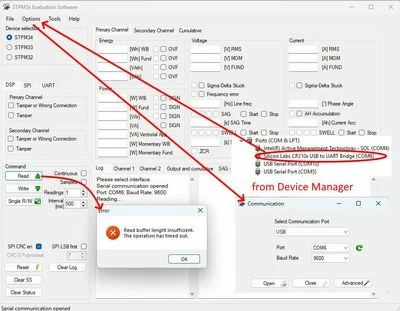
 

Stpm33CommsIssue.jpg

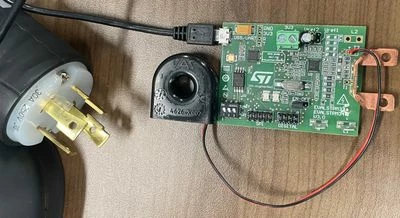
STPM33evalPhoto.jpg


Best answer by Peter BENSCH

Welcome @marc3141, to the community!

Had you ever read UM1748, in particular, section 2.3.2 for commissioning?

In your photo, you can see that you have correctly set SW1 (UART) and J4 (EN), but the STPM33 is not supplied with 3.3V because nothing is connected to J7 (the green 3V3 connector).

Additionally, you should select the correct target in the GUI: in your screenshot, you can see the STPM34, even though you have an STPM33.

Hope that helps?

Regards
/Peter

1 reply

Peter BENSCH
Peter BENSCHBest answer
Technical Moderator
March 5, 2026

Welcome @marc3141, to the community!

Had you ever read UM1748, in particular, section 2.3.2 for commissioning?

In your photo, you can see that you have correctly set SW1 (UART) and J4 (EN), but the STPM33 is not supplied with 3.3V because nothing is connected to J7 (the green 3V3 connector).

Additionally, you should select the correct target in the GUI: in your screenshot, you can see the STPM34, even though you have an STPM33.

Hope that helps?

Regards
/Peter