Cooke.Ernest
Associate III
April 4, 2017
Question

STEVAL PCC009V2 & SPINFamily Evaluation Tool

  • April 4, 2017
  • 5 replies
  • 2903 views
Posted on April 04, 2017 at 17:31

Hi,

I am trying to use the STEVAL-PCC009V2 & EVAL6470H boards using the SPIN

Family Evaluation Tool (Version 3.2)

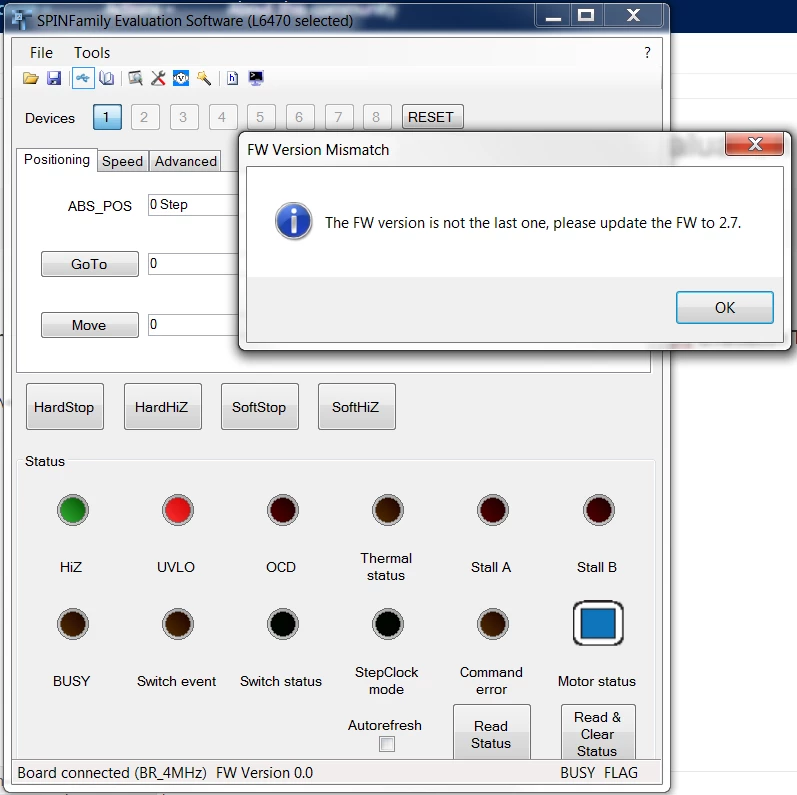
However when I try to connect to the board I get the following error:

0690X00000606d4QAA.png

I have managed to locate the below hex file at the following location:

C:\Program Files (x86)\STMicroelectronics\SPINFamily Evaluation Tool 3.2\Firmware

0690X00000606dnQAA.png

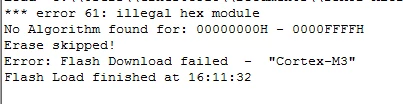
I have tried to download the hex file below onto the board using Keil uVision but I am getting the following error in the Build Output.

0690X00000606hFQAQ.png

It should be noted that I was able get older versions of the SPINFamily Evaluation Tool to work.

If anyone has any solutions to this problem or has a link to Version 3 of the Evaluation Tool I would greatly appreciate it.

Kind Regards,

Ernest Cooke

#dspin #pcc009v2-eval6470h-spinfamily #dspin-gui #powerstep01 #keil-uvision
This topic has been closed for replies.

5 replies

Enrico Poli
ST Employee
April 7, 2017
Posted on April 07, 2017 at 14:31

Hello Ernest,

I have no expertise in uVision, but you can try update the PCC009V2 board using the 'IBUUI Updater' tool you can fin in the SPINFamily folder.

If this procedure is not available (it is firmware based, I don't know if your attempt to update the firmware through uVision corrupted the flash) and you have a ST-LINK, you can use the STM32 ST-LINK Utility to write the .hex file into the MCU.

Cooke.Ernest
Associate III
April 7, 2017
Posted on April 07, 2017 at 15:46

Hi Enrico,

Thank you very much for your response!

I tried to update the board using the ?IBUUI Updater? tool and I got through the first three steps as shown below.  However, the program crashes when it gets to the next stage (Switch to DFU mode) and it doesn?t go any further in updating the board.

 0690X00000606iDQAQ.png

IBUUI Board Updater - Stuck at 'Switch to DFU mode'

I then tried to update the code through the ST-LINK Utility.  However I was unable to connect to the board.  I got the errors shown below.

0690X00000606eNQAQ.png

STM32 ST-LINK ? Connect to the target

 0690X00000606iSQAQ.png

STM32 ST-LINK ? Settings

Updating the firmware through Keil µVision has not corrupted the flash on the STEVAL board because I can still download the older version of the hex file and use the older version of the SPINFamily Evaluation Tool.

Enrico Poli
ST Employee
April 7, 2017
Posted on April 07, 2017 at 16:32

Hi Ernest,

The PCC009V2 is not a STLINK itself! You should connect a STLINK programmer to the 20 poles connector of the board. You can also use a Nucleo board as programmer, but in this case you have to wire the SWD lines by yourself.

Maybe it is the same method you already tried, but I found this on Keil website:

http://www.keil.com/support/man/docs/uv4/uv4_fl_hexdownload.htm

 
Enrico Poli
ST Employee
April 10, 2017
Posted on April 10, 2017 at 13:35

Glad to know you are ready to work with the SPINFamily tool.

Regards

Enrico

FF1
Associate III
November 15, 2018

Hi, I've a similar trouble, but the IBUUI updater in my case (WinXP Pro SP3) crash on a missing DLL (setupapi that is still into the folder) and I'm unable to perform the sw upgrade of the firmware board to the 2.7 release.

Tomorrow I'll get a ST-LINK/V2 JTAG programmer, can I try to program the hex file directly by means of the ST-LINK/V2 tool directly connected to the steval-pcc009v2 board through the J3 connector?

I'm also a little confused about the upgrading firmware guide concerning the IBUUI on Win7 system because this guide talk about the JTAG and also discovery board... and seems that I've to use the ST-LINK/V2 and the discovery board attached to steval-pcc009v2 at the same time... could you please clarify me a little bit also about this point?

Thank!

Best regards.

Fabio

FF1
Associate III
November 22, 2018

Hi All,

I've succesfully updated the STEVAL-PCC009V2 board with the latest firmware fwpsin_pcc009v2_FWV2_7.hex and the ST-Link/v2 JTAG adapter, simply connect the programmer module to the STEVAL-PCC009V2 board, connect either to some free USB port then launch the STM32 ST-LINK Utility (search for STSW-LINK004 on the ST site).

Now simply Connect to the target, load the firmware and the make the Program and Verify option all is done in a few seconds. Now detach from the target and close the programming application.

Detach the JTAG cable on the STEVAL-PCC009V2 board and launch the SPINFamily Evaluation Tool 3.2 now your board will be correctly managed and the firmware relase will be the latest v2.7.

Hope it help.

As a side note after this searching I've found same procedure steps at the end of the UM2022 (User Manual - SPINFamily evaluation tool) on page 80, §A.1.2 .

Best regards

Fabio

Explorer II
November 21, 2023

Thanks for your instruction. It works for me !

dungeonlords789
Associate III
April 24, 2019

BUG at SPINFamily Evaluation Tool (STSW-SPIN002)

There is a bug when I use ihm03a1 with SPINFamily Evaluation Tool. I am creating new settings for my motor, select Voltage mode, and resistance > 2 Ohm. So SPINFamily Evaluation Tool throw fatal exception.

dungeonlords789
Associate III
May 13, 2019

My motor has 5 Ohms resistance. When I try to set 5 Ohms at SPINFamily tool for ihm03a1 - application crash! Is it a bug of application?