
Associate
April 10, 2024
Solved

STSW-WPSTUDIO GUI cannot connect to ST Wireless Charging board

  • April 10, 2024
  • 6 replies
  • 7418 views

Hello,

I purchased a set of Wireless charging evaluation boards (RX & TX) on Mouser.com for $160.

The 2 board names are STEVAL-WBC86TX and STEVAL-WLC38RX.


I use STSW-WPSTUDIO V1.8.4 software to try to connect to the board from my PC and get access to the register setting. But every time I click on the Connect button, there is the same error message appearing:


"Unable to find any [RX]WLC38 device. Please check your connection again."


The issue is the same with both boards.

But it seems the boards are working, because when I place STWLC38 on top of STWBC86, the boards are charging, because I can see the red LED on the receiver board, and Vout is 5V.


So the main issue is the GUI.

I cannot use the ST GUI to connect to any of the ST boards that I paid $200 for ! (with shipping + fee cost)


My computer is Windows 11. And the board is properly connected through a USB-A to USB-C cable.

I followed the steps from the user manual. The 2nd USB-C connector of STWBC86 is connected to 100W USB-C adapter. So the boards are powered on, because I can see the LED turned on. I tried with other USB cables, and it is still the same issue.

And I didn't install any USB driver on Windows because I didn't see mentioned anywhere the requirement to install a driver to use this board.

Do I need to install a USB driver ?


  • GUI Error message with STWBC86 evaluation board:

"Unable to find any [TX]WBC86 device. Please check your connection again."
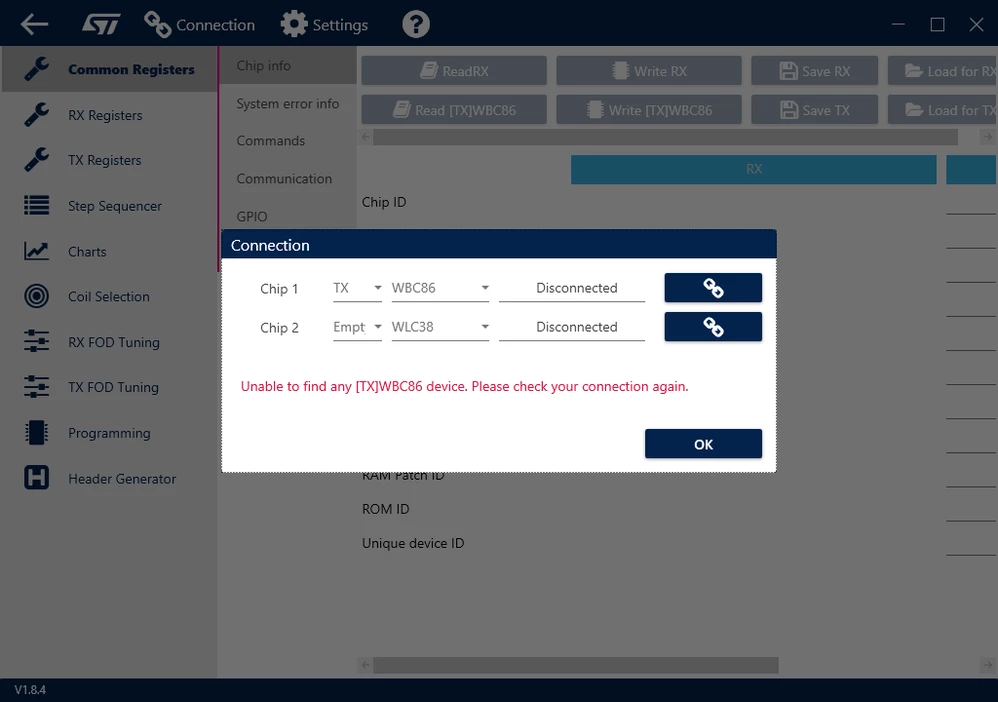
STWBC86 GUI connection issueSTWBC86 GUI connection issue


  • GUI Error message with STWLC38 evaluation board:

"Unable to find any [RX]WLC38 device. Please check your connection again."
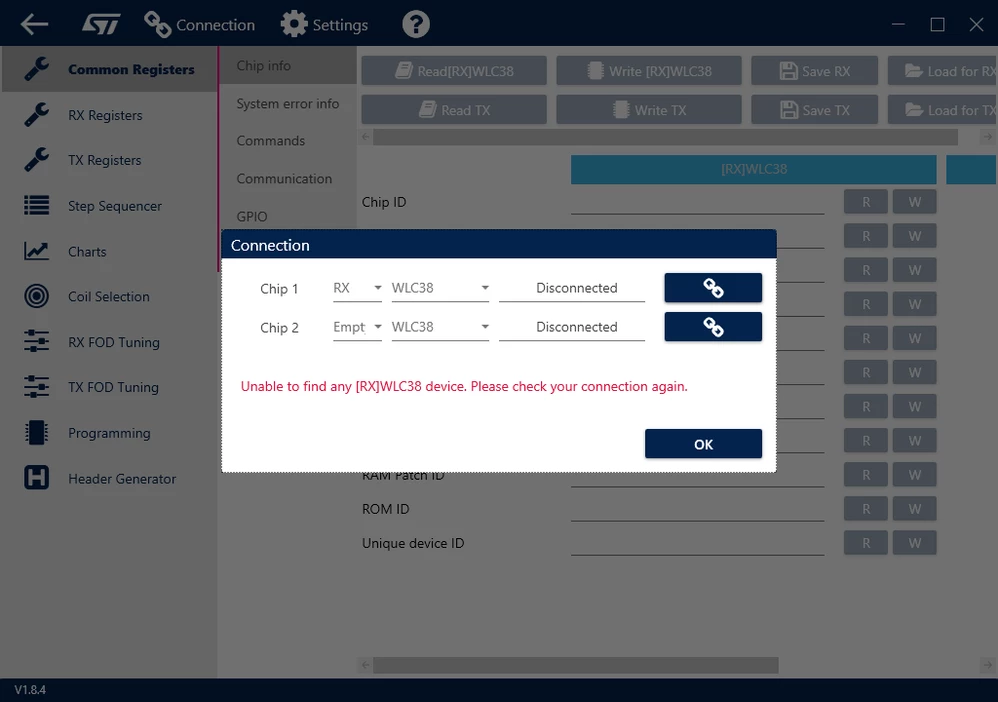
STWLC38 GUI connection issueSTWLC38 GUI connection issue


I don’t understand why there is such critical issue with new boards right out of the box ??

I have used STM32CubeProgrammer in the past to connect to a low cost $10 STM32 Nucleo board, and I never faced any USB connectivity issue. It was simple as plug and play.

What needs to be done for WPSTUDIO to detect that the computer is attached to the $160 Wireless boards ?


Best answer by willzhou

@Joshua1  @sjones  @GRB 


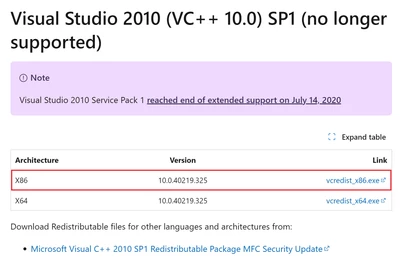
We have confirmed this version GUI is dependent on “Microsoft Visual C++ 2010 X86 Redistributable Package” .

willzhou_0-1713868708231.png

6 replies

Technical Moderator
April 11, 2024

Hi Sir

Sorry for the inconvenience,

Can i confirm you connect the right USB/GUI/J3 one?

Also please try set  RX WLC38 and try again.

We have update GUI tool ,please use this one. 

https://github.com/STwirelesscharger/STSW-WPSTUDIO/blob/main/STSW-WPSTUDIO%20V2.1.0.exe


willzhou_0-1712803198261.png

Also can you share your LOG information to me?

willzhou_0-1712803676482.png


In order to give better visibility on the answered topics, please click on Accept as Solution on the reply which solved your issue or answered your question.
Joshua1Author
Associate
April 16, 2024

Hello Sir,

I tested WPSTUDIO version 2.1.0, but there is no LOG available in this version !!
So how are we supposed to see the full error messages ?


STSW-WPSTUDIO_v2.1.0 still buggySTSW-WPSTUDIO_v2.1.0 still buggy


And I don't see any release notes for the software you provided.
So which bugs are fixed in v2.1.0 ? Is it supposed to fix the USB connection issue ?


Thanks


Technical Moderator
April 19, 2024

Hi

Sorry for the inconvenience

I have test in several computer and this tool can be used and log can be seen.

Can you test in other computer .

In order to give better visibility on the answered topics, please click on Accept as Solution on the reply which solved your issue or answered your question.
Associate
April 19, 2024

I am also having the same problem, tried on two different computers and versions 2.1.0 and 2.2.5.
The error in the log file is:

,{"Type":3,"Date":"2024-04-19","Time":"04:34:11.573 PM","ThreadId":"9","Message":"Error during enumeration for HidDongleMaster: Unable to load DLL 'HidDongle.dll': The specified module could not be found. (Exception from HRESULT: 0x8007007E)","TypeToView":"ERROR"},

Associate
April 20, 2024

I am also having the same problem, tried on three different computers with  versions 2.1.0 and 2.2.5. I had two transmitter and two receiver eval boards. It was working at first but one by one they quit connecting. There is definitely an issue with the hardware for no known reason. 


Technical Moderator
April 20, 2024

Hi 

please share gui log and check it is dongle issues, Or use GUI connect select "Empty" item to try it.

In order to give better visibility on the answered topics, please click on Accept as Solution on the reply which solved your issue or answered your question.
Associate
April 20, 2024

@ STM - How do I get replacement boards?

Technical Moderator
April 20, 2024

please careful about use dongle, protect from ESD, Also i recommed you to buy ft260 dongle. 

If you volume > 10k i can contract local FAE to support you.

Also we have wireless power solution 50W and 70W in this website link

STWLC - Products - Search STMicrocontrollers


In order to give better visibility on the answered topics, please click on Accept as Solution on the reply which solved your issue or answered your question.
Associate
April 20, 2024

What does "recommed you to buy ft260 dongle" mean? How will that make the STM Qi Rx/Tx boards that were working now work again? Volume is >10K. I need support if I am going to use STM because right now nothing is working. I attached a log of trying to connect using Empty and Rx

Technical Moderator
April 20, 2024
In order to give better visibility on the answered topics, please click on Accept as Solution on the reply which solved your issue or answered your question.
Associate
April 22, 2024

There seems to be some confusion here:

The STEVAL-WBC86TX board has an FT260 chip on board. This does the I2C to USB interface, and so (I think) replaces the need for the FT260 dongle mentioned above. The user guide for the board (UM3161) certainly doesn't mention a dongle in the hardware setup.

UM3161 does mention the need for I2C drivers (no link to download them), but this contradicts the FT260 user guide (https://www.ftdichip.com/old2020/Support/Documents/AppNotes/AN_394_User_Guide_for_FT260.pdf) which states:

The FT260 is a full speed USB device which supports I²C and UART communication through
standard USB HID interfaces. The USB HID class is natively supported by most operating systems.
A custom driver is not required to be installed for the FT260.


Here is a (base64) decoded log from V2.2.5 (with debug turned on) of what happens when I attempt to connect:

{"Type":1,"Date":"2024-04-22","Time":"10:11:13.620 AM","ThreadId":"1","Message":"STSW-WPSTUDIO V2.2.5","TypeToView":"INFO"},
{"Type":0,"Date":"2024-04-22","Time":"10:11:35.728 AM","ThreadId":"9","Message":"[WindowsHidDeviceFactory - GetConnectedDeviceDefinitionsAsync] About to call SetupDiGetClassDevs for class Guid 4d1e55b2-f16f-11cf-88cb-001111000030. Flags: 18","TypeToView":"DEBUG"},
{"Type":0,"Date":"2024-04-22","Time":"10:11:35.730 AM","ThreadId":"9","Message":"[WindowsHidDeviceFactory - GetConnectedDeviceDefinitionsAsync] The call to SetupDiEnumDeviceInterfaces returned ERROR_NO_MORE_ITEMS","TypeToView":"DEBUG"},
{"Type":0,"Date":"2024-04-22","Time":"10:11:35.731 AM","ThreadId":"8","Message":"[WindowsHidDeviceFactory - GetConnectedDeviceDefinitionsAsync] About to call SetupDiGetClassDevs for class Guid 4d1e55b2-f16f-11cf-88cb-001111000030. Flags: 18","TypeToView":"DEBUG"},
{"Type":0,"Date":"2024-04-22","Time":"10:11:35.731 AM","ThreadId":"8","Message":"[WindowsHidDeviceFactory - GetConnectedDeviceDefinitionsAsync] The call to SetupDiEnumDeviceInterfaces returned ERROR_NO_MORE_ITEMS","TypeToView":"DEBUG"},
{"Type":0,"Date":"2024-04-22","Time":"10:11:35.731 AM","ThreadId":"8","Message":"[WindowsHidDeviceFactory - GetConnectedDeviceDefinitionsAsync] About to call SetupDiGetClassDevs for class Guid 4d1e55b2-f16f-11cf-88cb-001111000030. Flags: 18","TypeToView":"DEBUG"},
{"Type":0,"Date":"2024-04-22","Time":"10:11:35.731 AM","ThreadId":"8","Message":"[WindowsHidDeviceFactory - GetConnectedDeviceDefinitionsAsync] The call to SetupDiEnumDeviceInterfaces returned ERROR_NO_MORE_ITEMS","TypeToView":"DEBUG"},
{"Type":1,"Date":"2024-04-22","Time":"10:11:35.732 AM","ThreadId":"6","Message":"ConnectionType: ADDRESS_SIZE_2_BYTES bytes","TypeToView":"INFO"},
{"Type":1,"Date":"2024-04-22","Time":"10:11:35.732 AM","ThreadId":"6","Message":"ReadChunk: 240 bytes","TypeToView":"INFO"},
{"Type":1,"Date":"2024-04-22","Time":"10:11:35.732 AM","ThreadId":"6","Message":"WriteChunk: 50 bytes","TypeToView":"INFO"},
{"Type":1,"Date":"2024-04-22","Time":"10:11:35.732 AM","ThreadId":"6","Message":"ConnectionType: ADDRESS_SIZE_2_BYTES bytes","TypeToView":"INFO"},
{"Type":1,"Date":"2024-04-22","Time":"10:11:35.733 AM","ThreadId":"6","Message":"ReadChunk: 4091 bytes","TypeToView":"INFO"},
{"Type":1,"Date":"2024-04-22","Time":"10:11:35.733 AM","ThreadId":"6","Message":"WriteChunk: 50 bytes","TypeToView":"INFO"},
{"Type":1,"Date":"2024-04-22","Time":"10:11:35.733 AM","ThreadId":"6","Message":"ConnectionType: ADDRESS_SIZE_2_BYTES bytes","TypeToView":"INFO"},
{"Type":1,"Date":"2024-04-22","Time":"10:11:35.733 AM","ThreadId":"6","Message":"ReadChunk: 55 bytes","TypeToView":"INFO"},
{"Type":1,"Date":"2024-04-22","Time":"10:11:35.733 AM","ThreadId":"6","Message":"WriteChunk: 55 bytes","TypeToView":"INFO"},
{"Type":1,"Date":"2024-04-22","Time":"10:11:35.733 AM","ThreadId":"6","Message":"ConnectionType: ADDRESS_SIZE_2_BYTES bytes","TypeToView":"INFO"},
{"Type":1,"Date":"2024-04-22","Time":"10:11:35.733 AM","ThreadId":"6","Message":"ReadChunk: 50 bytes","TypeToView":"INFO"},
{"Type":1,"Date":"2024-04-22","Time":"10:11:35.733 AM","ThreadId":"6","Message":"WriteChunk: 50 bytes","TypeToView":"INFO"},
{"Type":3,"Date":"2024-04-22","Time":"10:11:35.736 AM","ThreadId":"6","Message":"Error during enumeration for HidDongleMaster: Unable to load DLL 'HidDongle.dll': The specified module could not be found. (Exception from HRESULT: 0x8007007E)","TypeToView":"ERROR"},
{"Type":1,"Date":"2024-04-22","Time":"10:11:35.736 AM","ThreadId":"6","Message":"HidDongle enumerate in 2ms","TypeToView":"INFO"},
{"Type":1,"Date":"2024-04-22","Time":"10:11:35.738 AM","ThreadId":"6","Message":"DingDongle enumerate in 1ms","TypeToView":"INFO"},
{"Type":0,"Date":"2024-04-22","Time":"10:11:35.739 AM","ThreadId":"5","Message":"[WindowsHidDeviceFactory - GetConnectedDeviceDefinitionsAsync] About to call SetupDiGetClassDevs for class Guid 4d1e55b2-f16f-11cf-88cb-001111000030. Flags: 18","TypeToView":"DEBUG"},
{"Type":0,"Date":"2024-04-22","Time":"10:11:35.739 AM","ThreadId":"5","Message":"[WindowsHidDeviceFactory - GetConnectedDeviceDefinitionsAsync] The call to SetupDiEnumDeviceInterfaces returned ERROR_NO_MORE_ITEMS","TypeToView":"DEBUG"},
{"Type":0,"Date":"2024-04-22","Time":"10:11:35.739 AM","ThreadId":"5","Message":"[WindowsHidDeviceFactory - GetConnectedDeviceDefinitionsAsync] About to call SetupDiGetClassDevs for class Guid 4d1e55b2-f16f-11cf-88cb-001111000030. Flags: 18","TypeToView":"DEBUG"},
{"Type":0,"Date":"2024-04-22","Time":"10:11:35.739 AM","ThreadId":"5","Message":"[WindowsHidDeviceFactory - GetConnectedDeviceDefinitionsAsync] The call to SetupDiEnumDeviceInterfaces returned ERROR_NO_MORE_ITEMS","TypeToView":"DEBUG"},
{"Type":0,"Date":"2024-04-22","Time":"10:11:35.739 AM","ThreadId":"5","Message":"[WindowsHidDeviceFactory - GetConnectedDeviceDefinitionsAsync] About to call SetupDiGetClassDevs for class Guid 4d1e55b2-f16f-11cf-88cb-001111000030. Flags: 18","TypeToView":"DEBUG"},
{"Type":0,"Date":"2024-04-22","Time":"10:11:35.740 AM","ThreadId":"5","Message":"[WindowsHidDeviceFactory - GetConnectedDeviceDefinitionsAsync] The call to SetupDiEnumDeviceInterfaces returned ERROR_NO_MORE_ITEMS","TypeToView":"DEBUG"},
{"Type":0,"Date":"2024-04-22","Time":"10:11:35.740 AM","ThreadId":"5","Message":"[WindowsHidDeviceFactory - GetConnectedDeviceDefinitionsAsync] About to call SetupDiGetClassDevs for class Guid 4d1e55b2-f16f-11cf-88cb-001111000030. Flags: 18","TypeToView":"DEBUG"},
{"Type":0,"Date":"2024-04-22","Time":"10:11:35.740 AM","ThreadId":"5","Message":"[WindowsHidDeviceFactory - GetConnectedDeviceDefinitionsAsync] The call to SetupDiEnumDeviceInterfaces returned ERROR_NO_MORE_ITEMS","TypeToView":"DEBUG"},
{"Type":0,"Date":"2024-04-22","Time":"10:11:35.740 AM","ThreadId":"5","Message":"[WindowsHidDeviceFactory - GetConnectedDeviceDefinitionsAsync] About to call SetupDiGetClassDevs for class Guid 4d1e55b2-f16f-11cf-88cb-001111000030. Flags: 18","TypeToView":"DEBUG"},
{"Type":0,"Date":"2024-04-22","Time":"10:11:35.740 AM","ThreadId":"5","Message":"[WindowsHidDeviceFactory - GetConnectedDeviceDefinitionsAsync] The call to SetupDiEnumDeviceInterfaces returned ERROR_NO_MORE_ITEMS","TypeToView":"DEBUG"},
{"Type":1,"Date":"2024-04-22","Time":"10:11:35.741 AM","ThreadId":"6","Message":"McpDongle enumerate in 2ms","TypeToView":"INFO"},
{"Type":2,"Date":"2024-04-22","Time":"10:11:35.742 AM","ThreadId":"6","Message":"FT260 Dongle Library Load error ","TypeToView":"WARNING"},
{"Type":1,"Date":"2024-04-22","Time":"10:11:35.742 AM","ThreadId":"6","Message":"FT260 enumerate in 1ms","TypeToView":"INFO"}]

Associate
April 23, 2024

A 14 year old Service Patch, why didn't I think of that?

Technical Moderator
April 23, 2024

Hi

This is due to FT260 dongle dll file need this Microsoft Visual C++ 2010 driver.

In order to give better visibility on the answered topics, please click on Accept as Solution on the reply which solved your issue or answered your question.