ST Community
ST Employee
July 23, 2018

DMA is not working on STM32H7 devices

  • July 23, 2018
  • 24 replies
  • 180121 views

The problem is related to two things: memory layout on STM32H7 and internal data cache (D-Cache) of the Cortex-M7 core. 

In summary these can be the possible issues:

  • Memory placed in DTCM RAM for D1/D2 peripherals. Unfortunately, this memory is used as default in some projects including examples.
  • Memory not placed in D3 SRAM4 for D3 peripherals.
  • D-Cache enabled for DMA buffers, different content in cache and in SRAM memory.
  • Starting the DMA just after writing the data to TX buffer, without placing __DSB() instruction between.

For Ethernet related problems, please see separate FAQ: FAQ: Ethernet not working on STM32H7x3 

1. Explanation: memory layout

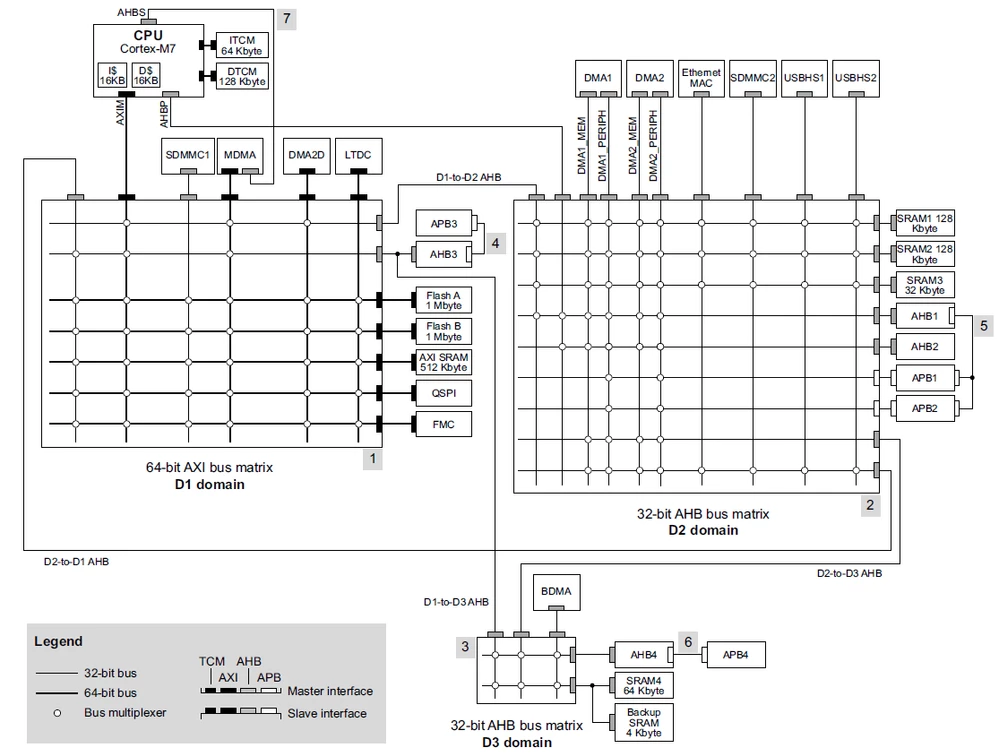
The STM32H7 device consists of three bus matrix domains (D1, D2 and D3) as seen on the picture below. The D1 and D2 are connected through bus bridges, both can also access data in D3 domain. However, there is no connection from D3 domain to D1 or D2 domain. In some devices (STM32H7A3/7B3 and STM32H7B0), we can find only two domains, where D1 and D2 domains are merged into one domain which is the CD Domain, and D3 is nominated as SRD Domain.

The DMA1 and DMA2 controllers are located in D2 domain and can access almost all memories, with the exception of ITCM and DTCM RAM (located at 0x20000000). These controllers are used in most cases.

The BDMA controller is located in the D3 domain and can access only SRAM4 and backup SRAM in the D3 domain.

The MDMA controller is located in D1 domain and can access all memories, including ITCM and DTCM. This controller is primarily used for handling D1 peripherals and memory-to-memory transfers.
698.png

From performance perspective, it is better to place DMA buffers inside the D2 domain (SRAM1, SRAM2 and SRAM3), since the D2-to-D1 bridge can introduce additional delay.

2. Explanation: handling DMA buffers with D-Cache enabled

The Cortex-M7 contains two internal caches: I-Cache for loading instructions and D-Cache for data. The D-Cache can affect the functionality of DMA transfers because it holds the new data in the internal cache and does not write it to the SRAM memory. However, the DMA controller loads the data from SRAM memory, not from the D-Cache.

If the DMA transfer starts immediately after writing data to the tx_buffer in the code, the tx_buffer data might still reside in the write buffer inside the CPU while the DMA has already started. The solution is to set the tx_buffer as a device type to force the CPU to order memory operations or to add the __DSB() instruction before starting the DMA.

There are several ways to manage DMA buffers with D-Cache:

  • Disable the D-cache globally. This is the simplest solution, but it is not an effective one, as you can lose a significant portion of performance. However, it can be useful for debugging to analyze whether the problem is related to the D-cache.
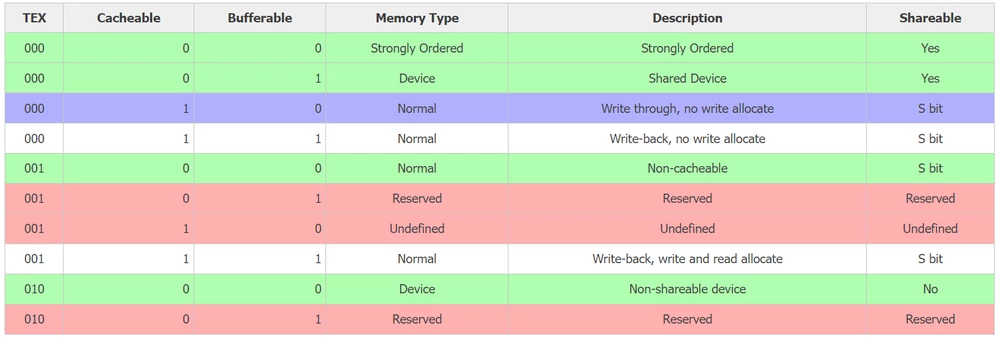
  • Disable the D-cache for a portion of the memory by configuring the memory protection unit (MPU). However, the MPU regions have specific alignment restrictions, and it is necessary to place the DMA buffers in designated parts of the memory. Each toolchain (GCC, IAR, KEIL) must be configured differently.
    • Note that MPU regions can overlap, and the higher region number has priority. Together with subregion disable bits, this feature can soften the alignment and size restrictions.
    • Note that Device and Strongly Ordered memory types do not allow unaligned access to memory.
  • Configure a part of the memory as write-through. This configuration can only be used for TX DMA. Note that on some revisions (r1p1 and older, excluding r0p0) of the Cortex-M7 core, there is an erratum concerning the write-through configuration. This issue affects only STM32H74x and STM32H75x devices from the STM32H7 family.
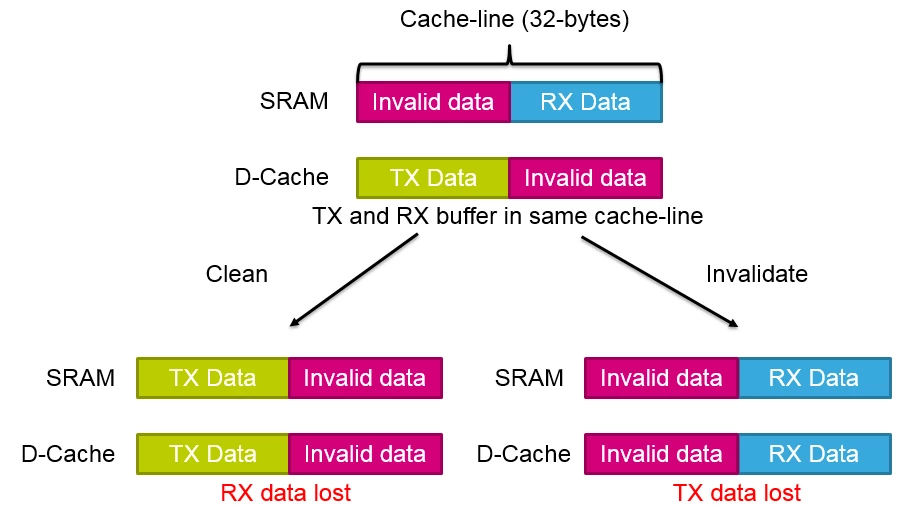
  • Use cache maintenance operations to manage data consistency. You can write data stored in the cache back to memory using the "clean" operation for a specific address range. Additionally, you can discard data stored in the cache using the "invalidate" operation.
    • The downside is that these operations work with a cache-line size of 32 bytes, so you cannot clean or invalidate a single byte from the cache. This limitation can lead to errors when the RX buffer shares the cache line with other data or the TX buffer (see the figure below).
    • Beware that with an uninitialized D-cache, the maintenance operations "clean" or "clean and invalidate" can lead to a BusFault exception. This issue is caused by uninitialized ECC (error correction code) after a power-on reset. If your project involves frequent maintenance operations and you want to temporarily disable the D-cache, you can use the SCB_InvalidateDCache function. This function cleans the cache and sets the correct ECC without enabling it.
700.png

Below are the possible MPU configurations. Green configurations are suitable for DMA buffers, blue configurations are suitable only for TX-only DMA buffers, and red configurations are forbidden. Other configurations are not suitable for DMA buffers and require cache maintenance operations:
Laurids_PETERSEN_0-1690194613355.png

3. Solution example 1: simple placement of all memory in the D1 domain

D-Cache must be disabled globally for this solution to work.

GCC (Atollic TrueStudio/System Workbench for STM32/Eclipse)

Replace DTCMRAM with RAM_D1 for section placement in linkerscript (.ld file extension), for example, like this:

.data : 
{
 ... /* Keep same */
} >RAM_D1 AT> FLASH

This should be done also for the .bss and the ._user_heap_stack sections.

In some linker scripts, the initial stack is defined separately. Therefore, you must either update it with the section or define it inside the section, as shown below:

._user_heap_stack :
{
 . = ALIGN(8);
 PROVIDE ( end = . );
 PROVIDE ( _end = . );
 . = . + _Min_Heap_Size;
 . = . + _Min_Stack_Size;
 _estack = .; /* <<<< line added */
 . = ALIGN(8);
} >RAM_D1

And remove the original _estack definition.

IAR (in project settings):
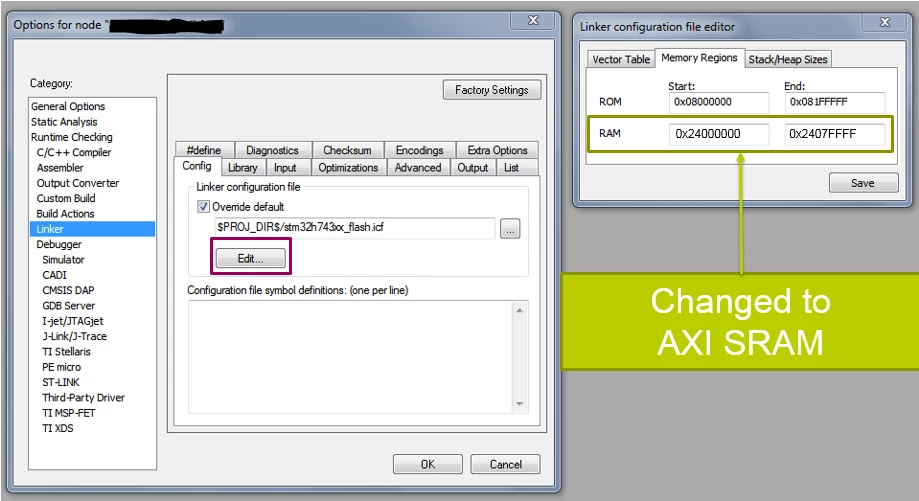
701.png

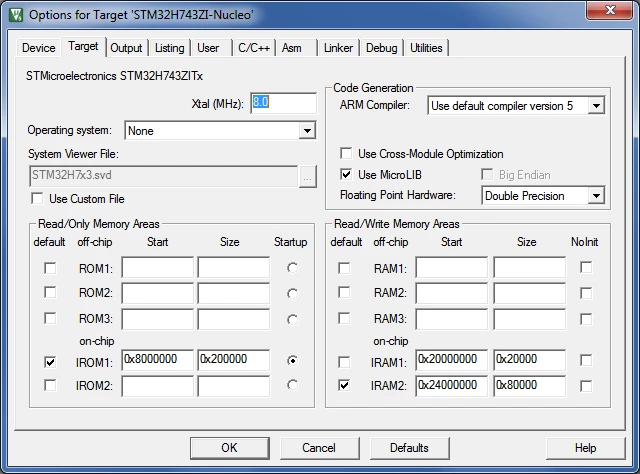
For Keil:

702.png

4. Solution example 2: placing buffers in separated memory part

D-cache must be disabled through the MPU for the specific memory region where the DMA buffer is placed. Note that the MPU region size must be a power of two. Additionally, the region's start address must have the same alignment as its size. For example, if the region is 512 bytes, the start address must be aligned to 512 bytes (the 9 least significant bits must be zero).


NOTE: IAR compiler and Keil compiler version <= 5 allow placing variables at absolute address in code using compiler specific extensions.

C code:

Define placement macro:

#if defined( __ICCARM__ )
 #define DMA_BUFFER \
 _Pragma("location=\".dma_buffer\"")
#else
 #define DMA_BUFFER \
 __attribute__((section(".dma_buffer")))
#endif


Specify DMA buffers in code:

DMA_BUFFER uint8_t rx_buffer[256];

GCC linkerscript (*.ld file)

Place the section in D2 RAM. You can also specify custom memory regions in the linker script file.

.dma_buffer : /* Space before ':' is critical */
{
 *(.dma_buffer)
} >RAM_D2

This does not include default value initialization. Otherwise, you must place special symbols and add your own initialization code.

IAR linker file (*.icf file)

define region D2_SRAM2_region = mem:[from 0x30020000 to 0x3003FFFF];
place in D2_SRAM2_region { section .dma_buffer};
initialize by copy { section .dma_buffer}; /* optional initialization of default values */

Keil scatter file (*.sct file)

LR_IROM1 0x08000000 0x00200000 { ; load region size_region
 ER_IROM1 0x08000000 0x00200000 { ; load address = execution address
 *.o (RESET, +First)
 *(InRoot$$Sections)
 .ANY (+RO)
 }
 RW_IRAM2 0x24000000 0x00080000 { ; RW data
 .ANY (+RW +ZI)
 }
 ; Added new region
 DMA_BUFFER 0x30040000 0x200 {
 *(.dma_buffer)
 }
}

Generation of scatter file should be disabled in Keil:
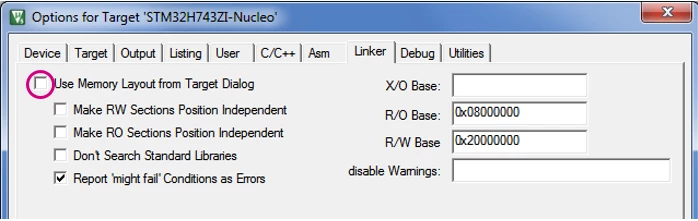
703.png

5. Solution example 3: Use Cache maintenance functions

Transmitting data:

#define TX_LENGTH (16)
uint8_t tx_buffer[TX_LENGTH];

/* Write data */
tx_buffer[0] = 0x0;
tx_buffer[1] = 0x1;

/* Clean D-cache */
/* Make sure the address is 32-byte aligned and add 32-bytes to length, in case it overlaps cacheline */
SCB_CleanDCache_by_Addr((uint32_t*)(((uint32_t)tx_buffer) & ~(uint32_t)0x1F), TX_LENGTH+32);

/* Start DMA transfer */
HAL_UART_Transmit_DMA(&huart1, tx_buffer, TX_LENGTH);

Receiving data:

#define RX_LENGTH (16)
uint8_t rx_buffer[RX_LENGTH];

/* Invalidate D-cache before reception */
/* Make sure the address is 32-byte aligned and add 32-bytes to length, in case it overlaps cacheline */
SCB_InvalidateDCache_by_Addr((uint32_t*)(((uint32_t)rx_buffer) & ~(uint32_t)0x1F), RX_LENGTH+32);

/* Start DMA transfer */
HAL_UART_Receive_DMA(&huart1, rx_buffer, RX_LENGTH);
/* No access to rx_buffer should be made before DMA transfer is completed */

Please note that in case of reception, there can be a problem if the rx_buffer is not aligned to the size of the cache line (32 bytes). During the invalidate operation, other data sharing the same cache line(s) with the rx_buffer might be lost.

6. References

  • "AN4838: Managing memory protection unit (MPU) in STM32 MCUs"
  • "AN4839: Level 1 cache on STM32F7 Series and STM32H7 Series":
  • "AN4296: Overview and tips for using STM32F303/328/334/358xx CCM RAM with IAR EWARM, Keil MDK-ARM and GNU-based toolchains":
  • "AN4891: STM32H7x3 system architecture and performance software expansion for STM32Cube":

24 replies

OHaza.1
Associate III
September 13, 2022

Am I right in thinking that in the latest versions of Cube, the .ld file already uses RAM_d1 by default? So the change doesn't need to be made manually now

magene
Senior
July 2, 2023

Can anyone confirm that this has or has not been resolved in the latest versions of CubeMX and/or CubeIDE?  I can get a USART to use DMA just fine using the HAL drivers but am struggling to get things working with the LL drivers. I have TX and RX looped together.  I can see my message going out the TX pin. and my DMA1_Strea0_IRQHandler sees the TC0 flag get set and call my rxDoneCallback.  But my rxBuffer is empty.  Which sounds a little bit like the memory problem described here.  But I haven't been able to correct it with my understanding of the solution provided in this article.

torgeirs
Associate
October 7, 2023

Thanks:up_arrow:

Associate III
November 27, 2023

Hello,

I have a NUCLEO-H743ZI2, I am using STM32CubeIDE, and I want to use a DMA to continuously read values from an ADC.
I tried the tutorial Getting started with ADC - stm32mcu but I can't find the option "DMA continuous request". 
(As a result?) I can't correctly read the values from the ADC provided from the DAC after putting the jumper wire.
I came across the article: Solved: Re: ADC-DMA setup in STM32CubeIDE: DMA Continuous ... - STMicroelectronics Community which led to this article here.

First question: Is this article up-to-date ? (I just bought the card in July 2023).

Second question: I tried to solve the issue by the suggested solutions but I can't find some files/softwares (Keil, IAR,.bss and ._user_heap_stack sections. ??)

Third question: Is there a tutorial which explains clearly step by step for beginners how to implement the DMA for STM32H743ZI2 ?

Thank you

HTD
Senior II
November 27, 2023

What does it mean "it doesn't work"? I have a device on STM32H745 that just uses ADC with DMA and it just works. I don't use any other software for it than STM32 HAL firmware and I used STM32CubeIDE to configure the DMA. It just worked, I get all the samples in buffer. However, I stumbled upon some issues with using DMA with UART and some H7 board - it helped when I disabled DCACHE. I assume the caching feature requires some extra configuration and I hadn't got time to play with it.

In order to use DMA just see at the device configuration tool, look at the available options there. First you should set up your device pins. Set the input pins. Then set the appropriate clock for the ADC peripheral to derive your sampling frequency from it. Then set the ADC clock divider to get the actual sampling frequency. Set the sampling resolution if selectable. Then go to the DMA tab and enable a channel that maps peripheral to memory. I used circular buffer and half-word, because the data arrives in 16-bit words. Just try to figure it out on your own and test if you get any data in the buffer. BTW, I used DMA to collect raw samples to filter an average reading and have some control over the signal to noise ratio. It's also a simple way to test if it works. Just connect some constant voltage (like 1V) to the ADC input, fill the buffer, then calculate the average value. If it roughly matches the voltage, then it works. At least it samples the voltage more or less correctly in terms of its value.

If you need more than just reading a value, then it's easier to start from where you already have some readings.

AFAK using ADC in STM32H7 doesn't require any additional middleware, all required settings and drivers are already built in the standard firmware package in STM32CubeIDE. Configuration of the DMA using STM32Cube IDE is pretty straight forward, I haven't even used any tutorial for it. I just used the FAFO method ;)

Associate III
November 27, 2023

Hello HTD,
So I followed the tutorial (getting started with ADC) step by step.

For reading a one time shot value from ADC it works fine:

I create the DAC and ADC:
1_DAC.png1_ADC.png

Code:

/* USER CODE BEGIN 2 */
 int value_dac=0;
 HAL_DAC_Start(&hdac1, DAC_CHANNEL_2);//be sure to manually write the correct DAC channel
 float voltage=0;
 int value_adc=0;

 /* USER CODE END 2 */

 /* Infinite loop */
 /* USER CODE BEGIN WHILE */
 while (1)
 {
	 if (value_dac < 4095-200) {
	 	value_dac+=200;
	 } else {
	 	value_dac=0;
	 }
	 HAL_DAC_SetValue(&hdac1, DAC_CHANNEL_2, DAC_ALIGN_12B_R, value_dac);

	 HAL_Delay(1000);

	 HAL_ADC_Start(&hadc1);
	 HAL_ADC_PollForConversion(&hadc1, HAL_MAX_DELAY);
	 value_adc= HAL_ADC_GetValue(&hadc1);

	 HAL_Delay(1000);

	 voltage=value_dac*0.8;
 printf("DAC: %d (voltage %f) ADC: %d \r\n",value_dac,voltage,value_adc);


 /* USER CODE END WHILE */

 /* USER CODE BEGIN 3 */
 }


Result from printf/UART:
 

DAC: 200 (voltage 160.000000) ADC: 265 <\r><\n>
DAC: 400 (voltage 320.000000) ADC: 464 <\r><\n>
DAC: 600 (voltage 480.000000) ADC: 665 <\r><\n>
DAC: 800 (voltage 640.000000) ADC: 864 <\r><\n>
DAC: 1000 (voltage 800.000000) ADC: 1057 <\r><\n>
DAC: 1200 (voltage 960.000000) ADC: 1256 <\r><\n>
DAC: 1400 (voltage 1120.000000) ADC: 1459 <\r><\n>
DAC: 1600 (voltage 1280.000000) ADC: 1659 <\r><\n>


Now, I want to use a DMA to continuously read from the ADC.
As a first step I don't use a buffer but still one int for value_adc and it should get updated as the tutorial suggests.

I create the DMA and update the ADC. I don't change the DAC.

2_DMA.png2_ADC.png

Code:

/* USER CODE BEGIN 2 */
 int value_dac=0;
 HAL_DAC_Start(&hdac1, DAC_CHANNEL_2);//be sure to manually write the correct DAC channel
 float voltage=0;
 int value_adc=0;

 HAL_ADCEx_Calibration_Start(&hadc1,ADC_CALIB_OFFSET,ADC_SINGLE_ENDED);
 HAL_ADC_Start_DMA(&hadc1,(uint32_t*)&value_adc,1);

 /* USER CODE END 2 */

 /* Infinite loop */
 /* USER CODE BEGIN WHILE */
 while (1)
 {
	 if (value_dac < 4095-200) {
	 	value_dac+=200;
	 } else {
	 	value_dac=0;
	 }
	 HAL_DAC_SetValue(&hdac1, DAC_CHANNEL_2, DAC_ALIGN_12B_R, value_dac);

	 HAL_Delay(1000);


	 HAL_Delay(1000);

	 voltage=value_dac*0.8;
 printf("DAC: %d (voltage %f) ADC: %d \r\n",value_dac,voltage,value_adc);


 /* USER CODE END WHILE */

 /* USER CODE BEGIN 3 */
 }


Result

DAC: 200 (voltage 160.000000) ADC: 0 <\r><\n>
DAC: 400 (voltage 320.000000) ADC: 0 <\r><\n>
DAC: 600 (voltage 480.000000) ADC: 0 <\r><\n>
DAC: 800 (voltage 640.000000) ADC: 0 <\r><\n>
DAC: 1000 (voltage 800.000000) ADC: 0 <\r><\n>
DAC: 1200 (voltage 960.000000) ADC: 0 <\r><\n>


So I guess the value_adc doesn't get update. I guess there is missing some kind of trigger to say that it should be updated with the DMA.

HTD
Senior II
November 27, 2023

It seems like you need "Continuous conversion mode" enabled:

HTD_0-1701099462497.png

Then, using DMA I don't use HAL function to read value. I just start reading with HAL, then I read the data directly from my buffer.

I set the callback to be notified when the conversion is complete:

HAL_ADC_RegisterCallback(m_hadc, HAL_ADC_CONVERSION_COMPLETE_CB_ID, conversionComplete);

Inside the function `conversionComplete` I just calculate the average from all samples in the buffer and trigger another notification when it's done. Of course instead of averaging the values you can do anything else with them, like copy them somewhere else.

I would paste my code but it's unnecessarily complex because it handles multiple channels and performs additional calculations, also it's done in C++. The only important part is the function takes `ADC_HandleTypeDef` as the only parameter. As this is an ISR, whatever you do in that function must be done very quickly, without blocking or god forbid waiting. So using UART from it is a no-no. It only averages the values and sets a variable that tells the other thread in my code that the new value is ready to be read. Then the other thread just reads the result. So in case of no OS used - your main thread is your main loop. It can loop and test if you set a special variable that the value is ready, when it's ready read it and send it to the UART, then clear the flag and loop. The callback mentioned earlier is responsible for actual reading exactly when the data from ADC is ready. Remember to not block / wait in callback, otherwise you would deadlock the MCU and it won't work.


Associate III
November 27, 2023

Yes I put the  "Continuous conversion mode" enabled in my second example.
I used UART but if comment it and read by the debugger the value_adc variable it is still 0.

I also tried the 

HAL_ADC_RegisterCallback

function be it is never called.

HTD
Senior II
November 28, 2023

Looking at your screenshot, you have `Conversion Data Management Mode` set to `Regular Conversion data stored in DR register only`, I believe it should be set to `DMA Circular Mode`.

Here's how it's set in my project:

HTD_0-1701163116768.png

BTW, try to use more than 1 word for the data, define a buffer for like 128 samples as array. If your resolution is set to 12 bits, that the closest word size will be 16-bits. So I would use an array of let's say 128 of `uint16_t`, the length of the data should be 128 (number of 16-bit words). That's what I believe is half word in DMA settings, here:

HTD_1-1701163489204.png

Also be sure to have IRQ enabled:

HTD_2-1701163528046.png

Then the registered callback function should start to be called. And the elements of the buffer array should contain the measured values. I guess the main point of using DMA here is to quickly get many samples without interrupting MCU. So if you set like 128 samples (buffer size) - you will get the interrupt and the callback called when all of the samples are written in the buffer, so not on the single reading, but when multiple readings complete. IDK, maybe it would just work on a single value, but I haven't tested it. Try to replace single value with a buffer (and best make it length divisible by 4), then in the callback try to calculate the average of the values in the buffer, then copy result to another variable. Then in your main loop just print this value using UART debugger function. Please tell me if it worked.

Associate III
November 29, 2023

Silly me, I just saw the parameter you pointed out : 'Conversion Data Management Mode' to `DMA Circular Mode`. I guess this is the new parameter corresponding to the "DMA continuous request" from the outdated tutorial I was looking for.
When I choose this option, then my variable "value_adc" is updated correctly.  

I replaced it with a buffer and the buffer was filled correctly too. There was a trick though, to declare as uint16_t buffer_adc[N] but then casted it as (uint32_t*)&buffer_adc, otherwise the buffer is filled weirdly.

However, I didn't use your callback function "HAL_ADC_RegisterCallback", but I use the functions explained in some other tutorials HAL_ADC_ConvHalfCpltCallback and HAL_ADC_ConvCpltCallback and it is correctly called.

Thank you for the help !