
B-G431B-ESC1: How to build software?????
All I want to do (for now) is build the ESC software and download it into the B-G431B-ESC1 board.
1. After alot of searching, I installed this: MC_SDK_6.2.0
2. I ran MotorControl Workbench 6.2.0, loaded the "Electronics Speed control on B-G431B-ESC kit", Click "Generate the Project"
3. I get error: STM32CubeMX not found - ver. "6.0.0" or higher is required
4. I install STM32Cube 6.1, and also it's "patch" (which the instructions for applying are extremely confusing)
Well, that didn't help. I installed STM32CubeMX , tried again and I see the same thing:
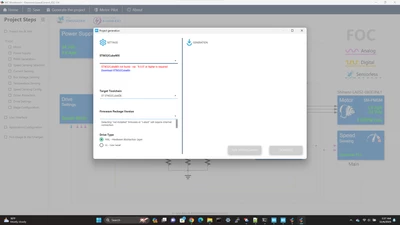
Logfile from my project:
2023-12-06 02:36:22,256 DEBUG [WB_to_MX.lambda$run_gui_mode$0] Arguments: [-mx_timeout, -1, -pack, assets/MotorControlPack/MotorControl.zip, -exp, templates/wb-defines_where_and_what.txt, -ftl, templates/wb_ioc_template.ftl, -xdm, C:\develop\st_workbench\ElectronicSpeedControl_ESC-G4\ElectronicSpeedControl_ESC-G4.wbdef, -ioc, C:\develop\st_workbench\ElectronicSpeedControl_ESC-G4\ElectronicSpeedControl_ESC-G4.ioc]
2023-12-06 02:36:22,259 DEBUG [ArgsValue.lambda$retrieve$2] CLI_ARG[ftl]: templates/wb_ioc_template.ftl
2023-12-06 02:36:22,260 DEBUG [ArgsValue.lambda$retrieve$2] CLI_ARG[exp]: templates/wb-defines_where_and_what.txt
2023-12-06 02:36:22,260 DEBUG [ArgsValue.lambda$retrieve$2] CLI_ARG[xdm]: C:\develop\st_workbench\ElectronicSpeedControl_ESC-G4\ElectronicSpeedControl_ESC-G4.wbdef
2023-12-06 02:36:22,260 DEBUG [ArgsValue.lambda$retrieve$2] CLI_ARG[ioc]: C:\develop\st_workbench\ElectronicSpeedControl_ESC-G4\ElectronicSpeedControl_ESC-G4.ioc
2023-12-06 02:36:22,260 DEBUG [ArgsValue.lambda$retrieve$2] CLI_ARG[pack]: assets/MotorControlPack/MotorControl.zip
2023-12-06 02:36:22,261 DEBUG [ArgsValue.lambda$retrieve$2] CLI_ARG[mx_timeout]: -1
2023-12-06 02:36:22,261 DEBUG [ArgsValue.retrieve] {xdm=C:\develop\st_workbench\ElectronicSpeedControl_ESC-G4\ElectronicSpeedControl_ESC-G4.wbdef, updftl=templates/wb_ioc_mc-middleware.ftl, mx_timeout=-1, exp=templates/wb-defines_where_and_what.txt, ioc=C:\develop\st_workbench\ElectronicSpeedControl_ESC-G4\ElectronicSpeedControl_ESC-G4.ioc, pack=assets/MotorControlPack/MotorControl.zip, ftl=templates/wb_ioc_template.ftl}
2023-12-06 02:36:22,331 DEBUG [WB_to_MX.run] Targeted MCU family = G4
2023-12-06 02:36:22,339 DEBUG [WB_to_MX.run] Minimum associated CubeMx to the `6.0.0-a0` targeted MCU family is `G4`
2023-12-06 02:37:29,950 DEBUG [IOCDialogController.lambda$onClose$8] IOCGenerationDialog exists with return code 4