shane mattner
Senior
September 19, 2024
Solved

EVLSPIN32G4-ACT button doesn't spin motor, motor buzzes for a second

  • September 19, 2024
  • 1 reply
  • 1083 views

Version: MCSDK v6.3.0, CubeMX v6.9.2, STM32 FW V1.5.2 (using HAL)
Tool: Firmware generated by MCWB, no modification
Details: Pressing button SW1 on EVLSPIN32G4-ACT is supposed to start the motor, but instead makes the motor buzz for a second, then stop. I successfully ramped the motor with B-G431B-ESC1 dev kit and I'm using the same `mc_parameters.c` file (14 pole motor, RS=0.11836, LS=0.04).  I also tried the same main.c code on the EVLSPIN32G4-ACT as the B-G431B-ESC1 main loop.
Expected Behavior: motor should spin as it does in this demo video https://www.youtube.com/watch?v=DIMeHnKfJZ8
How to reproduce: Use EVLSPIN32G4-ACT, generate default project from MCSDK, press SW1 to try and run motor.

Can anyone tell me what variables I might look at to troubleshoot this issue?  Or possibly some more example code to try?


Thank you
    Best answer by Cristiana SCARAMEL

    The motor profiler allows to estimate parameters for the motor.
    In your case motor parameters are already known so there is no need to use this tool.

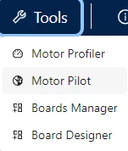
    Please re start from a clean project in the motor control work bench and upload the generated firmware on the board. Then open the Motor Pilot from the drop down list as shown below.

    STMCWB-Tools-menù.pngAfter connecting the board you can start your motor.

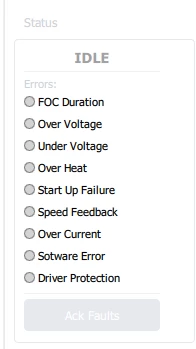
    Please report the error that is eventually shown in the panel below.

    STMCWB-Errors.png


    1 reply

    Cristiana SCARAMEL
    Technical Moderator
    September 20, 2024

    Hello @shane mattner,

    to better understand the root cause of this behavior in your application,

    could you please try to spin the motor using the motor control pilot software?

    Check if any error is returned on motor start.


    "If you feel a post has answered your question, please click ""Accept as Solution"""
    shane mattner
    Senior
    September 20, 2024

    After successfully running the motor profiling tool the button now works as expected and starts/stops the motor.  What's interesting is that yesterday I ran the motor profiling tool and the motor spun, but the tool got stuck at 28%.  Now today the Profiling tool ran (after several attempts) successfully to 100% completion. And now the button seems to work to make the motor spin as expected.


    However, after power-cycling the mcu the button no longer works to spin the motor.  Does that mean the profiler tool sends some parameters to the MCU that it needs to spin the motor?  Can I set those parameters somewhere in firmware myself and not require profiling?

    Cristiana SCARAMEL
    Technical Moderator
    September 23, 2024

    The motor profiler allows to estimate parameters for the motor.
    In your case motor parameters are already known so there is no need to use this tool.

    Please re start from a clean project in the motor control work bench and upload the generated firmware on the board. Then open the Motor Pilot from the drop down list as shown below.

    STMCWB-Tools-menù.pngAfter connecting the board you can start your motor.

    Please report the error that is eventually shown in the panel below.

    STMCWB-Errors.png


    "If you feel a post has answered your question, please click ""Accept as Solution"""