

shane mattner
Senior
September 26, 2024
Solved

EVLSPIN32G4-ACT quadrature encoder mode issues

  • September 26, 2024
  • 1 reply
  • 2260 views
  • MCSDK v6.3.0
  • Problem: MCWB generated code with quadrature encoder does not spin motor properly
  • STWB6 file is attached.  I had to copy and paste the contents into a .txt file to upload it


Here are links to videos with quadrature direction reversed and not reversed.  With the quadrature reversed I press the SW1 button and the motion seems to be somewhat smooth for the motion the motor makes.  With the quadrature signals NOT reversed the motor alternates back and forth violently and produces vibrations enough to move the motor test stand for ~5sec then cuts out and will not restart.


The motor commutates smoothly in sensorless FOC mode using SW1 button startup.  Then I change the Speed Sensing Config to use the encoder signals and the motor behaves as described above.  The encoder has 4096 slots which is what I'm using for pulses per revolution.  I also tried 4*4096 (16,384) ppr but that resulted in a hard fault of the firmware immediately on start up.  I confirmed Speed Sensing Mode Selection is quadrature encoder.  


Can anyone give some advice on how I might work through this problem?  I'll try playing with parameters today but if anyone has insights please let me know.


Best answer by cedric H

> After a bunch of testing I found that with the encoder enabled I could successfully do position commands with MCI_ExecPositionCommand().  It's weird the Motor Pilot doesn't work as expected for speed or torque control though.  Any idea how I might be able to run the velocity and torque control with the encoder enabled?

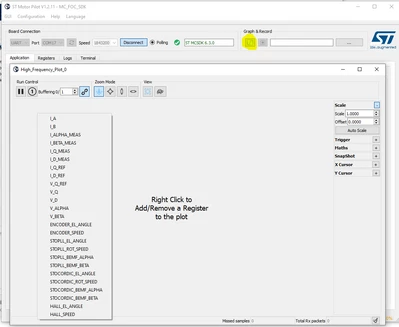
Motor Pilot does actually nothing else than sending commands to the firmware. From what you describe I suspect a hardware issue around your encoder signals. It would be interesting to do a live plot with the Pilot (By clicking on the highlighted button) of STO-PLL angle and Encoder angle with STO-PLL as primary sensor as you did before but for a longer period and increasing the speed target, I suspect that at some speed your encoder signal is corrupted, and the encoder angle will be distorted. That could explain why for position control the angle is properly tracked. 

Plugin an oscilloscope at encoder signals could also be very helpful if you can.

cedricH_1-1727855725767.png

Regards

Cedric


1 reply

cedric H
Technical Moderator
September 27, 2024

Hello @shane,

If your motor run smoothly in sensorless mode, the easiest way to debug your encoder settings is to generate a project with STO-PLL as a primary sensor and encoder as auxiliary sensor.

Once it is done, you can plot with the MC-Pilot the angle of the STO-PLL and the encoder simultaneously. Both angles must be merged.

Keep in mind that in case of sensored configuration (Hall as Encoder), the order of the motor phases does matter. Which is not the case in sensorless config.

Hope it helps.

Regards

Cedric

PS: If you still have issues, please send a plot of the two angles acquired with the MC-Pilot.

shane mattner
Senior
September 28, 2024

I have not been able to get the Motor Pilot to work for plotting signals.  I can get the Motor Profiler to work but but not the other part of the tool that connects to the motor and you can give commands.  V1.2.9 of Motor Pilot.


I tried reversing the motor phases, and then reversing the encoder phases, which resulted in the same behavior as above:  one connections of encoder wires makes the motor vibrate in place and the other connection can sometimes make the motor rotate for a bit.

But when the motor rotates it does so with inconsistent speed and the torque is very weak.  1/3 times the motor will make it a full rotation when using the encoder mode.  Then where it stops I cannot get the motor to spin again until I move the motor manually by a few degrees, then the motor will spin again weakly as described above.  All of this functional testing is by pressing the SW1 button on the dev kit.


Can you point me towards some variables to check?  It looks like STO_PLL_M1 is the struct to monitor the PLL and ENCODER_M1 is the struct to monitor the encoder.  Is there a way to switch the firmware from using the encoder to the PLL while the program is running?


Is there anything obvious in the encoder struct below that might need to be changed?


shanemattner_0-1727538561491.png


For the PLL struct I see the "is speed reliable" bit being flipped when the motor stops rotating 

shanemattner_1-1727538666583.png


It's weird the motor will spin a little bit sometimes and weakly.  I would expect no rotation and more consistent torque.


cedric H
Technical Moderator
September 30, 2024

Hello,

> I have not been able to get the Motor Pilot to work for plotting signals

So let's start with the beginning. 

what is the issue you are facing with the motor Pilot ? Could you copy/paste the information from the terminal tab ?

> Is there a way to switch the firmware from using the encoder to the PLL while the program is running?

Unfortunately, this is not available yet. The auxiliary sensor capability has been designed as a debug feature. This is in the pipe for a future version.

Regards

Cedric