Associate II
October 15, 2025
Solved

EVSPIN32G4 3 ph motor driver-- How to get motor speed on the GPIO to match with measured quantity in the motor pilot?

  • October 15, 2025
  • 5 replies
  • 432 views

I am working on a 3ph motor control with EVSPIN32G4. I want to know how to measure motor speed through GPIO (To match with the measured quantities in motor pilot). Where can i find the details of that?


Best answer by GMA

Hello @Sanchari,

If you require an output signal proportional to the motor speed, use the DAC debug feature.
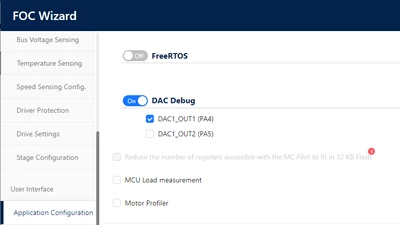
GMA_0-1760541547789.png

You can select the required data by replacing MC_REG_I_ALPHA_MEAS with MC_REG_STOPLL_ROT_SPEED (defined in the register_interface.h file), for example.

/**
 * @brief Hardware and software initialization of the DAC object.
 * @param pHandle pointer on related component instance.
 */
__weak void DAC_Init(DAC_Handle_t *pHandle)
{
#ifdef NULL_PTR_CHECK_DAC_UI
...
 /* Enable DAC Channel1 */
 /* By default send Ialpha motor 1 */
 (void)HF_GetPtrReg((MC_REG_I_ALPHA_MEAS + 0x1U), (void *)&pHandle->ptrDataCh[DAC_CH1]); //cstat !MISRAC2012-Rule-11.5
 LL_DAC_Enable(DAC1, LL_DAC_CHANNEL_1);
...

}

 

5 replies

Senior III
October 15, 2025

The motor speed can be calculated by measuring the hall signal using oscilloscope at the connector. 

GMA
GMABest answer
Technical Moderator
October 15, 2025

Hello @Sanchari,

If you require an output signal proportional to the motor speed, use the DAC debug feature.

GMA_0-1760541547789.png

You can select the required data by replacing MC_REG_I_ALPHA_MEAS with MC_REG_STOPLL_ROT_SPEED (defined in the register_interface.h file), for example.

/**
 * @brief Hardware and software initialization of the DAC object.
 * @param pHandle pointer on related component instance.
 */
__weak void DAC_Init(DAC_Handle_t *pHandle)
{
#ifdef NULL_PTR_CHECK_DAC_UI
...
 /* Enable DAC Channel1 */
 /* By default send Ialpha motor 1 */
 (void)HF_GetPtrReg((MC_REG_I_ALPHA_MEAS + 0x1U), (void *)&pHandle->ptrDataCh[DAC_CH1]); //cstat !MISRAC2012-Rule-11.5
 LL_DAC_Enable(DAC1, LL_DAC_CHANNEL_1);
...

}


If you agree with the answer, please accept it by clicking on 'Accept as solution'.Best regards.GMA
SanchariAuthor
Associate II
October 16, 2025

Is there any documentation on the debug features and how to use them?

Also, foc algorithm supports what all features, how to know them?

GMA
Technical Moderator
October 16, 2025

Hello @Sanchari,

Refer to the documentation available through Workbench tool > About > Documentations > Documentation. Motor control features descriptions are available in the User manual tab.
Debug features are not described in the current documentation.

If you agree with the answer, please accept it by clicking on 'Accept as solution'.Best regards.GMA
SanchariAuthor
Associate II
October 16, 2025

Thanks for the documentation details.

I have another question related to motor profiler.

As per the user guide, its saying that motor profiler will open either through workbench icon or from motor profiler option in motor pilot GUI. When I am trying to open the profiler through Pilot, i am getting below error message.

Sanchari_0-1760605135195.png

Please guide me what i should do now?


GMA
Technical Moderator
October 16, 2025

Hello @Sanchari,

You have to select a Port (Motor Profiler tool connection interface part of Motor Profiler documentation or you can use Pilot Discover Board button)

If you agree with the answer, please accept it by clicking on 'Accept as solution'.Best regards.GMA