

AChha.1
Associate II
August 12, 2022
Solved

F401RE + IHM16M1

  • August 12, 2022
  • 9 replies
  • 4474 views

Hello

I am using the combination of F401RE and IHM16M1 for a project in my lab to drive a 24V BLDC Motor (max RPM 5000).

Issues:

1) I am unable to select the above combination in the Motor Profiler.

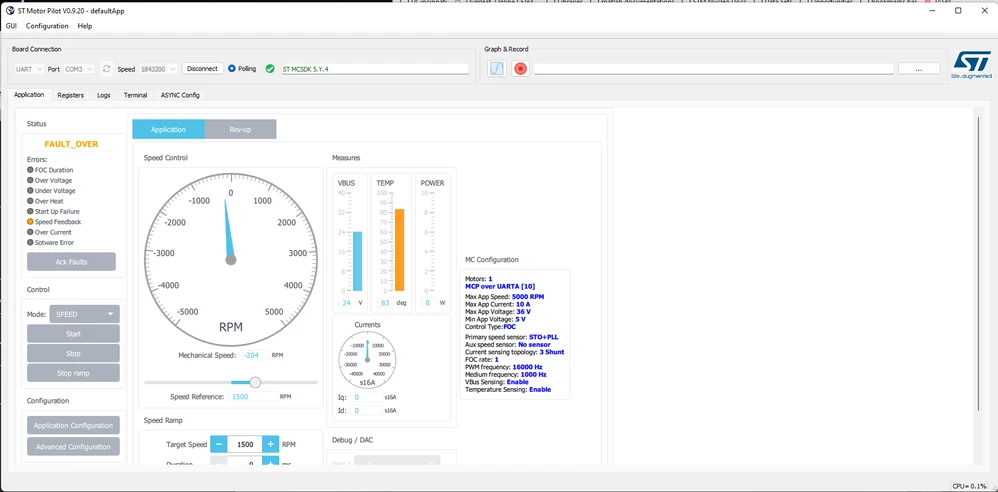
2) When I try to generate code using Motor Control Workbench (5.Y), I generate code using CubeMX (6.3) and flash it using CubeIDE (1.10.1) -->I run motor using Motor Pilot but it always says "Speed Feedback Error". I don't know why this happens.

3) No resources about how to make this combination work.

4) I tried using the 6StepLib. However, the motor just spins and then stops making a humming noise (increasing), then stops. Sometimes it doesn't stop but runs at 450-500 RPM.

Can anyone please point me to a given example for this combination? Or am I missing something?

I am new to the ecosystem so I would appreciate any help or guidance. Thank you.

------------------------------------------------------------------------------------------------ 

****UPDATE****

GMA,

Thank you for helping me resolve this issue.

All,

For more information about the issue and the solution, please visit: https://community.st.com/s/question/0D53W00001AzMDESA3/environment-mcsdk-5y2-stm32cubemx-630-nucleof446re-is-not-working-compared-to-other-nucleo-boards-while-using-the-same-power-board-bldc-motor-with-the-same-configuration-what-would-be-the-possible-cause-for-this-problem

Very helpful post regarding the compatibility issue between F446 and IHM16M1.

I will try to summarise everything together and make a post sometime soon.

------------------------------------------------------------------------------------------------

Thank you and regards

Anirudh Chhabra0693W00000QNbhCQAT.png
This topic has been closed for replies.
Best answer by GMA

Hello,

Please find attached an example stmcx used to run a test with same configuration F401/IHM16 but with a different motor. I made the same modifications as on F446 forum topic:

  • All ADC input have to be checked in "Analog Input and Protection" box, pin map for "Phase current feedback", "Bus voltage feedback" and "Temperature feedback" tabs.
  • I removed IHM16 R41 resistance.
  • And I also changed the Drive Management / Start-up parameters Profile from "Advanced customized" to "Basic".

Hope it helps you.

Best regards.

GMA

9 replies

GMA
Technical Moderator
August 16, 2022

Hello,

For the motor parameters without using profiler:

How To manually configure the motor parameters - stm32mcu

For the speed feedback, please check FAQ speed feedback chapter:

Frequently asked questions (FAQ) - stm32mcu

Best regards.

GMA

If you agree with the answer, please accept it by clicking on 'Accept as solution'.Best regards.GMA
AChha.1
AChha.1Author
Associate II
August 20, 2022

Please see my comments below. I am still unable to resolve the issue.

Regards

Anirudh

AChha.1
AChha.1Author
Associate II
August 20, 2022

Hello

I updated the motor parameters as per the motor's datasheet. Both in the motor workbench as well as checked the appropriate header files. All the information and specs are correctly loaded in the IDE.

Here is the motor description: https://lin-docs.s3.us-west-2.amazonaws.com/datasheets/external/bldc/BL17E19-01D-03RO.pdf

0693W00000QO8UuQAL.png 

However, the error I get is startup failure. The code flashes correctly in the MCU but the motor just hums and runs for almost 1-2 seconds, and stops and shows failure. Even when I modify the code to run it using the MC_StartMotor1(); command.

I saw another post here on the forum that F446RE and similar MCUs (like F401RE) have a pin assignment issue and an ST employee suggested cutting the C10 - 18 pin on the MCU since that is the VCAP pin and changing the pin assignment. I want to know if that is relevant to my MCU+driver combination. Here is the post link:

https://community.st.com/s/question/0D53W00001AzMDESA3/environment-mcsdk-5y2-stm32cubemx-630-nucleof446re-is-not-working-compared-to-other-nucleo-boards-while-using-the-same-power-board-bldc-motor-with-the-same-configuration-what-would-be-the-possible-cause-for-this-problem

Also, what is the best way to resolve this issue? I am stuck and looking forward to some help.

Regards

Anirudh

AChha.1
AChha.1Author
Associate II
August 20, 2022

Hello

Here is an update:

Whenever I run the motor using the motor profiler tool, the following happens.

You can see the power measure is off the chart up to 65kW. I don't think that should be correct. But I don't understand why this happens.

Regards

Anirudh

Also, here is the log:

[INFO] - : Application is starting : MotorPilot version:0.9.20[INFO] - : ini file path=C:/Users/aniru/AppData/Roaming/ST Microelectronics/ST Motor Pilot.ini

[INFO] - : Polling time out is set to 200 ms

[INFO] - : set qml to : qrc:/GUI/defaultApp.qml

[INFO] - : Register json file path from qml is : C:/Program Files (x86)/STMicroelectronics/MC_SDK_5.Y.4/Utilities/PC_Software/STMotorPilot/RegisterList/RegListSTMV2.json

[INFO] - : Loading registers bank desciption file C:/Program Files (x86)/STMicroelectronics/MC_SDK_5.Y.4/Utilities/PC_Software/STMotorPilot/RegisterList/RegListSTMV2.json

[WARNING] - MotorControlRegistersBank: Register [SCALES_CONFIG] does not exist although a reference on it is requested. Please, load a suitable Register Description file

[INFO] - : Registers bank description loaded successfully

[INFO] - : Load Application qrc:/GUI/defaultApp.qml

[INFO] - : QML Application ready

[INFO] - : Connecting to Board

[INFO] - UART worker: Successfully open port COM3 @ 1843200

[INFO] - : try to configure the board

[INFO] - : Connected to board

[WARNING] - MotorControlRegistersBank: Accessing register [6937] PERF_MAX_CPU_LOAD for motor 0 resulted in error[5] . Changing register's access accordingly to avoid getting this error again

[WARNING] - MotorControlRegistersBank: Accessing register [6873] PERF_MIN_CPU_LOAD for motor 0 resulted in error[5] . Changing register's access accordingly to avoid getting this error again

[WARNING] - MotorControlRegistersBank: Accessing register [6809] PERF_CPU_LOAD for motor 0 resulted in error[5] . Changing register's access accordingly to avoid getting this error again

[WARNING] - MotorControlRegistersBank: Accessing register [977] STOCORDIC_C1 for motor 0 resulted in error[5] . Changing register's access accordingly to avoid getting this error again

[WARNING] - MotorControlRegistersBank: Accessing register [1041] STOCORDIC_C2 for motor 0 resulted in error[5] . Changing register's access accordingly to avoid getting this error again

[WARNING] - MotorControlRegistersBank: Accessing register [1680] DAC_OUT2 for motor 0 resulted in error[5] . Changing register's access accordingly to avoid getting this error again

[WARNING] - MotorControlRegistersBank: Accessing register [1616] DAC_OUT1 for motor 0 resulted in error[5] . Changing register's access accordingly to avoid getting this error again

[ERROR] - MotorControlProtocol: ASPEP_RESP ERROR:CMD_NOK

[ERROR] - MotorControlProtocol: ASPEP_RESP ERROR:CMD_NOK

[ERROR] - MotorControlProtocol: ASPEP_RESP ERROR:CMD_NOK

[ERROR] - MotorControlProtocol: ASPEP_RESP ERROR:CMD_NOK

 0693W00000QO8UzQAL.png0693W00000QO8UaQAL.png

GMA
Technical Moderator
August 22, 2022

Hello,

A short remark, it is mentioned in Motor specification document "Pole Number 6", I assume that it means 3 Pole Pairs...

In Motor Setting WorkBench, "Pole Pairs" is set to 6.

Did you try with 3?

Best regards.

GMA

If you agree with the answer, please accept it by clicking on 'Accept as solution'.Best regards.GMA
AChha.1
AChha.1Author
Associate II
August 24, 2022

Hello, can you please check my comments below? I posted some updates and a public video link.

Regards

Anirudh

AChha.1
AChha.1Author
Associate II
August 22, 2022

Hello, I tried using 3 pole pairs, and I get the same error - Startup failure. I think I did that before as well because I was confused about the specs too but I did it again and it throws the same error.

Regards

Anirudh

Edit: The only difference is that when I select 3 pole pairs, it seems to spin more aggressively as it starts but then again the humming and full stop. Startup failure.

However, thank you for pointing that out. I did check the pole pairs manually, by shorting the two phases and I could feel 18 bumps/clicks.

18 --> 3 phases = 6 poles = 3 pole pairs.

My understanding is correct, right?

Update:

I write the following code inside the while loop:

/* USER CODE BEGIN 3 */
	 MC_ProgramSpeedRampMotor1(3000/6,1000);//Set the speed to 3000
	 MC_StartMotor1();//Motor running
	 HAL_Delay(10000);//Delay 10S

However, the motor still acts the same. Loud rev-up, little spin, humming and full stop. I attached a video of this as well.

Thanks!

link to video

GMA
Technical Moderator
August 24, 2022

Hello,

The remarks about F446 topic seems to be also relevant for F401 as both boards share same schematic... Other connections between F401 and IHM16 have to be also verified. I will come back to you...

Best regards.

GMA

If you agree with the answer, please accept it by clicking on 'Accept as solution'.Best regards.GMA
GMA
GMABest answer
Technical Moderator
August 24, 2022

Hello,

Please find attached an example stmcx used to run a test with same configuration F401/IHM16 but with a different motor. I made the same modifications as on F446 forum topic:

  • All ADC input have to be checked in "Analog Input and Protection" box, pin map for "Phase current feedback", "Bus voltage feedback" and "Temperature feedback" tabs.
  • I removed IHM16 R41 resistance.
  • And I also changed the Drive Management / Start-up parameters Profile from "Advanced customized" to "Basic".

Hope it helps you.

Best regards.

GMA

If you agree with the answer, please accept it by clicking on 'Accept as solution'.Best regards.GMA
AChha.1
AChha.1Author
Associate II
August 31, 2022

Hello

Do I need to cut the pin CN10-18 on the Nucleo? Or should it work without doing that and just loading the file you provided?

Update:

I got it and am able to control the motor perfectly. Thank you so much for your help! I appreciate it.

On the issue you helped me with, is there documentation that provides information about the boards affected by this difference in their pin layouts? I feel that such things should've been mentioned in the IHM16M1 User Manual, which is just a generic tutorial. It says that the driver is compatible with F401RE but doesn't tell how to make it work.

Regards

Anirudh

GMA
Technical Moderator
August 31, 2022

Hello,

You are welcome and thank you for reporting the point.

Issue will be corrected on next version.

Best regards.

GMA

If you agree with the answer, please accept it by clicking on 'Accept as solution'.Best regards.GMA
AChha.1
AChha.1Author
Associate II
September 7, 2022

Hello, I have a follow-up question regarding this. What would be the steps briefly if I wanted to control multiple motors?

From my understanding, I need to add relevant functions for Motor2 in the "mc_api.c" file inside the IDE. Is this correct?

Also, the "mc_api.c" mentions that it can only cope with 2 motors. How do I control 3 motors?

It would be great if you could answer these questions.

Regards

Anirudh

GMA
Technical Moderator
September 7, 2022

Hello,

Using WB5.4.8 e.g., you can choose Dual Motor configuration. You will have a set of available control boards for that purpose:

0693W00000SujgzQAB.pngGenerating the code, the dual motor api will be visible in mc_api.c.

3 motors are not supported by the workbench for the moment.

Best regards.

GMA

If you agree with the answer, please accept it by clicking on 'Accept as solution'.Best regards.GMA
AChha.1
AChha.1Author
Associate II
September 13, 2022

Hello

My project requires me to control 3 motors, and I need to do that with one MCU. This 2 motor-limit wasn't mentioned anywhere (in manuals or datasheets) when I purchased the Nucleo boards.

Is there any way I can control 3 motors by editing the API manually using the following boards?

Control Board: F401RE / G431RB

Power Board: IHM16M1 / IHM07M1

Regards

Anirudh