
Visitor II
February 9, 2024
Question

how to add project on STM32 IDE

  • February 9, 2024
  • 1 reply
  • 950 views

Hi,
I am following the instructions given in this page: https://wiki.st.com/stm32mcu/wiki/STM32MotorControl:SDK_AC_induction_motor
I have some question regarding that.
1. Are these the right examples that are shown in the figure?

  • ACIM-NUCLEOG431RB-IHM023V3-VF_OL.stmcx, or
  • ACIM-NUCLEOG431RB-IHM023V3-LSO_FOC.stmcx
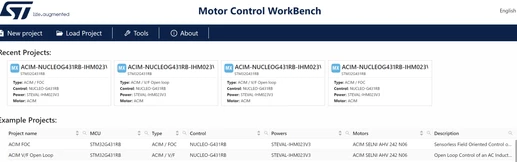
NAYAN_0-1707481959561.png
2. From where can I download the ACIMGUI? I can not find it in generated project as it is written in the document. There is no file with ".acimx".
3. I can not able to open the this project in 'STM32 IDE'. 

    This topic has been closed for replies.

    1 reply

    GMA
    Technical Moderator
    April 19, 2024

    Hello @NAYAN,

    Unfortunately, the wiki page concerns an obsolete MCSDK version. 
    For version, MCSDK6.x Workbench, the example will generate an ACIM-NUCLEOG431RB-IHM023V3-VF_OL.ioc file.
    The workbench interface replaces ACIMGUI for parameters changes (click on Motor for Motor parameters e.g.).

    GMA_0-1713543175906.png

    Use Workbench to generate the project.
    On STM32 IDE, load the generated STM32CubeIDE directory in "File>Open Projects from File System..."


    If you agree with the answer, please accept it by clicking on 'Accept as solution'.Best regards.GMA