
Associate II
July 6, 2024
Solved

MC 6.3 with MX6.12 - attr not supported : Dmpu

  • July 6, 2024
  • 8 replies
  • 11133 views

I am trying to generate code for "STM32 Nucleo packs FOC and 6-step motor control platform for three-phase, low-voltage and low-current motor" and I keep getting errors :-
Attr not supported : Dmpu  as in attached image. 

I am using cubeMX12, I have updated Java recently and I have uninstalled and reinstalled CubeMX as well. Still no luck. Log file attached. 
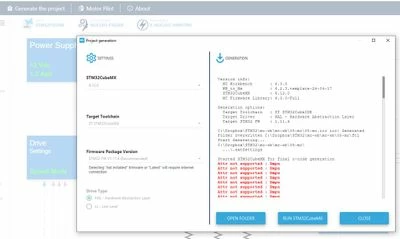
mc.JPG

Best answer by ASA

Hello @Sujoy_B


this error has been understood and will be corrected in the next version of CubeMx.

Nevertheless, a workaround can be proposed to you in order to avoid having this issue,
Please try after you have deleted the following files :

1- %HOME%\.stm32cubemx\thirdparties\pdsc\EmbeddedOffice.I-CUBE-FS-RTOS.pdsc
2- %HOME%\.stm32cubemx\thirdparties\pdsc\EmbeddedOffice.I-CUBE-FS-RTOS.1.0.1.pdsc


Please tell us if this solves your problem


Kind regards

Amina

8 replies

Associate II
July 7, 2024

I am having the same issue as well, using CubeMX version 6.11.1 and MC Workbench 6.3.0. I've tried several different combinations of MC Workbench and CubeMX versions with no success.

ST Employee
July 8, 2024

Hello @Sujoy_B

Can you give us the version of Java you had recently installed on your PC?
Thanks in advance


Best Regards
Amina


Sujoy_BAuthor
Associate II
July 8, 2024

I unistalled JAVA and installed the latest version from https://www.java.com/en/
I believe it is V8 update 411. 

Do you need me to share a snapshot?

ST Employee
July 9, 2024

Hi @Sujoy_B


can you please give us the version of JDK you have on your PC?
ps: the path is commonly : C:\Program Files\Eclipse Adoptium


Thanks for your feedback

Amina

Associate II
July 9, 2024

Same issue here. Using old projects with unchanged settings but showing the errors.

Associate II
July 9, 2024

Same to me, suddenly started showing the error.

Associate II
July 12, 2024

I have this error too. Any luck solving it?

Im not sure what it means and i dont have Java installed.

ST Employee
July 12, 2024

Hello @Sujoy_B


regarding the log you have attached to your message, the project have been successfully generated, please try to compile it.
The error message is not a blocking one, we are investigating on that nevertheless  you can continue working on your trials.


Thanks a lot for your comprehension

Regards

Amina

ASABest answer
ST Employee
July 15, 2024

Hello @Sujoy_B


this error has been understood and will be corrected in the next version of CubeMx.

Nevertheless, a workaround can be proposed to you in order to avoid having this issue,
Please try after you have deleted the following files :

1- %HOME%\.stm32cubemx\thirdparties\pdsc\EmbeddedOffice.I-CUBE-FS-RTOS.pdsc
2- %HOME%\.stm32cubemx\thirdparties\pdsc\EmbeddedOffice.I-CUBE-FS-RTOS.1.0.1.pdsc


Please tell us if this solves your problem


Kind regards

Amina

Texram
Associate III
July 15, 2024

HI Amina,

I took your suggestion made on 7/12 to ignore the error from MC WorkBench Generation. I compiled the code under CubeIDE and ran the code with target HW. It works.

I also compared two projects, one from the MC WB example, another one from what I created under MC WB, there is no difference technically.

But I haven't tried the suggestion you had on 7/15 to remove two files under CubeMX.


Thank you !


ST Employee
July 16, 2024

Hi @Texram 


good to hear that you can sucessfully compile your project with any regression.

Please do not hesitate to try the proposed workaround and give us feedback on that.


Regards

Amina


Texram
Associate III
July 17, 2024

No workaround is needed, just ignore the error messages from Project Generation.