

Thundernail
Associate
May 30, 2023
Solved

Motor does not start with B-G431B-ESC1 board.

  • May 30, 2023
  • 2 replies
  • 1787 views

Hi all,

I'm new to the STM32 world and ST motor control tools, so I might be missing something obvious.

I have the B-G431B-ESC1 development board connected to a BLDC motor.

I generated the code for FOC with the MC-WB 6.1.2 and STCubeMX 6.8.1. Compiled with STM32CubeIDE 1.12.1. Connecting to the board and upload worked well.

I can connect with the Motor Pilot 1.1.12 to the board.

The board generates a repeated beeping noise with 1 Hz frequency. Is that normal?

When I try to accelerate the motor via the GUI, the board initially responds but aborts. It sounds like the "beeping" generator is still active.

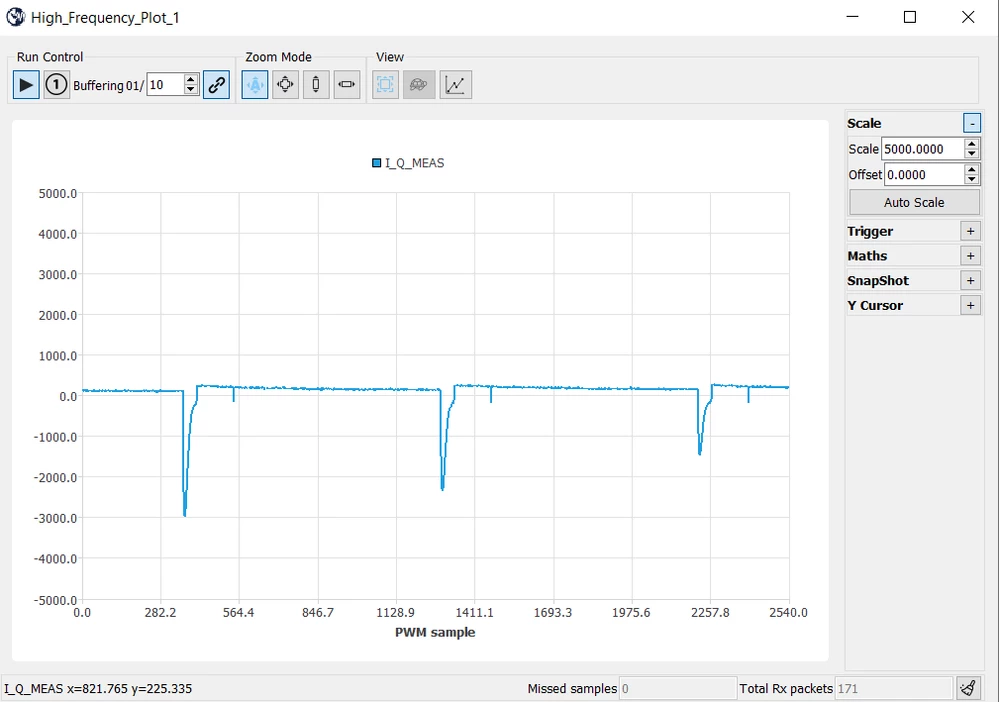
To test, I set the duration of the first phase to 10 seconds in the Rev-UP dialog and reduce the torque. This generates the current profile shown below. The current follows the reference value most of the time, but is periodically disturbed. This disturbance follows the rythm of the beeping. If I set the reference current higher (to generate enough torque to turn the motor), the controller trips for overcurrent.

Do I miss somthing?

How can I disable the beeping noise?

Kind Regards

Thundernail.
_legacyfs_online_stmicro_images_0693W00000blAX7QAM.png

This topic has been closed for replies.
Best answer by Thundernail

Hi SRedd.5,

Thank you for your help but this did not help. I had still as very similar responce from the system.

I solved the problem in the end by creating a new project in MC Workbench. I previouslly selected the Example project from the first page for the board and this initializes the TIM2 for a synchronization.This seems not to work as a stand alone unit.

Kind Regards

Thundernail

2 replies

SRedd.5
Senior III
May 31, 2023

Try running the motor without connecting to motor pilot, flash the software and press start / stop button and run the motor. If in torque mode provide IQ value as required in the workbench.

Thundernail
ThundernailAuthorBest answer
Associate
June 1, 2023

Hi SRedd.5,

Thank you for your help but this did not help. I had still as very similar responce from the system.

I solved the problem in the end by creating a new project in MC Workbench. I previouslly selected the Example project from the first page for the board and this initializes the TIM2 for a synchronization.This seems not to work as a stand alone unit.

Kind Regards

Thundernail

JKong.3
Associate III
June 26, 2023

can you describe in detail how you solved the problem? I have the same issue with the same board

I already tried erasing and re-downloading the project generated by MCWorkbench without any modification to a code. Do I need to add additional lines to the project file?