
Associate
December 11, 2023
Solved

Motor spin without Motor Pilot program

  • December 11, 2023
  • 1 reply
  • 1661 views

Hello,

I'm very biginner.

By MCSDK6.2, I generated code and tried to spin 3 phases BLDC motor with code

" MC_PrgramSpeedRampMotor1(1725, 2000);" and

"MC_Startmotor1();"

I inserted these code and built and tried to run, but it didn't work.

The motor didn't spin, don't move at all.

What's the problems ?
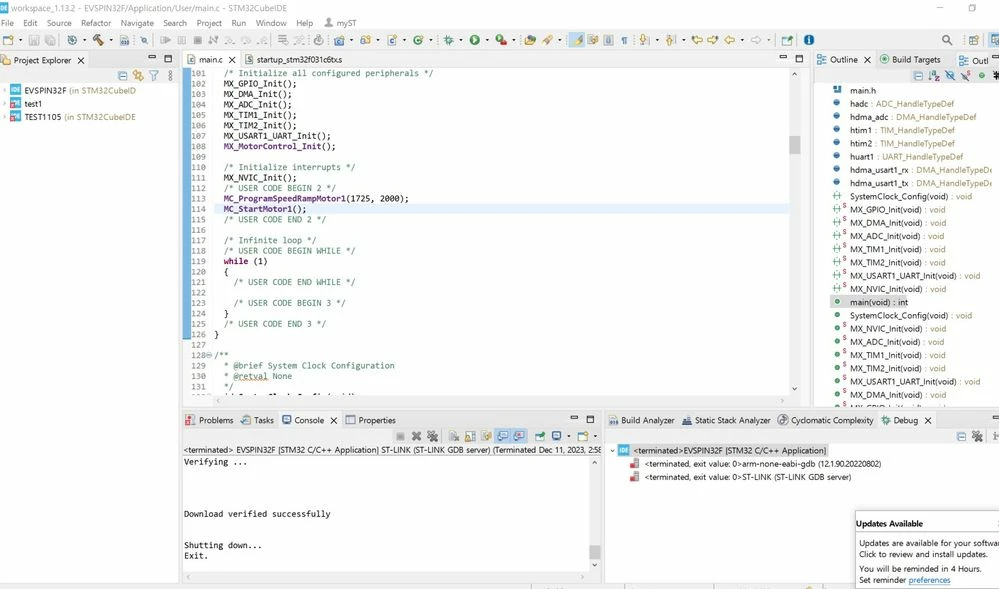
화면 캡처 2023-12-11 145920.jpg

Also, Cube IDE showed me as below captured photo.

What's the reason, is there any problems ? 
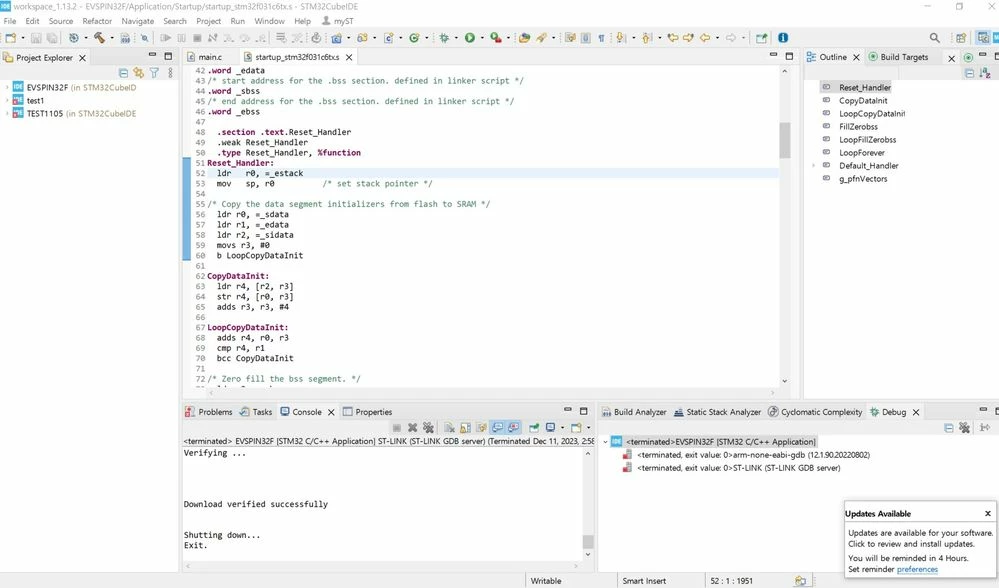
화면 캡처 2023-12-11 145850.jpg

Best Regards,

Bryan

    This topic has been closed for replies.
    Best answer by Gael A

    Hello again yourbryan,

    To match your baudrate to your board, you can check the main.c file. It should be located in the MX_USARTx_UART_INIT() function. The x stands for the used UART for MCP connection.

    It seems to me that your project is not running. To run a project, please follow the instructions :
    Right click on the project you want to run in the project explorer -> Either click on Debus As or Run As (in your case I would recommend Debug As) -> STM32 C/C++ Application -> On the newly opened window click Ok -> Update the STLink if need be -> Switch to Debug Perspective -> Click on Resume on the tool bar (or press F8).

    You can also add breakpoints to your code by double-clicking on the small space at the left of the code line number (you can also press Ctrl+Shift+B after selecting the desired line of code). This allows your code to stop on the selected line. It is useful for debugging, though be careful as it completely stops your code, so you have to remove the breakpoint and press Resume if you wat your code to run again.

    1 reply

    Gael A
    ST Employee
    December 11, 2023

    Hello yourbryan,

    This is strange, have you tried to run the MotorPilot first ? On a default project, have you tried running the motor using the button ? Is all of those don't work, then maybe the error lies somewhere else.

    Also, can you tell me what EVSPIN you are using ?

    If you agree with my answer, please consider accepting it by clicking on 'Accept as solution'.Hope this will help,Gaël A.
    yourbryanAuthor
    Associate
    December 11, 2023

    Hello, Gael.


    I'm trying to spin motor with ST board EVSPIN32F0602S1.

    I tried to spin motor with MotorPilot, but  The board  "EVSPIN32F0602S1" can't be connected correctly to Motor Pilot, in the all baud rate. I don't know what's the reasons. So I didn't test with Motor Pilot.
    화면 캡처 2023-12-11 145950.jpg

    Best Regards,

    Bryan

    Gael A
    Gael ABest answer
    ST Employee
    December 11, 2023

    Hello again yourbryan,

    To match your baudrate to your board, you can check the main.c file. It should be located in the MX_USARTx_UART_INIT() function. The x stands for the used UART for MCP connection.

    It seems to me that your project is not running. To run a project, please follow the instructions :
    Right click on the project you want to run in the project explorer -> Either click on Debus As or Run As (in your case I would recommend Debug As) -> STM32 C/C++ Application -> On the newly opened window click Ok -> Update the STLink if need be -> Switch to Debug Perspective -> Click on Resume on the tool bar (or press F8).

    You can also add breakpoints to your code by double-clicking on the small space at the left of the code line number (you can also press Ctrl+Shift+B after selecting the desired line of code). This allows your code to stop on the selected line. It is useful for debugging, though be careful as it completely stops your code, so you have to remove the breakpoint and press Resume if you wat your code to run again.

    If you agree with my answer, please consider accepting it by clicking on 'Accept as solution'.Hope this will help,Gaël A.