
Curve Wrecker
Associate II
March 28, 2023
Solved

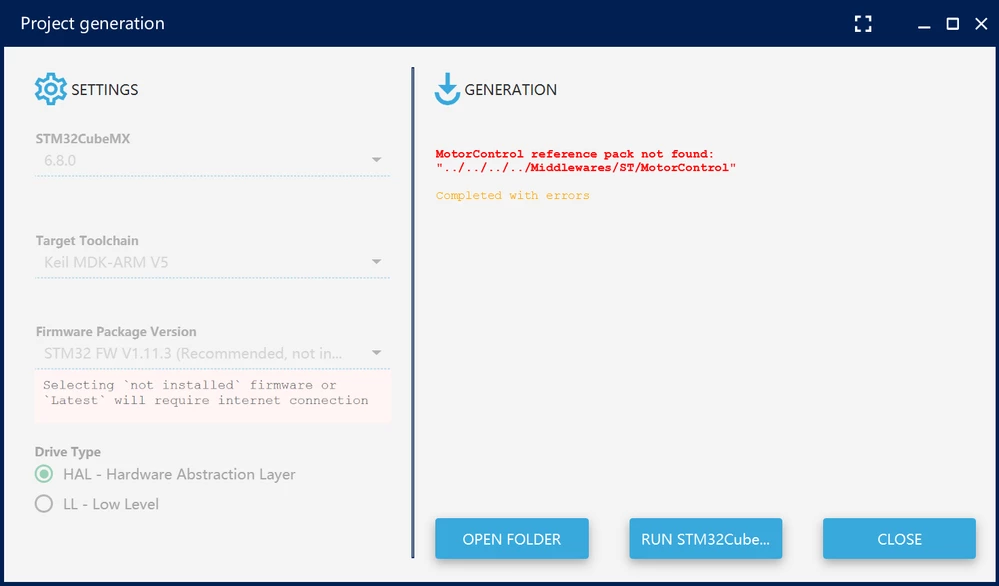
MotorControl reference pack not found: "../../../../Middlewares/ST/MotorControl

  • March 28, 2023
  • 11 replies
  • 14015 views

MC Workbench cannot generate STM32CubeMX project

STM32CubeMX.Version: 6.8.0-RC4

MC Workbench.Version:5.4.80693W00000aJqRkQAK.png 
Best answer by Curve Wrecker

Thank you so much! It works.

11 replies

ST Employee
March 28, 2023

According to the release note of the MCSDK version 5.4.8 it seems that we can use at most the STM32CubeMX v6.4.0 version, can you try with this version and tell me if it works?

Thanks

Curve Wrecker
Curve WreckerAuthorBest answer
Associate II
March 29, 2023

Thank you so much! It works.

VGani.1
Associate III
June 6, 2023

Hi @Zied b.​ ,

I too have a similar problem but with mCSDK version 6.1.2 and tried using STcube MX 6.4.0, all the include and source files are generated but showing an error "completed with errors".

can you suggest what need to be done?

thank you

Vijay

VGani.1
Associate III
June 6, 2023


_legacyfs_online_stmicro_images_0693W00000bVfwBQAS.png

ST Employee
June 6, 2023

Hello, according to your screenshot it seems that you are not using the correct version of the MCSDK, it is not version 6.1.2, can you try again with the correct version?

THANKS

VGani.1
Associate III
June 6, 2023

Hi Zied b.

Tried with MCSDK 6.1.2 and 5.4.8 but every version is having same issues. Not able to generate the project successfuly.

Please do check and help us in resolving the issue.

thank you

vijay G


_legacyfs_online_stmicro_images_0693W00000bVhIhQAK.png

ST Employee
June 6, 2023

can you try MCSDK version 6.1.2 with cube mx 6.8.0?

VGani.1
Associate III
June 6, 2023

Yes tried the latest version and then saw the suggestion here and tried version 6.4.0 cubemx.

I will try again with all the latest versions and send you the screenshot whether its working or not?

Thank you

ST Employee
June 6, 2023

yes of course, I would be happy to help you

VGani.1
Associate III
June 6, 2023

hi Zied,

Tried using latest version of Workbench, CubeMx and IDE. But still the same issue. Couldn't understand the error existence. Please help us to resolve the issue. Do we miss any drivers or softwares??

Thanks

Vijay


_legacyfs_online_stmicro_images_0693W00000bVhWFQA0.png

ST Employee
June 6, 2023

This doesn't seem to prevent a compatible project from being created, can you wait then check if the project is building in the location you chose.

can you please give me as much information as possible? in which directory is your Cube mx and your MCSDK installed?

VGani.1
Associate III
June 6, 2023

If we wait for longer time, all source files and include files are generating but if we press close button, it shows generation is failed.

CubeMx Installation Path: C:/Program Files/STMicroelectronics/STM32CUbe/STM32CubeMX

MCSDK Installation Path: C:/Program Files(x86)/STMicroelectronics/MC_SDk_6.1.2


_legacyfs_online_stmicro_images_0693W00000bViG3QAK.png 


_legacyfs_online_stmicro_images_0693W00000bViGNQA0.png 

ST Employee
June 6, 2023

thank you for answer, the generated project should be the one you need, despite the error. We'll be working on a solution to this error.

VGani.1
Associate III
June 7, 2023

Hi, there is no file in .st_motor_control . So we need to create a new file with wb2mx.properties (.txtfile)?? and add these line to it

ST Employee
June 7, 2023

Hello @Community member​ , yes you need to create file named wb2mx.properties and add the above code in it.

VGani.1
Associate III
June 7, 2023

Hi @Zied b.​ ,

Created a file in .txt format in the folder as you said. But still the error do exist.


_legacyfs_online_stmicro_images_0693W00000dDIdSQAW.png 


_legacyfs_online_stmicro_images_0693W00000dDIayQAG.png 


_legacyfs_online_stmicro_images_0693W00000dDIdmQAG.png 


_legacyfs_online_stmicro_images_0693W00000dDIaZQAW.png

VGani.1
Associate III
June 7, 2023

Hi,

Can we use STEVAL_SPIN3201 for motor control? or using Nucleo board (F446RE) and XNUCLEO_IHM08M1

Which one is more suitable?

Regards\

Vijay

KStew.1
Associate II
March 31, 2025

Is there a solution to this? The above one is not working as shown above
