
Associate III
October 9, 2023
Solved

Some confusion about MCSDK 6.2.0

  • October 9, 2023
  • 1 reply
  • 1993 views

[VERSION]: 6.2.0

[TOOL]: ST Motor Pilot/ MotorControl Workbench 6.2.0

[DETAILS]:

1.The speed ki ‘s numerical values ​​do not correspond.It is different from 5.Y.4.
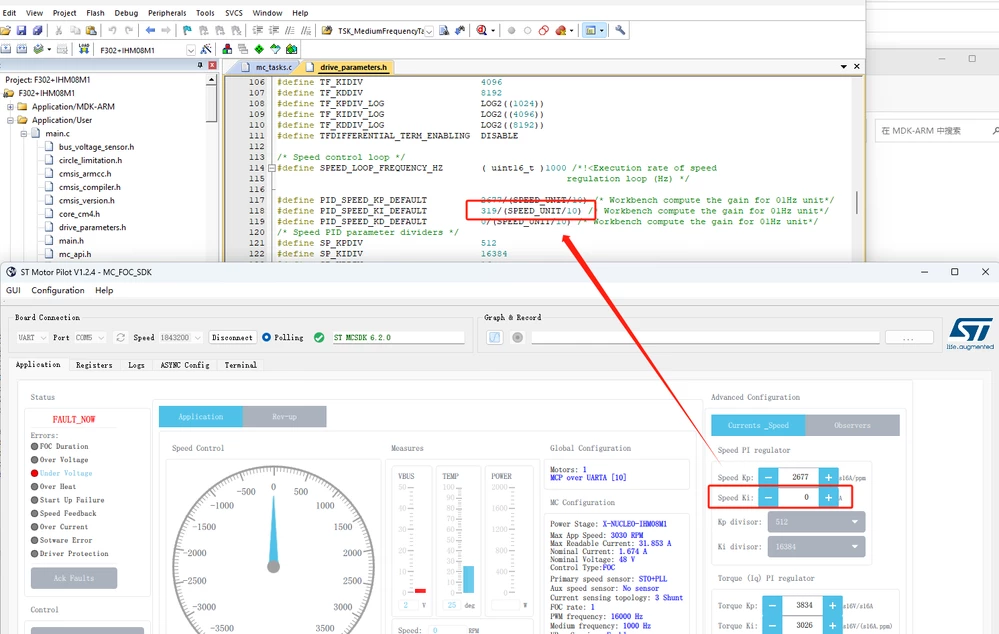
企业微信截图_16968470027075.png

2. About the Board Maneger. I want to add my own board but no documentation guidance.

3. About the Phases Current Sensing. I want to change it to Isolated Current Sensors, but the same reason.

I'm expecting a reply.

 
This topic has been closed for replies.
Best answer by Zied b.

Hello @gtop.1 
For your first question, this is an error that I reported to be corrected for the next version. In the meantime you can resolve this error locally by following these steps:
1.Go to the directory where the Mcsdk is installed, then open the folder: MC_SDK_6.2.0\Utilities\PC_Software\STMotorPilot\RegisterList
2. Open the RegListSTMV2.json file with a text editor
3. Find the "SPEED_KI" register and delete the "Scale": "CURRENT_SCALE" line, which is associated with this register.
4. Save, then restart the Motor Pilot, normally you will have the correct value.

For your other questions, the documentation for the board manager is currently being validated and should arrive soon. 
Regards

1 reply

Zied b.Best answer
ST Employee
October 10, 2023

Hello @gtop.1 
For your first question, this is an error that I reported to be corrected for the next version. In the meantime you can resolve this error locally by following these steps:
1.Go to the directory where the Mcsdk is installed, then open the folder: MC_SDK_6.2.0\Utilities\PC_Software\STMotorPilot\RegisterList
2. Open the RegListSTMV2.json file with a text editor
3. Find the "SPEED_KI" register and delete the "Scale": "CURRENT_SCALE" line, which is associated with this register.
4. Save, then restart the Motor Pilot, normally you will have the correct value.

For your other questions, the documentation for the board manager is currently being validated and should arrive soon. 
Regards

gtop.1Author
Associate III
October 11, 2023

Thanks.

cedric H
Technical Moderator
October 11, 2023

Hello @gtop.1 ,

If you need Isolated Current Sensors, then I advise you to look at the description of the board 

STEVAL-CTM009V1 . It makes use of the Hardware Variant.  "type": "TwoICSCurrents".
This Hardware variant is available for now only on STM32G4 and requires 2 ADCs. It is possible to enable it on STM32F3 but it has not been tested yet, but once again only with 2 ADCs. It means that STM32F302 is not an option (as it has only 1 ADC  ), but STM32F303 could be a candidate.
 
To enable it on STM32F3, update the connectionParameters.json file in the asset folder of STMCWB.
(MC_SDK_6.2.0\Utilities\PC_Software\STMCWB\assets)
 
In the section STM32F3 / CurrentSensing add the section TwoICSCurrents (copy/paste from the stm32G4 section):
  "TwoICSCurrents": {
     "ADCSignals":[ [ "CURRENT_ICS_U", "CURRENT_ICS_V"],["(ADC[0-9]*)_IN(?!N)"] ],
              "swVariant": {
                  "DualADCsNoSharedPhase" :{
                  "ips": ["All"]
                  }   
              }
    }
 
Regards
Cedric