
Ranjeet Singh
Senior
July 19, 2023
Solved

Speed control

  • July 19, 2023
  • 3 replies
  • 3173 views

how we can change the speed of motor in STEVAL -SPIN3201 using external Potentionmeter?/or inbuilt Potentionmeter (Variable resistor )?

    This topic has been closed for replies.
    Best answer by Gael A

    Hello Ranjeet Singh,

    Using the MCSDK 6.1.2, you can enable the potentiometer while configuring your project via WorkBench.
    Under Stage Configuration, check the Potentiometer box :
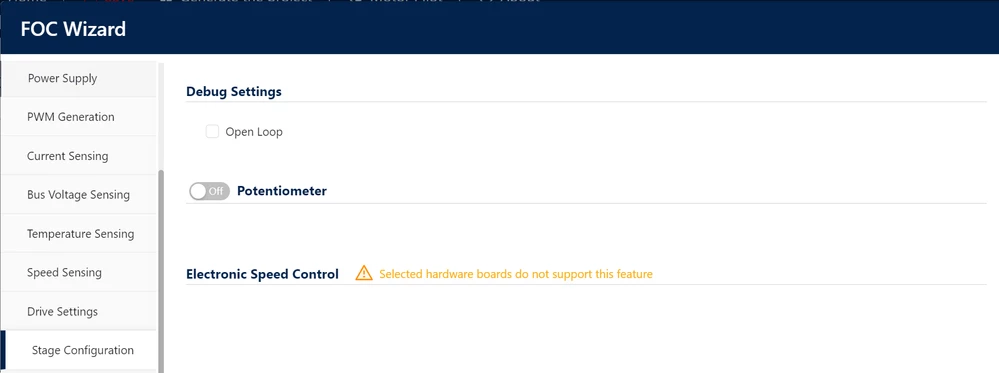
    STEVAL_SPIN3201.PNG

    The generated project should include a speed control using the board's potentiometer.

    Hope this will help,
    Gaël A.

    3 replies

    Gael A
    Gael ABest answer
    ST Employee
    July 19, 2023

    Hello Ranjeet Singh,

    Using the MCSDK 6.1.2, you can enable the potentiometer while configuring your project via WorkBench.
    Under Stage Configuration, check the Potentiometer box :
    STEVAL_SPIN3201.PNG

    The generated project should include a speed control using the board's potentiometer.

    Hope this will help,
    Gaël A.

    If you agree with my answer, please consider accepting it by clicking on 'Accept as solution'.Hope this will help,Gaël A.
    DMeie.2
    Associate III
    November 10, 2023

    How do I set what this potentiometer is used for?
    For example, by default it seems to be used for setting speed, but what if I want to use it for setting any other value, like max torque, position or max amperage value?
    Likewise, what happens if I have more than one Potentiometer on my board, how do I change which is used for what?

    SRedd.5
    Senior III
    November 15, 2023

    It is based on the potentiometer connection to the ADC channels of the microcontroller

    As an example

    ex: Potentiometer1 - ADC1  potentiometer1 connected to ADC1 channel

    Potentiometer2 - ADC2  potentiometer2 connected to ADC2 channel

    The data you read from ADC1 corresponds to potentiometer1 and from ADC2 corresponds to potentiometer2. Accordingly you have to implement code for speed, position, torque etc.

    Ranjeet Singh
    Senior
    July 19, 2023

    how to solve this in old software 5.4.7 ?

    Gael A
    ST Employee
    July 20, 2023

    Hello Ranjeet Singh,

    Unfortunately, the potentiometer feature was not available in MCSDK 5.4.7 and was introduced in version 6.0.
    However, you can still implement it yourself with a bit of coding.

    Hope this will help,
    Gaël A.

    If you agree with my answer, please consider accepting it by clicking on 'Accept as solution'.Hope this will help,Gaël A.
    Ranjeet Singh
    Senior
    July 28, 2023

    sir ,can i know how i can add this coding?

    Gael A
    ST Employee
    August 7, 2023

    Hello Ranjeet Singh,

    In my opinion, the easiest way to do it is to generate two projects using MCSDK 6.1.2 : one with potentiometer enabled and the other without, and see what the differences are so you can copy the potentiometer related part of the code to your 5.4.7 project.

    Hope this will help,
    Gaël A.

    If you agree with my answer, please consider accepting it by clicking on 'Accept as solution'.Hope this will help,Gaël A.