
Associate
December 18, 2024
Question

St motor workbench CubeMx error

  • December 18, 2024
  • 12 replies
  • 3423 views

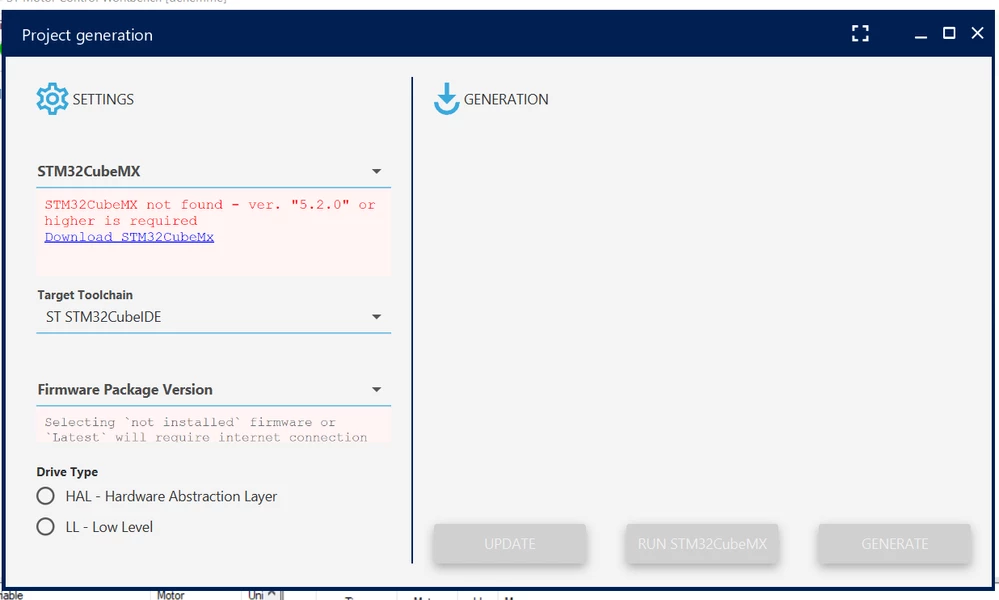
Hi everyone,I have problem about ST Motor Control Workbench.I can ' t generate project.I tried so many things(I installed and unistalled different versions , I changed OS language etc.) but I couldn't do it .Please help.stPic.PNG
12 replies

ilker07Author
Associate
December 18, 2024

power board:B-G431B-ESC1 

ilker07Author
Associate
December 19, 2024

Please any help?

ST Employee
December 19, 2024

Hello @ilker07 


could you tell us which version of MCSDK and also STM32Cubemx you have already installed on your PC ?

Thanks in advance


ilker07Author
Associate
December 19, 2024

MCSDK  ==> 5.4.8

STM32Cubemx==> 6.2.0


Thanks in advance

ST Employee
December 19, 2024

@ilker07 ,


it seems that the STMC Workbench does not detect correctly the latest version of CubeMx installed.

Can we try to uninstall the Cubemx and reinstall it, and try again please (keeping MCSDKalready installed)?

ilker07Author
Associate
December 19, 2024

I installed and unsitalled so many cubemx version.Nothing worked.

ST Employee
December 19, 2024

@ilker07 


normally the MC Workbench will detect at least the latest CubeMx version you had installed, that why i propose you to uninstall and reinstall it to check this.

ilker07Author
Associate
December 19, 2024

you mean STM32Cubemx verison 6.2.0 or Motor Control Workbench?

ST Employee
December 19, 2024

only uninstall (launch uninstall.bat located in your Cubemx folder) and reinstall STM32CubeMx v6.2.0

ilker07Author
Associate
December 19, 2024

I did exactly what you said but it didn't work.

ST Employee
December 19, 2024

Hi @ilker07 ,

I need some inputs :

- can you tell me if you are installing CubeMx with your admin account or not?

- can you check if when editing windows "register editor" in the following path Computer\HKEY_CURRENT_USER\Software\Microsoft\Windows\CurrentVersion\Uninstall you have the Key for your installation of Cube Mx ()


Regards


ilker07Author
Associate
December 19, 2024

q1 ==> yes


reg.PNG

ST Employee
December 19, 2024

@ilker07 ,


your register key status explains that the MC Workbench cannot detect whether a CubeMx version is installed or not.

Can you check also this key in the following path :  Computer\HKEY_LOCAL_MACHINE\SOFTWARE\Microsoft\Windows\CurrentVersion\Uninstall\STM32CubeMX

ilker07Author
Associate
December 19, 2024

there is no folder named STM32CubeMX after  Uninstall.

ST Employee
December 19, 2024

@ilker07 ,


ok all this explain your problematic because the detection of CubeMx version through MC WB GUI is based on those windows keys, and the only way to solve it is to again, sorry but we need to do so again, is to

- uninstall and reinstall STM32CubeMx v6.2.0 or you can use also 6.4.0 which is compatible with MCSDK 5.4.8
- do it with admin rights and select whether you want it to be for you only or all users on the machine.

By the way, do you select the path where to install CubeMx or do you let the default path ?


ilker07Author
Associate
December 20, 2024

C:\Program Files\STMicroelectronics\STM32Cube\STM32CubeMX

ST Employee
December 20, 2024

Hi @ilker07 ,


what did you have in the windows register key now ?

ilker07Author
Associate
December 20, 2024

Did you mean HKEY_LOCAL_MACHINE\SOFTWARE\Microsoft\Windows\CurrentVersion\Uninstall\STM32CubeMX?

ST Employee
December 20, 2024

@ilker07 ,


yes please if you can check this key.


Regards

ilker07Author
Associate
December 20, 2024

There is nothingnamed STM32CUBEMX reg.PNG