EShaw.1
Associate III
May 18, 2022
Solved

STEVAL-SPIN3202. Got it turning. Now need a guidance on where / what file and how I can control the speed.

  • May 18, 2022
  • 18 replies
  • 5232 views

Hi All,

Got it turning. Now need a guidance on where / what file and how I can control the speed. 

SDK 5.4.8.

6S_STEVAL3202_SL_VM example.

Monitor connects well.

I can start the motor.

Final ramp speed does not work. The only use - setting the direction of rotation.

Measured speed raises from 0 to 4000rpm and motor stops with Fault over "Start-up failure". Motor power indicator jumps to max and stays there.

My application is simple. I need an open loop control. 2 speeds forward, 2 speeds reverse. Stop. Preferably hardware control -3 pin. The only feedback - hardware Fault output.

Questions are:

  1. Where (what settings) can be an error.
  2. Where can I find the code where I can control the speed.
  3. How I can control the speed (what variables are responsible for speed and acceleration?). I assume that it can be done in main.c in while(1) loop.
  4. Could you please direct me to some manual or documentation on 6S_STEVAL3202_SL_VM package.

Thanks in advance for your answers.

Regards,

Edward.
This topic has been closed for replies.
Best answer by ADAVE.1

Hi Edward,

the errors raised are related to FOC functions that should not be there in the six-step project. You are likely missing something in the generation process.

I suggest to clean the folder and recreate the project from scratch starting from loading the example from 5.Y.4 as follows:

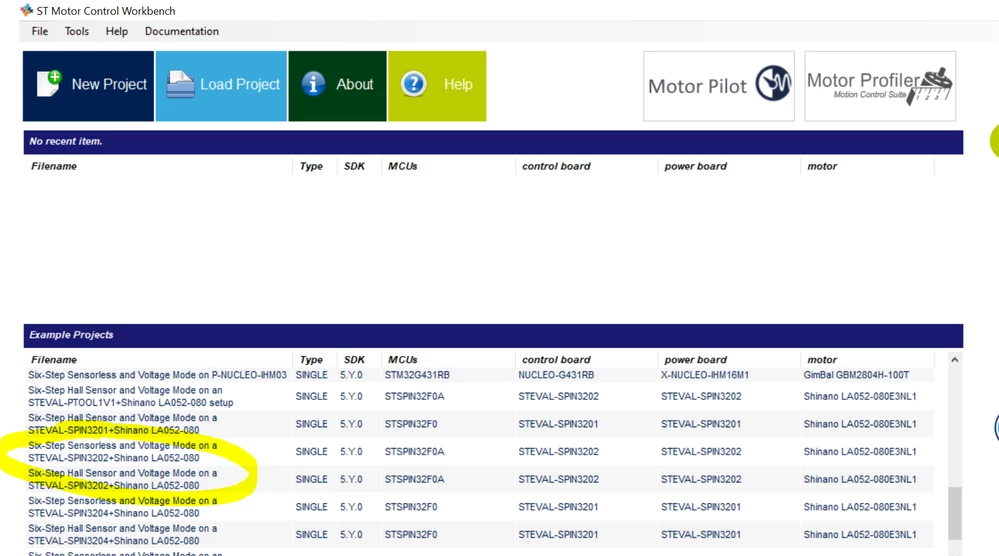
1- in the 5.Y.4 click on the example you are interested in

0693W00000Nqd6OQAR.png 2- After reading, close the readme.txt file and the warning message

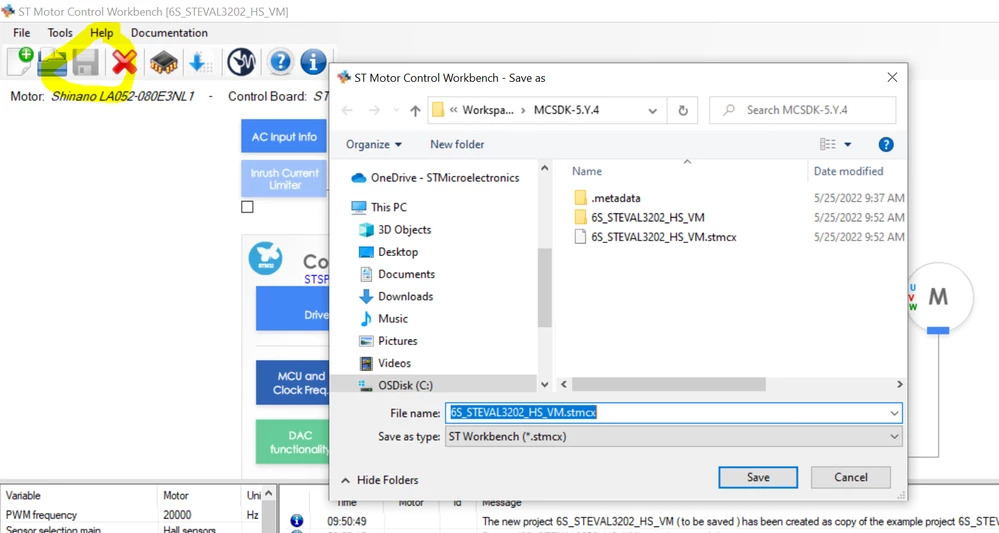
3- Click on "Save As" and save the project without renaming it

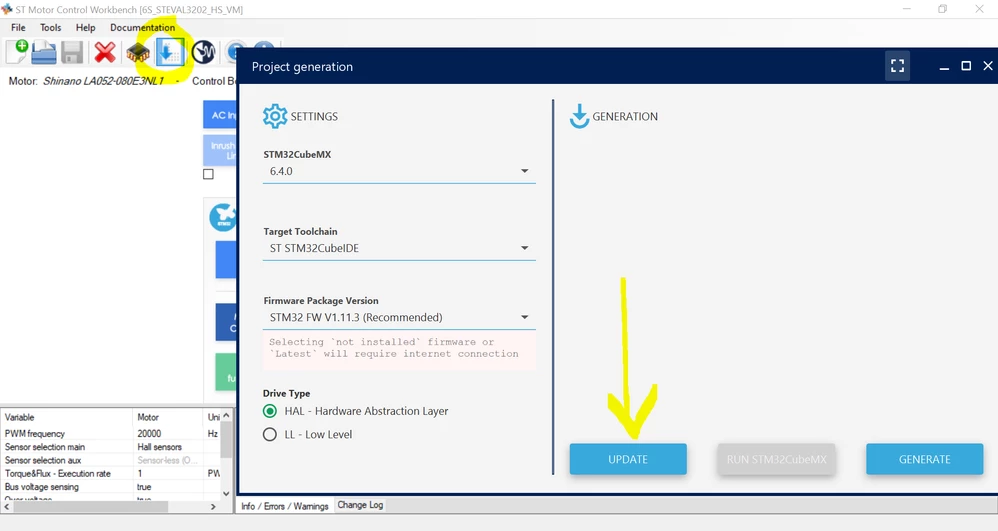
0693W00000Nqd6xQAB.png4- Click on project generation icon, select the toolchain and click UPDATE

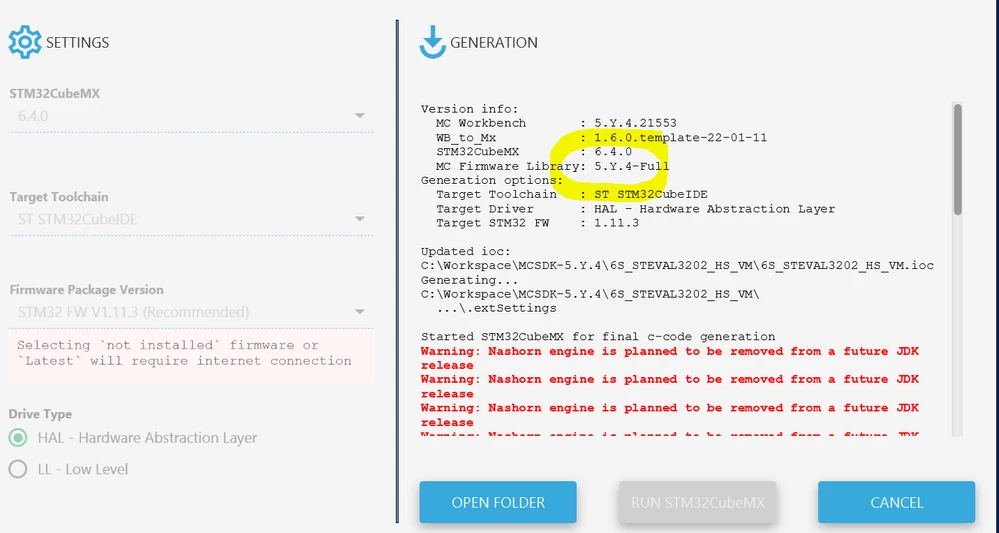
0693W00000Nqd7lQAB.png5- generation process should start with the proper library version (5.Y.4-Full)

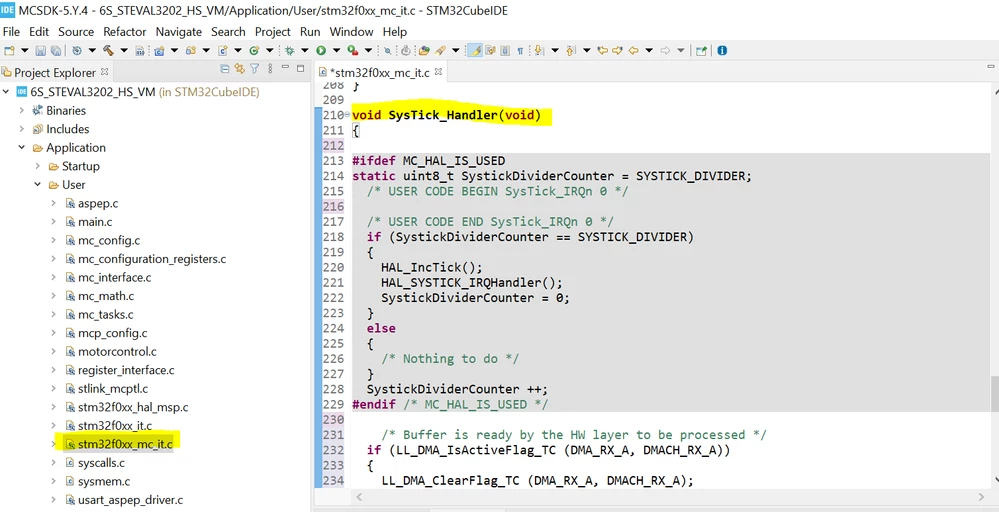
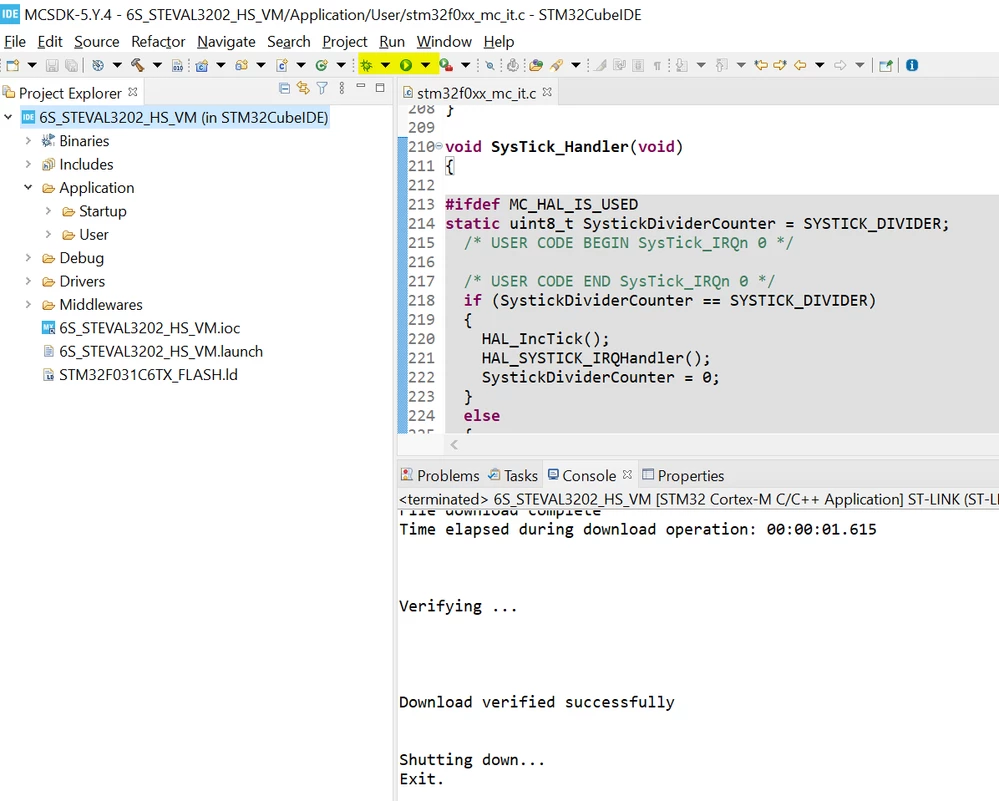
0693W00000Nqd8FQAR.png6- Load the project in your development environment and open the file stm32f0xx_mc_it.c where you have to replace the function like in my previous post

0693W00000Nqd9DQAR.png7- build and download the project to the board (or launch the debug mode...)

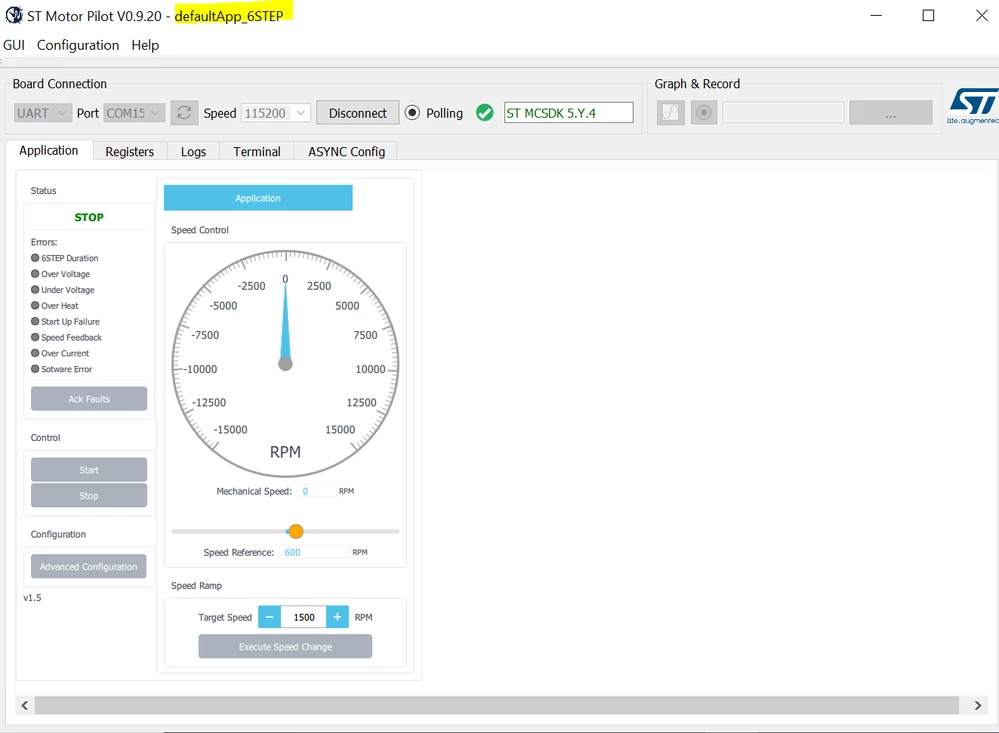
0693W00000NqdA6QAJ.png8- Open the Motor Pilot, load the defaultApp_6STEP and connect with Speed 115200

0693W00000NqdApQAJ.png 

Regards

Alessio

18 replies

EShaw.1
EShaw.1Author
Associate III
May 25, 2022

Hi Alessio,

After replacing the code as instructed, I'm receiving error messages from compiler:

12:02:47 **** Incremental Build of configuration Debug for project 6S_STEVAL3202_HS_VM ****

make -j8 all 

arm-none-eabi-gcc "C:/ST/Projects/6S_STEVAL3202_HS_VM/Src/register_interface.c" -mcpu=cortex-m0 -std=gnu11 -g3 -DDEBUG -DARM_MATH_CM0 -DUSE_FULL_LL_DRIVER -DUSE_HAL_DRIVER -DSTM32F031x6 -c -I../../Inc -I../../Drivers/STM32F0xx_HAL_Driver/Inc -I../../Drivers/STM32F0xx_HAL_Driver/Inc/Legacy -I../../MCSDK_v5.Y.4-Full/MotorControl/MCSDK/MCLib6Step/Any/Inc -I../../MCSDK_v5.Y.4-Full/MotorControl/MCSDK/MCLib6Step/Any/Src -I../../MCSDK_v5.Y.4-Full/MotorControl/MCSDK/MCLib/Any/Inc -I../../MCSDK_v5.Y.4-Full/MotorControl/MCSDK/MCLib6Step/F0xx/Inc -I../../Drivers/CMSIS/Device/ST/STM32F0xx/Include -I../../Drivers/CMSIS/Include -I../../Drivers/CMSIS/DSP/Include -Ofast -ffunction-sections -fdata-sections -Wall -fstack-usage -MMD -MP -MF"Application/User/register_interface.d" -MT"Application/User/register_interface.o" --specs=nano.specs -mfloat-abi=soft -mthumb -o "Application/User/register_interface.o"

C:/ST/Projects/6S_STEVAL3202_HS_VM/Src/register_interface.c: In function 'RI_SetReg':

C:/ST/Projects/6S_STEVAL3202_HS_VM/Src/register_interface.c:235:13: warning: implicit declaration of function 'STO_PLL_GetObserverGains' [-Wimplicit-function-declaration]

 235 |       STO_PLL_GetObserverGains(stoPLLSensor[motorID], &hC1, &hC2);

   |       ^~~~~~~~~~~~~~~~~~~~~~~~

C:/ST/Projects/6S_STEVAL3202_HS_VM/Src/register_interface.c:235:38: error: 'stoPLLSensor' undeclared (first use in this function)

 235 |       STO_PLL_GetObserverGains(stoPLLSensor[motorID], &hC1, &hC2);

   |                   ^~~~~~~~~~~~

C:/ST/Projects/6S_STEVAL3202_HS_VM/Src/register_interface.c:235:38: note: each undeclared identifier is reported only once for each function it appears in

C:/ST/Projects/6S_STEVAL3202_HS_VM/Src/register_interface.c:236:13: warning: implicit declaration of function 'STO_PLL_SetObserverGains' [-Wimplicit-function-declaration]

 236 |       STO_PLL_SetObserverGains(stoPLLSensor[motorID], (int16_t)regdata16, hC2);

   |       ^~~~~~~~~~~~~~~~~~~~~~~~

C:/ST/Projects/6S_STEVAL3202_HS_VM/Src/register_interface.c:251:13: warning: implicit declaration of function 'PID_SetKI'; did you mean 'PID_KI'? [-Wimplicit-function-declaration]

-------------------------------------------------------------------------------etc--------------------------------------------

make: *** [Application/User/subdir.mk:85: Application/User/register_interface.o] Error 1

"make -j8 all" terminated with exit code 2. Build might be incomplete.

12:02:48 Build Failed. 9 errors, 11 warnings. (took 641ms)

It may be some other mods need to be done in code?

Regards,

Edward.

ADAVE.1
ADAVE.1Best answer
ST Employee
May 25, 2022

Hi Edward,

the errors raised are related to FOC functions that should not be there in the six-step project. You are likely missing something in the generation process.

I suggest to clean the folder and recreate the project from scratch starting from loading the example from 5.Y.4 as follows:

1- in the 5.Y.4 click on the example you are interested in

0693W00000Nqd6OQAR.png 2- After reading, close the readme.txt file and the warning message

3- Click on "Save As" and save the project without renaming it

0693W00000Nqd6xQAB.png4- Click on project generation icon, select the toolchain and click UPDATE

0693W00000Nqd7lQAB.png5- generation process should start with the proper library version (5.Y.4-Full)

0693W00000Nqd8FQAR.png6- Load the project in your development environment and open the file stm32f0xx_mc_it.c where you have to replace the function like in my previous post

0693W00000Nqd9DQAR.png7- build and download the project to the board (or launch the debug mode...)

0693W00000NqdA6QAJ.png8- Open the Motor Pilot, load the defaultApp_6STEP and connect with Speed 115200

0693W00000NqdApQAJ.png 

Regards

Alessio

EShaw.1
EShaw.1Author
Associate III
May 25, 2022

Hi Alessio!

Thank you!

Thanks to you I've made the biggest progress in 6 month with this board!

I was able to download HAL (not LL) and it connects to Monitor!

Thanks again!

I'll be continuing my endeavors in the code to find how to control the board from code.

Thanks again!

Regards,

Edward.

EShaw.1
EShaw.1Author
Associate III
May 25, 2022

Hi Alessio,

The errors starting to pop up when I select Sensorless + PLL or other Sensorless in Speed sensing:

0693W00000NqeqSQAR.pngC:/ST/Projects/6S_STEVAL3202_SL_VM/Src/mc_config.c:47:43: warning: initialization of 'short unsigned int' from 'void *' makes integer from pointer without a cast [-Wint-conversion]

  47 |  .enPWMx[0].enPWMx_GPIO_Pin      = NULL,

   |                      ^~~~

C:/ST/Projects/6S_STEVAL3202_SL_VM/Src/mc_config.c:47:43: note: (near initialization for 'Motor_Device1.enPWMx[0].enPWMx_GPIO_Pin')

C:/ST/Projects/6S_STEVAL3202_SL_VM/Src/mc_config.c:49:43: warning: initialization of 'short unsigned int' from 'void *' makes integer from pointer without a cast [-Wint-conversion]

  49 |  .enPWMx[1].enPWMx_GPIO_Pin      = NULL,

   |                      ^~~~

C:/ST/Projects/6S_STEVAL3202_SL_VM/Src/mc_config.c:49:43: note: (near initialization for 'Motor_Device1.enPWMx[1].enPWMx_GPIO_Pin')

C:/ST/Projects/6S_STEVAL3202_SL_VM/Src/mc_config.c:51:43: warning: initialization of 'short unsigned int' from 'void *' makes integer from pointer without a cast [-Wint-conversion]

  51 |  .enPWMx[2].enPWMx_GPIO_Pin      = NULL,

   |                      ^~~~

C:/ST/Projects/6S_STEVAL3202_SL_VM/Src/mc_config.c:51:43: note: (near initialization for 'Motor_Device1.enPWMx[2].enPWMx_GPIO_Pin')

First the warning above (pops up even with hall sensors selected but can be ignored)

With Sensorless selected:

C:/ST/Projects/6S_STEVAL3202_SL_VM/Src/register_interface.c:235:13: warning: implicit declaration of function 'STO_PLL_GetObserverGains' [-Wimplicit-function-declaration]

 235 |       STO_PLL_GetObserverGains(stoPLLSensor[motorID], &hC1, &hC2);

   |       ^~~~~~~~~~~~~~~~~~~~~~~~

C:/ST/Projects/6S_STEVAL3202_SL_VM/Src/register_interface.c:235:38: error: 'stoPLLSensor' undeclared (first use in this function)

 235 |       STO_PLL_GetObserverGains(stoPLLSensor[motorID], &hC1, &hC2);

   |                   ^~~~~~~~~~~~

6 step can be sensorless right?

Regards,

Edward.

ADAVE.1
ST Employee
May 25, 2022

Hi Edward,

examples cannot be customized through the MCSDK GUI. So you cannot choose sensorless and regenerate the project.

If you want to run the sensorless algorithm you need to open the corresponding example in the example projects list, repeat the above steps and customize the algorithm parameters like shown in section 4.2 of the UM2916 I attached to my previous post

EShaw.1
EShaw.1Author
Associate III
May 30, 2022

Hi Alessio,

I am opening a new project in 5.Y.4.

It is sensorless:

0693W00000NqsA6QAJ.png When it is just open, It has Hall Sensors for the Motor and in Speed Sensing.

Am I not allowed to change it to sensorless?

Motor and Speed sensing in sensorless example should be sensorless right? Or I just need to ignore these settings?

0693W00000NqsAfQAJ.pngRegards,

Edward.

ADAVE.1
ST Employee
May 31, 2022

Hi Edward,

disregard those setting. If you opened the sensorless example it will run in this way despite the configuration reported in the GUI

Alessio

September 20, 2022

Hi ADAVE.1,

I was able to successfully run 6 step with the Steval-Spin3202, starting with the 6 step example provided by MCSDK-Y and following the steps you provided above.

Now, I have made many attempts to develop FOC with the same board Steval-Spin3202, but couldn't succeed. For that, I tried developing the code from scratch with MCSDK-Y. All I get is the following:

0693W00000SvpUrQAJ.pngNote that, when I try to change the code "void SysTick_Handler(void)" I get errors due to some variables or functions not declared. Maybe that piece of code you tell us to change only apply for 6step development and not for FOC.

Please, can you write a post with detailed steps, similar than before, but now for FOC and with the same board Steval-Spin3202?

Regards,

Joseph

ADAVE.1
ST Employee
September 21, 2022

Hi Joseph,

This board is supported by MCSDK 5.Y.4 for FOC algorithm. Therefore, if you want to generate the FOC code for STEVAL-SPIN3202, I suggest you to follow the wizard.

Select New project -> Inverter -> Steval-Spin3202

Customize the parameters in the GUI as you wish, save the project and generate the code.

Regards

Alessio