

BAtma.1
Visitor II
June 25, 2020
Question

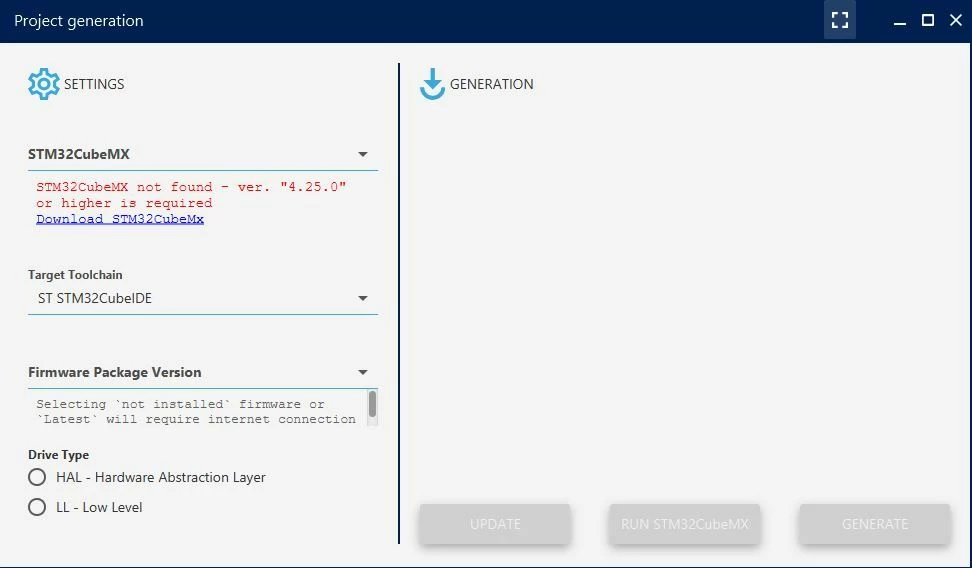
STM32CubeMX not found - ver. "4.25.0" or higher is required

  • June 25, 2020
  • 12 replies
  • 7507 views

Dear all,

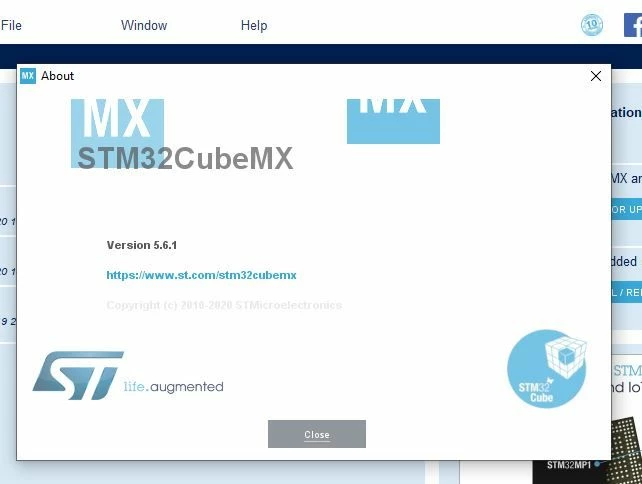
I would like to use ST Motor Control Workbench for BLDC FOC Control. I have installed version 5.4.4 and used an example project to generate code. However, the workbench doesnt generate code and gives error ("STM32CubeMX not found - ver. "4.25.0" or higher is required"). I had already STMCubeMx version 5.6.1 before installing motor control workbench and I am able to generate code using CubeMx alone. Is there a way to link these two programs manually?
0693W000001rSReQAM.jpg

0693W000001rSSNQA2.jpg

Best regards,

Berat

12 replies

Dkoşa.1
Associate
June 29, 2020

I have same issue :(

Sözer.1
Visitor II
December 20, 2020

You need to make the Windows language pack to English

Laurent Ca...
Senior III
June 22, 2021

The question has been moved from the section "Motor Control Hardware" to the "STM32 Motor Control" section (the question is about the STM32 MC SDK). 

Best regards

nLi.1
Visitor II
April 2, 2022

I have same issue,has it be sovled?(STMCubeMx version 6.5.0)0693W00000LwerAQAR.png

cedric H
Technical Moderator
April 6, 2022

Hello @nLi.1​ ,

Could you tell us which MCSDK version do you use ?

Regards

Cedric

nLi.1
Visitor II
April 14, 2022

I used STMCWB5.4.8.

Now I have sloved the problem:my workbench can't find cubemx was because that I habitually rechanged the name of "cubemx.exe" to "cubemx6.5.0.exe"...

How can I be so follish?

nLi.1
Visitor II
April 14, 2022

On the way, another question: when I use STMCWB_full_5.4.1.exe and cubemx6.5.0 to generate the code ,it just stay there and no response.But STMCWB_5.4.8 can work well . Firewell 1.27.0 was used.

cedric H
Technical Moderator
April 14, 2022

Hello @nLi.1​ ,

The main purpose of releasing the 5.4.8 was actually to be compatible with cubeMX 6.5.0.

If you want to use a previous version of the SDK, you have to use a cubeMX version < 6.5.0

Regards

Cedric

MKara.14
Visitor II
April 21, 2022

0693W00000LybuPQAR.png

I have same problem. How can i solve this problem?

GManav
Visitor II
March 16, 2023

Hello @MKara.14​ , Try to install STM32CubeMX into the directory "Program Files" instead of "Program Files (x86).

Visitor II
November 17, 2023

Did you solve the problem? I have the same problem as yours. If you solve it could you advice to me to solve mines?

Thank you.

December 25, 2023

Hi,dear Orhan

Did you solve the problem  ? 

McMax
Associate
June 11, 2024

I had the same issue and solved by re-installing CubeMX for all users instead of just myself. Not sure if that was the issue but after uninstall and reinstall 3 times I tried this and it worked out.

Explorer
September 12, 2024

This worked for me