ENGIN TANRIKULU
Associate III
January 18, 2024
Solved

STM32CubeMX version problem with Motor Control WorkBench

  • January 18, 2024
  • 3 replies
  • 2456 views

hi,

When I want to generate the code, it says that the STM32CubeMX version is not supported.
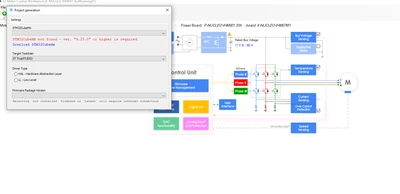
ENGINTANRIKULU_0-1705580255694.png


Even though I downloaded the latest version, it still gives the same problem.
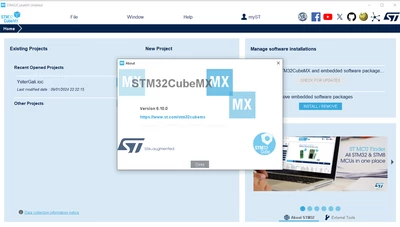
ENGINTANRIKULU_1-1705580255804.png


ENGINTANRIKULU_2-1705580255703.png


How can I solve this problem?

Thank you

    Best answer by CLD

    Hi @ENGIN TANRIKULU ,

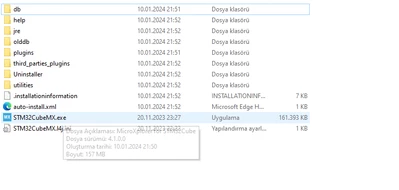
    Please provide more information about your installation to help us to replicate the issue:

    * CubeMx versions installed

    * CubeMx installed for "user" or for "all users" (system installation)

    * CubeMx installation folder was manually moved?

    * OS used and version

    * OS Language

    Regards

    Claudio


    3 replies

    Gael A
    ST Employee
    January 18, 2024

    Hello ENGIN TANRIKULU,

    It looks like it is your MCSDK version that is outdated. You can either download the MCSDK latest version MCSDK v6.1.2 (recommended solution) or downgrade your CubeMX version to one that is supported by the MCSDK you are currently using. Unfortunately, as I don't know which version of the MCSDK software your are using, I can't give you any more precise information.

    If you agree with my answer, please consider accepting it by clicking on 'Accept as solution'.Hope this will help,Gaël A.
    cedric H
    Technical Moderator
    January 18, 2024

    Hello @ENGIN TANRIKULU ,

    I highly encourage you to switch to the latest MCSDK 6.2.1 version.

    If you are forced to stay on a 5.4 version, the supported version of cubeMX at the release date was STM32CubeMx 6.4.0.

    Regards

    Cedric


    ENGIN TANRIKULU
    Associate III
    January 18, 2024

    ENGINTANRIKULU_0-1705585500619.png

    I'm still having the same problem.

    ENGINTANRIKULU_1-1705585548847.png


    ENGIN TANRIKULU
    Associate III
    January 19, 2024

    @cedric H @Gael A The problem is still not fixed. can you help me

    ST Employee
    January 28, 2025

    Hello @YEK-Kayra ,

    Please, verify that you have installed latest X-MCSDK version package from st.com.
    To change the operating system language and/or regional settings, you must refer to the specific instructions for your operating system version.