
Associate III
March 17, 2025
Solved

STMC Board Designer cannot create bridge

  • March 17, 2025
  • 2 replies
  • 598 views

Hi, 

I'm currently using the STMC Board Designer but seem to be unable to create a "Bridge" board. I was hoping to use this to create a temp pinout into connecting 2 IHM08-M1 power boards to a Nucleo-H755ZI-Q evaluation board. 

The documentation on the BRIDGE section isn't clear as well. 


I tried adding a new board but am unable to select Bridge here: 
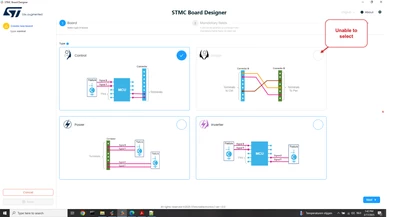
Zeno_0-1742215857536.png


Then I tried creating a .json for a Bridge board but I'm unable to import it because I'm unable to select the bridge section. 
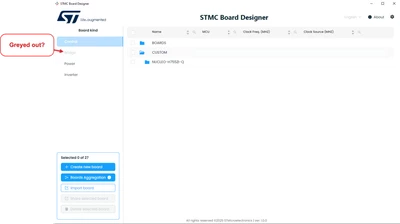
Zeno_1-1742215976602.png

Import failed due to "type board not match" which makes me assume that he's only able to import Control board since that tab is selected.
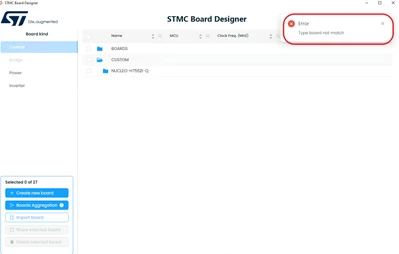
Zeno_2-1742216012944.png


Could you guys help me out into creating a Bridge board? 

Best answer by Gael A

Hello Zeno,

The Board Designer is currently unable to describe a Bridge board. There are however a few solutions to your problem :

- You can use the Board Manager to write your .json file. You will just need to import it inside the WB to be able to generate a project. This should work as long as you don't use the Board Designer.
- Using the Board Designer, you can create an Inverter Board that will behave as your 2 IHM08-M1 power boards and Nucleo-H755ZI-Q setup. As long as each feature is connected to the correct pin, you should have no issue.

2 replies

Gael A
Gael ABest answer
ST Employee
March 17, 2025

Hello Zeno,

The Board Designer is currently unable to describe a Bridge board. There are however a few solutions to your problem :

- You can use the Board Manager to write your .json file. You will just need to import it inside the WB to be able to generate a project. This should work as long as you don't use the Board Designer.
- Using the Board Designer, you can create an Inverter Board that will behave as your 2 IHM08-M1 power boards and Nucleo-H755ZI-Q setup. As long as each feature is connected to the correct pin, you should have no issue.

If you agree with my answer, please consider accepting it by clicking on 'Accept as solution'.Hope this will help,Gaël A.
ZenoAuthor
Associate III
March 17, 2025

Hi Gael, 


Thanks for the clarification, I'll try to go with the "inverter" setup so that I can use the designer, if that fails I'll try to manipulate the .json files directly. 

ZenoAuthor
Associate III
March 17, 2025

Update, using the STMC Board Manager I seem to be able to add a Bridge/Adapter.

However still unable to configure it using the STMC Board Designer.


Zeno_0-1742216805234.png