
Question
Unable to activate over current protection on ST Workbench (6.1.2) with a custom board
Hello,
I've made a custom card and I'm stuck on two features in particular:
- over-current protection
- Current sensing
They don't show up in the ST Workbench Pannel.
[VERSION]: 6.1.2
[TOOL]: MC WB
[DETAILS]:
here is an extract of my custom board (current Sensing):
 {
 "name": "CurrentSensing",
 "type": "CurrentSensing",
 "tRise": 59,
 "hwVariants": [
 {
 "type": "SingleShunt_AmplifiedCurrents_noOffset",
 "shuntResistor":0.0005,
 "opAmpGain":20,
 "amplifyingNetworkImax":330,
 "amplifyingNetworkVm":3.3,
 "amplifyingNetworkPrating":10,
 "signals": {
 "CURRENT_AMPL": [
 {
 "name": "PA3",
 "help": "",
 "cost": 0
 }
 ]
 }
 }
 ]
 }
And for overcurrent protection :
{
 "name":"OverCurrentProtection",
 "type":"OverCurrentProtection",
 "hwVariants": [
 {
 "type":"SingleInput_RawCurrents_Protection_IntRef",
 "OCNetworkGain":20,
 "OCNetworkOffset":0,
 "OCComparatorThreshold":2,
 "OCSignalPolarity": "Active high",
 "signals": {
 "CURRENT_INPUT_P":[
 {
 "name":"PA7",
 "help":"",
 "cost":0
 }
 ]
 }
 }
 ]
 }
Yet, on WB view, I got these :
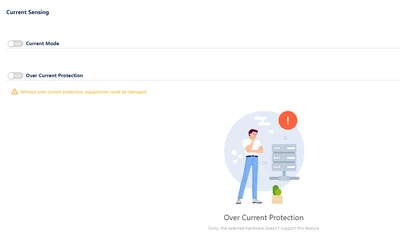
I'm working on a custom Inverter with a STM32G431RTBx and all the other features show up well.
[EXPECTED BEHAVIOR]:be able to activate overcurrent protection and current sensing.
Thank for your help,
Irian