
Associate
December 18, 2023
Solved

USB/com interface not working in STEVAL-SPIN3204/Windows10

  • December 18, 2023
  • 4 replies
  • 6473 views

Hi, I am new to ST evaluation board. I am trying to connect STEVAL-SPIN3204 board to a windows 10, and it is not working.

In more details: The board is working with stsw-link007 (ST-LinkUpgrade) and loads the recent driver version (V2J43M28). The USB connects to Windows as Drive D with details.txt file.

I loaded en.stsw-link009 drivers (64 bits) and updated the com port (STMicroelectronics STLink Virtual COM Port (COM3)) driver to version 2.2.0.0 dated 4/1/2021. The COM port hardware Ids are USB\VID_0483PID_374B&REV_000&MI_02 and USB\VID_0483PID_374B&MI_02.

The COM port is configured for 115200 baud, 8 bits, not parity, 1 stop bit.

However, when it is connected to the ST Motor Pilot V.1.2.5 that came with Motor Pilot 6.2.1 - it is not working and the board remains disconnected. Discover Board fails with the following message:

[INFO] - : Application is starting : MotorPilot version:1.2.5

[INFO] - : ini file path=C:/Users/Ran/AppData/Roaming/ST Microelectronics/ST Motor Pilot.ini

[INFO] - : Polling time out is set to 200 ms

[INFO] - : set qml to : qrc:/GUI/defaultApp.qml

[INFO] - : Loading registers bank desciption file C:/Program Files (x86)/STMicroelectronics/MC_SDK_6.2.1/Utilities/PC_Software/STMotorPilot/RegisterList/RegListMinimal.json

[INFO] - : Registers bank description loaded successfully

[INFO] - : Load Application qrc:/GUI/defaultApp.qml

[INFO] - : QML Application ready

[INFO] - : sdkPath=C:/Program Files (x86)/STMicroelectronics/MC_SDK_6.2.1

[INFO] - : disconnect UART START

[INFO] - : Disconnected from board

[INFO] - : disconnect UART END

[INFO] - : try to connect to COM3@1843200 Bauds

[INFO] - UART worker: Successfully open port COM3 @ 1843200

[INFO] - : try to configure the board

[INFO] - : Disconnected from board

[INFO] - : try to connect to COM3@115200 baud

[INFO] - UART worker: Successfully open port COM3 @ 115200

[INFO] - : try to configure the board

[INFO] - : Disconnected from board

[ERROR] - : Failed to discover Board at 1843200 Bauds and 115200 Bauds

[INFO] - : disconnect UART START

[INFO] - : Disconnected from board

[INFO] - : disconnect UART END


and terminal shows Tx msg of 85FFFFF (ASPEP_BEACON) and no Rx msg (ERROR:ASPEP BEACON TIMEOUT 500ms).

I replaced the cable, and used another (similar) evaluation board - and the issue remains.

What am I missing here?


Thanks for any idea that will solve this issue.


    This topic has been closed for replies.
    Best answer by cedric H

    Your settings are perfectly fine and aligned with your STSPIN32F0. But yeah, if you do not flash your code... no chance to connect !

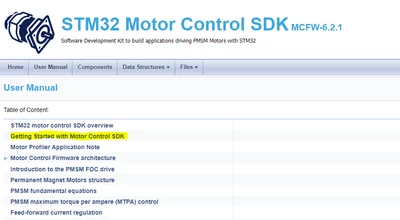
    I strongly advise you to read the Getting started chapter from the Documentation page accessible from the about menu of the MC Workbench.

    cedricH_0-1702914445714.png


    Regards

    Cedric

    4 replies

    Visitor II
    December 18, 2023

    Confirm that the COM port settings match the requirements of the board (115200 baud rate, 8 data bits, no parity, 1 stop bit). Also, ensure that the correct COM port is selected in the ST Motor Pilot software.

    ranrangAuthor
    Associate
    December 18, 2023

    Thanks, I checked it. the same baud rate, 8 data bits, no parity, 1 stop bit. What else can go wrong?

    cedric H
    Technical Moderator
    December 18, 2023

    Hello @ranran,

    Before going further, could you confirm that you generated a Motor control project with MCSDK 6.2.1 ?

    The connection with ST Motor Pilot requires a software protocol which comes with a Motor control project only if it is enabled. To do so, go in the User Interface section, and check that the Motor Control Protocol over USART A is enabled as shown below: (look also at the Baudrate, it is the one you have to apply at MC Pilot side)

    cedricH_0-1702912190453.png

    Once your project is generated, compiled and flashed to your MCU, you can connect the Pilot only if the MCU is not paused. So be careful if you attached a debugger that it did not break the processor.

    Let us know if it helps.

    Regards

    Cedric

    ranrangAuthor
    Associate
    December 18, 2023

    Thanks, It is 6.2.1. I generated and compiled a sample application, but have not flashed it yet (I wanted to check motor parameters). I shall flash it to the MCU... this part was not done yet. I shall let you know the results. BTW, the Interface sectoin of the SPIN3204 board is a bit different. Here is how I set it up.

    cedric H
    cedric HBest answer
    Technical Moderator
    December 18, 2023

    Your settings are perfectly fine and aligned with your STSPIN32F0. But yeah, if you do not flash your code... no chance to connect !

    I strongly advise you to read the Getting started chapter from the Documentation page accessible from the about menu of the MC Workbench.

    cedricH_0-1702914445714.png


    Regards

    Cedric

    ranrangAuthor
    Associate
    December 19, 2023

    Thanks again. I read it, and many other application notes, UMs, specs, theory, howtos, getting started, and a week of doing so. And I have lots of experience in embedded stuff. Even wrote a book. It seems that you have lots of docs, some outdated, many repetitions, and quite a complicated way of explanations. 

    Not arguing, however, there isn't a clue that I should download first the application to the board. On the contrary - after the IDE compile - it goes directly to profiling. Moreover, for the first-time user of the IDE (or after a break of 15 years), not a word about having to run the STLINK server. Just an example. What is required, in my opinion, is a simple cookbook at the end of the description of all SW components. And a problem solver (see next paragraph).

    And now, for example, the application runs fine, but the profiler isn't starting, due to a wrong motor config (register 105). Firmware 0.2 message in big red rectangular - with no further explanation (and I suggested the number of pairs). Go a find what it means and how to correct it.

    And back to my problem - I have an unknown motor. All I know is that it is BLDC, 12V, 1A. How do I manage to profile it? to define it to the application I want to write?

    And again - not complaining, just observing and making notes. I'll solve it eventually, but it will take lots of time to find the answers.

    Thanks, Ran

    SKled.1
    Senior
    January 11, 2024

    I second that.

    The actual experience of the MCSDK desktop tools diverges quite a bit from the marketing brochures / videos ("get ...  running in under 2 minutes!" [on my dev machine]).

    Have you gotten everything working by now?

    cedric H
    Technical Moderator
    January 12, 2024

    Hello @ranrang ,

    I am sorry to read that our MCSDK did not satisfy your expectations.

    If I am right your configuration is based on a STSPIN32F0. 

    But if you read the introduction chapter of the Profiler Application note you can see the line I just highlighted:

    cedricH_0-1705067485579.png

    STSPIN32F0 embeds an STM32F0, therefore profiler cannot work with your configuration.

    If you read the chapter just after the introduction, you can find the following line:

    cedricH_1-1705067783286.png

    In a previous post you mentioned "Not arguing, however, there isn't a clue that I should download first the application to the board." 

    In the Getting Started with Motor Control SDK, you can find the following instructions.


    cedricH_2-1705081391378.png

    Best Regards

    Cedric

    ranrangAuthor
    Associate
    January 12, 2024

    Hello Cedric,

    Sorry... my bad. It was not clear to me that downloading a project is a must to communicate with the evaluation board. It reads as if it is necessary to test your application, which is obvious, not to communicate with the board. I did not realize that the communications is part of the downloaded package (UART initialization and protocol handler routines).

    The issue with the profile: I bought STSPIN3204, STSPIN3202, STSPIN3201, and NUCLEO-G431RB/IHM16M1 which I believe is STM32G4. Again - I'm reading too superficially the vast number of documentation, trying to solve quickly the problem I have (my current driver stops after a minute or so, probably due to high torque when trying to achieve a certain speed. I want to start slower, try to sync at a lower speed, and set the speed to the maximum speed achievable, with max current/voltage (torque) I can put on the motor.)

    Thanks for the assistance, anyway. I hope I won't need to purchase an additional inverter (e.g., EVSPIN32G4).

    ranrangAuthor
    Associate
    January 12, 2024

    Hi, Finally it worked. Sort of. Had to reset and use the user button on the inverter in order to successfully finish the profile. Start with the app button caused all sorts of errors and did not finish.

    Thanks, a little progress...