B-U585-IOT2A TF-M Update Script not Working on Windows
Hi
Greetings
I'm trying the TF-M Application package v1.2 released by ST and am following the instructions in UM2851.
I'm currently in the step shown below:
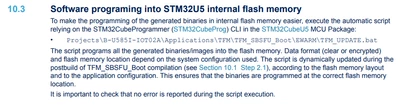
in windows im unable to run the TFM_Update.sh script that is provided in the following location(my installation path)
C:\TFM\en.stm32cubeu5-v1-2-0\STM32Cube_FW_U5_V1.2.0\Projects\B-U585I-IOT02A\Applications\TFM\TFM_SBSFU_Boot\STM32CubeIDE.
To enable the installation of shell scripts i used the cygwin tool and tried running the above mentioned script from the path and the following error is returned:

Is there any changes that i have to do(as i m not much familiar in shell scripts). Is my method correct? There is another path that contains a batch file TFM_UPDATE.batch in the path(for EWARM IDE). Can i use this batch file with STMCube IDE.
C:\TFM\en.stm32cubeu5-v1-2-0\STM32Cube_FW_U5_V1.2.0\Projects\B-U585I-IOT02A\Applications\TFM\TFM_SBSFU_Boot\EWARM.
Is there any manual sequence by which i can upload the code?
Please suggest me solutions for the same as i m stuck now.
Thanks for the support