EBonv
Associate III
May 22, 2021
Solved

H753ZI board unaccessible after download of incomplete secure boot

  • May 22, 2021
  • 3 replies
  • 3170 views

Hello,

I want to integrate a secure boot and secure software update (SBSFU) on a nucleo H753ZI board.

I downloaded the software from https://www.st.com/en/embedded-software/x-cube-sbsfu.html and followed the steps to compile the three programs (SECore, SBSFU and UserApp) proposed in the "projects" folder using the 1-image version of the SBSFU.

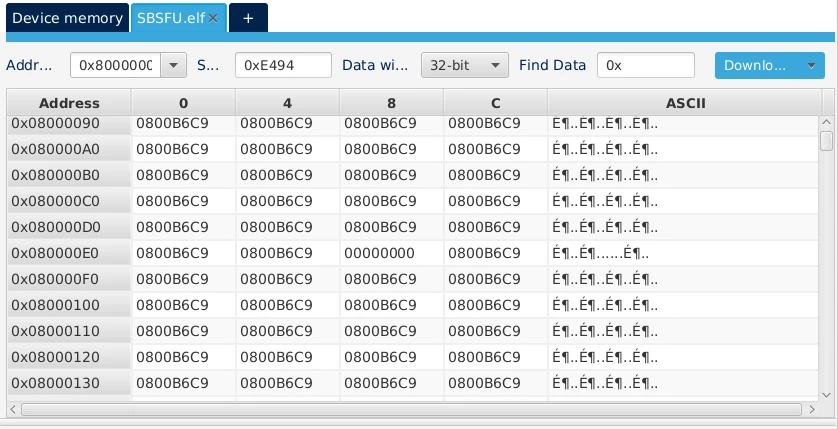
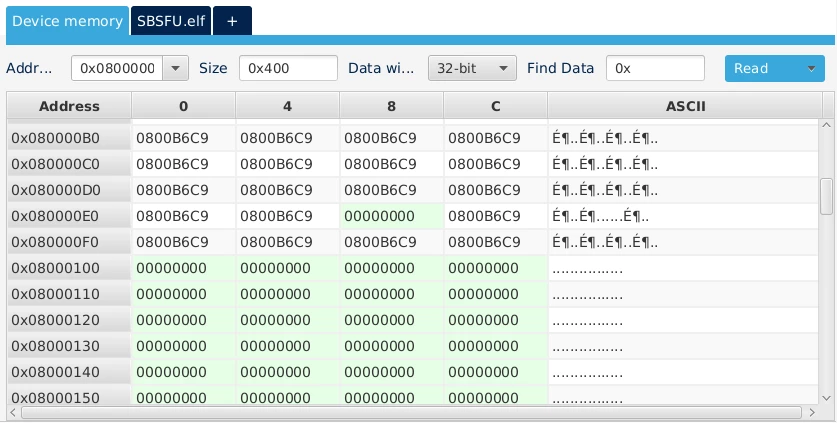
The next step was to program the SBSFU application on the board which I tried to do using STM32CubeProgrammer. However, the program has not been completely installed. The first image below shows the device memory after the introduction of the application and the second image shows what should have been programmed. You can observe that the code abruptly stops after the address 0x08000100 while it should continue.0693W00000APJdCQAX.png0693W00000APJd7QAH.png 
I suspect that something went wrong when I prepared the board and that the region after 0x08000100 has been mistakenly let as an area protected against writing.

My problem is that since this incomplete code has been inserted inside the board, I can not access it in normal mode using STM32CubeProgrammer, I get a  DEV_TARGET_NOT_HALTED error. The only way I can connect to the board is through hot plug mode. But from there I am unable to change any configuration, erase the memory or program anything else on the board.

Is there any way to somehow reset the board, or force it to clean anything that has been programmed on it to put it out from its idle and non-available state?

Any suggestions are welcome.

Thank you in advance.

This topic has been closed for replies.
Best answer by alister

X-CUBE-SBSFU is an example. You need to integrate your requirements, remove the parts you don't want, fix its problems and debug it.

Suggest separate it into Debug and Release builds, and use a different key and configure no protections for your Debug builds.

Use STM32CubeProgrammer or similar to clear any protections

Build, load and debug your Debug SBSFU using the debugger. Satisfy yourself that it's executing, checking there's nothing to install and checking there's no active UserApp to execute.

Then build load and debug your UserApp with the debugger. Satisfy yourself that the UserApp is executing and performing something you can measure.

When you're satisfied both the SBSFU and the UserApp are excuting ok, prepare an image of the UserApp and load it into the install region (slot #1), and load SBSFU using the debugger and check it installs it correctly.

Note, after loading an image into slot #1, any reset will cause the SBSFU to install it. So you want the SBSFU in flash to not execute until you've loaded it with the debugger. You can do that by adding some code like this to its main() function:

int startWait = 1;
int main(void)
{
 while (startWait);
 ...

On reset, the SBSFU will loop and do nothing.

But when you load the SBSFU with the debugger, you zero the startWait variable to allow it to execute.

3 replies

alister
alisterBest answer
Senior III
May 24, 2021

X-CUBE-SBSFU is an example. You need to integrate your requirements, remove the parts you don't want, fix its problems and debug it.

Suggest separate it into Debug and Release builds, and use a different key and configure no protections for your Debug builds.

Use STM32CubeProgrammer or similar to clear any protections

Build, load and debug your Debug SBSFU using the debugger. Satisfy yourself that it's executing, checking there's nothing to install and checking there's no active UserApp to execute.

Then build load and debug your UserApp with the debugger. Satisfy yourself that the UserApp is executing and performing something you can measure.

When you're satisfied both the SBSFU and the UserApp are excuting ok, prepare an image of the UserApp and load it into the install region (slot #1), and load SBSFU using the debugger and check it installs it correctly.

Note, after loading an image into slot #1, any reset will cause the SBSFU to install it. So you want the SBSFU in flash to not execute until you've loaded it with the debugger. You can do that by adding some code like this to its main() function:

int startWait = 1;
int main(void)
{
 while (startWait);
 ...

On reset, the SBSFU will loop and do nothing.

But when you load the SBSFU with the debugger, you zero the startWait variable to allow it to execute.

EBonv
EBonvAuthor
Associate III
May 24, 2021

As stated in the original question, my problem is that I can not access the board anymore in a mode other than hot plug mode as the board never halts.

Unfortunately, in this mode I do not seem to be able to clear the protections using STM32CubeProgrammer and I am unable to program anything else on the board. Using the debugger does not help either.

alister
Senior III
May 24, 2021

>The next step was to program the SBSFU application on the board which I tried to do using STM32CubeProgrammer.

This is enthusiastic and trusting. My post describes cautious steps. I've only developed custom boards. I can imagine if software purports to exactly support your dev board you may expect it to work. Even so, X-CUBE-SBSFU is example code.

>However, the program has not been completely installed. The first image below shows the device memory after the introduction of the application

The terms program, install and application may be ambiguous. Anything I say is guessing. Maybe something here will help.

X-CUBE-SBSFU uses the term "install" to describe the decrypting and writing the application into slot#0; the active region. But your first image is of STM32CubeProgrammer with the SBSFU.elf loaded. That's the boot code and not the application. So you've programmed only the SBSFU.elf to flash?

>My problem is that since this incomplete code has been inserted inside the board,

STM32CubeProgrammer would completely program the SBSFU.elf to flash, else it should have thrown an error, or the SBSFU.elf is incomplete and was programmed successfully. Perhaps inspect your link map file or elf file to ascertain if the SBSFU is good/complete. If you didn't output a map file, you might use "objdump.exe -t SBSFU.elf". Look for the addresses and sizes of each of the protections. You will find their symbol names in the code.

>My problem is that since this incomplete code has been inserted inside the board, I can not access it in normal mode using STM32CubeProgrammer, I get a DEV_TARGET_NOT_HALTED error. The only way I can connect to the board is through hot plug mode. But from there I am unable to change any configuration, erase the memory or program anything else on the board.

Perhaps check https://community.st.com/s/article/FAQ-Unable-to-connect-to-STM32H7-devices for ideas. It mentions ST-Link Utility and I've had to use that over STM32CubeProgrammer in the past.

Remi QUINTIN
Technical Moderator
June 1, 2021

I don’t know the H7 option bytes. Setting the PCROP-RDP to 1 enables the complete erasure of all protected areas when the RDP is reset on the WB.

Could it be the case for the H7 if this PCROP-RDP exists?

EBonv
EBonvAuthor
Associate III
June 2, 2021

On the H7 there is a combination of OBs that reaches the same behavior. There are two option bytes (DMEP1 and DMEP2) which, if they are set, erase the two flash banks when RDP level regression occurs. These two OBs are set on my board, unfortunately the RDP protection is currently set to the level 0, so no regression of that is possible.

Also, I am only able to connect to the board using the "hot plug" mode. In this mode, I am unable to modify any of the option bytes.

Remi QUINTIN
Technical Moderator
June 2, 2021

Set the RDP level to 1 and then back to 0 and the regression will trigger the complete erasure of the flash memory.

It works like that on the WB.

EBonv
EBonvAuthor
Associate III
June 2, 2021

As discussed previously with Alister, I am only able to connect to my board in hot plug mode. Connecting in any other mode fails. While in hot plug mode, I can not modify the values of the option bytes, therefore I can not change the RDP level. Here follows the output in STM32CubeProgrammer when I try to set the RDP level to 1 :

13:07:38:611 : Option byte command : -ob RDP=187 
 13:07:38:646 : PROGRAMMING OPTION BYTES AREA ...
 13:07:38:646 : Buffer program...
 13:07:38:646 : w ap 0 @0x580244F4 0x00000004 bytes Data 0x00000002
 13:07:38:646 : Reading data...
 13:07:38:647 : r ap 0 @0x58000528 0x00000004 bytes Data 0x00000000
 13:07:38:647 : Buffer program...
 13:07:38:652 : w ap 0 @0x580244F4 0x00000004 bytes Data 0x00000002
 13:07:38:653 : Reading data...
 13:07:38:653 : r ap 0 @0x58000528 0x00000004 bytes Data 0x00000000
 13:07:38:653 : Buffer program...
 13:07:38:654 : w ap 0 @0x580244F4 0x00000004 bytes Data 0x00000002
 13:07:38:654 : Reading data...
 13:07:38:662 : r ap 0 @0x58000528 0x00000004 bytes Data 0x00000000
 13:07:38:683 : Reading data...
 13:07:38:695 : r ap 0 @0x1FF1E880 0x00000004 bytes Data 0x00000800
 13:07:38:695 : Database: Config 2 is active.
 13:07:38:695 : Bank : 0x00
 13:07:38:696 : Address : 0x5200201c
 13:07:38:696 : Size : 308 Bytes
 13:07:38:696 : OB buffer: �?�����?���?���?����?���?���?���?���?���?���?����?���?���?����?����?���?���?����?���?���?����?���?���?����?���?���?���?����?����?����?����?����?���?���?����?���?���?���?����?���?���?���?���?���?���?���?���?���?���?���?���?���?���?���?���?���?���?���?���?���?���?���?���?���?���?���?���?���?���?���?���?���?���?���?���?���?���?���?���?���?���?���?���?���?���?���?���?���?���?���?���?���?���?���?���?���?���?���?���?���?���?���?���?���?���?���?���?���?���?���?���?���?���?���?���?���?���?���?���?���?���?���?���?���?���?���?���?���?���?���?���?���?���?���?���?���?���?���?���?���?���?���?���?���?���?���?���?���?���?���?���?���?���?���?���?���?���?���?���?���?���?���?���?���?���?���?���?���?���?���?���?���?���?���?���?���?���?���?���?���?���?���?���?���?���?���?���?���?���?���?���?���?���?���?���?���?���?���?���?���?���?���?���?���?���?���?���?���?���?���?���?����?���?���?���?���?���?���?���?���?���?���?���?���?���?���?���?���?���?���?���?���?���?���?���?���?���?���?���?�����?���?�����?���?���?���?���?���?���?����?���?���?����?����?���?���?����?���?���?����?���?���?����?���?���?���?����?����?����?����?����?���?���?����?���?��
 13:07:38:696 : Buffer program...
 13:07:40:003 : halt ap 0 Status = 18
 13:07:40:003 : halt ap 1 Status = 32
 13:07:40:010 : halt ap 2 Status = 32
 13:07:40:010 : w ap 0 reg 15 PC (0x24000000) 
 13:07:40:011 : w ap 0 reg 17 MSP (0x24000500) 
 13:07:40:011 : w ap 0 reg 16 xPSR (0x01000000) 
 13:07:40:012 : w ap 0 @0x24001220 0x00000200 bytes Data 0x00000000
 13:07:40:013 : w ap 0 @0x24000000 0x00000004 bytes Data 0x0000BE00
 13:07:40:073 : w ap 0 @0x24000004 0x00000DF4 bytes Data 0xB672B580
 13:07:40:074 : w ap 0 @0x24001220 0x00000134 bytes Data 0x1BC6AAF0
 13:07:40:075 : Loader write option bytes...
 13:07:40:075 : Init flashloader...
 13:07:40:076 : halt ap 0 
 13:07:40:076 : halt ap 0 
 13:07:42:003 : w ap 0 reg 0 R0 0x00000001
 13:07:42:003 : WriteOB function terminated with connection error due to OB_Launch
 13:07:42:006 : UPLOADING OPTION BYTES DATA ...
 13:07:42:006 : Bank : 0x00
 13:07:42:006 : Address : 0x5200201c
 13:07:42:006 : Size : 308 Bytes
 13:07:42:007 : Reading data...
 13:07:42:008 : r ap 0 @0x5200201C 0x00000134 bytes Data 0x1BC6AAF0
 13:07:42:008 : OPTION BYTE PROGRAMMING VERIFICATION:
 13:07:42:009 : Error: Expected value for Option Byte "RDP": 0xBB, found: 0xAA
 13:07:42:095 : Error: Option Byte Programming failed
 13:07:42:117 : Buffer program...
 13:07:42:119 : w ap 0 @0x580244F4 0x00000004 bytes Data 0x00000002
 13:07:42:130 : Reading data...
 13:07:42:131 : r ap 0 @0x58000528 0x00000004 bytes Data 0x00000000
 13:07:42:132 : Buffer program...
 13:07:42:141 : w ap 0 @0x580244F4 0x00000004 bytes Data 0x00000002
 13:07:42:142 : Reading data...
 13:07:42:144 : r ap 0 @0x58000528 0x00000004 bytes Data 0x00000000
 13:07:42:144 : Buffer program...
 13:07:42:145 : w ap 0 @0x580244F4 0x00000004 bytes Data 0x00000002
 13:07:42:145 : Reading data...
 13:07:42:145 : r ap 0 @0x58000528 0x00000004 bytes Data 0x00000000
 13:07:42:165 : Reading data...
 13:07:42:192 : r ap 0 @0x1FF1E880 0x00000004 bytes Data 0x00000800
 13:07:42:194 : Database: Config 2 is active.
 13:07:42:393 : UPLOADING OPTION BYTES DATA ...
 13:07:42:394 : Bank : 0x00
 13:07:42:394 : Address : 0x5200201c
 13:07:42:394 : Size : 308 Bytes
 13:07:42:395 : Reading data...
 13:07:42:395 : r ap 0 @0x5200201C 0x00000134 bytes Data 0x1BC6AAF0

Observe line 47 that the programming of the option byte failed. On the line above, the value 0xBB corresponds to the level 1 RDP and 0xAA corresponds to the level 0. I obtain similar outputs whenever I try to change the value of any option byte.