

AHuan.9
Associate
March 19, 2022
Question

How to import and build X-CUBE-GCP 2.0 in STM32CubeIDE Ver 1.9.0??

  • March 19, 2022
  • 2 replies
  • 896 views

Hi,

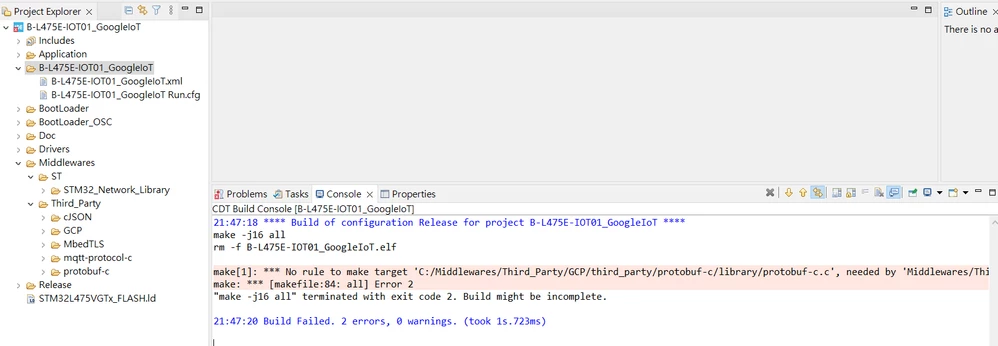
As title. I imported project and try to build code. But got error as below:

21:47:18 **** Build of configuration Release for project B-L475E-IOT01_GoogleIoT ****

make -j16 all 

rm -f B-L475E-IOT01_GoogleIoT.elf

make[1]: *** No rule to make target 'C:/Middlewares/Third_Party/GCP/third_party/protobuf-c/library/protobuf-c.c', needed by 'Middlewares/Third_Party/protobuf-c/library/protobuf-c.o'. Stop.

make: *** [makefile:84: all] Error 2

"make -j16 all" terminated with exit code 2. Build might be incomplete.

21:47:20 Build Failed. 2 errors, 0 warnings. (took 1s.723ms)
0693W00000KdGi2QAF.png

This topic has been closed for replies.

2 replies

AHuan.9
AHuan.9Author
Associate
March 19, 2022

Hi,

Updated status. Any idea how to fix this error???

Description Resource Path Location Type

cannot use executable file '../../../../BootLoader_OSC/2_Images_SBSFU/STM32CubeIDE/B-L475E-IOT01_2_Images_SBSFU/Debug\se_interface_app.o' as input to a link B-L475E-IOT01_GoogleIoT C/C++ Problem

Thanks.​

Jocelyn RICARD
ST Employee
March 25, 2022

Hello @AHuan.9​ ,

This is a known issue for which I made a dedicated post here:

https://community.st.com/s/question/0D53W00001PwBDDSA3/issue-building-sbsfu-with-latest-stm32cubeide-190-here-is-the-solution

Best regards

Jocelyn