Associate II
September 17, 2025
Solved

Is there a way to unlock STM32H563 if wrong obk file provisioned?

  • September 17, 2025
  • 3 replies
  • 1074 views

Hello!
I a new in this.
I have two sets of DA files: for password access and for access via certificate.
I've tried to flash a NS-firmware, provision a password.obk, then change Product state to Provisioned/closed. 
Thas was successful. I can perform a regression from this state.
But i also tried to open a debug session. Without success. CubeProgrammer says, that I am able to make full regression only, while Cube IDE asks for certificate DA.
I know, that certificate auth method is valid with TZEN=1 only, but I tried to provision that obk with TZEN=0.

As a result, I Have this:
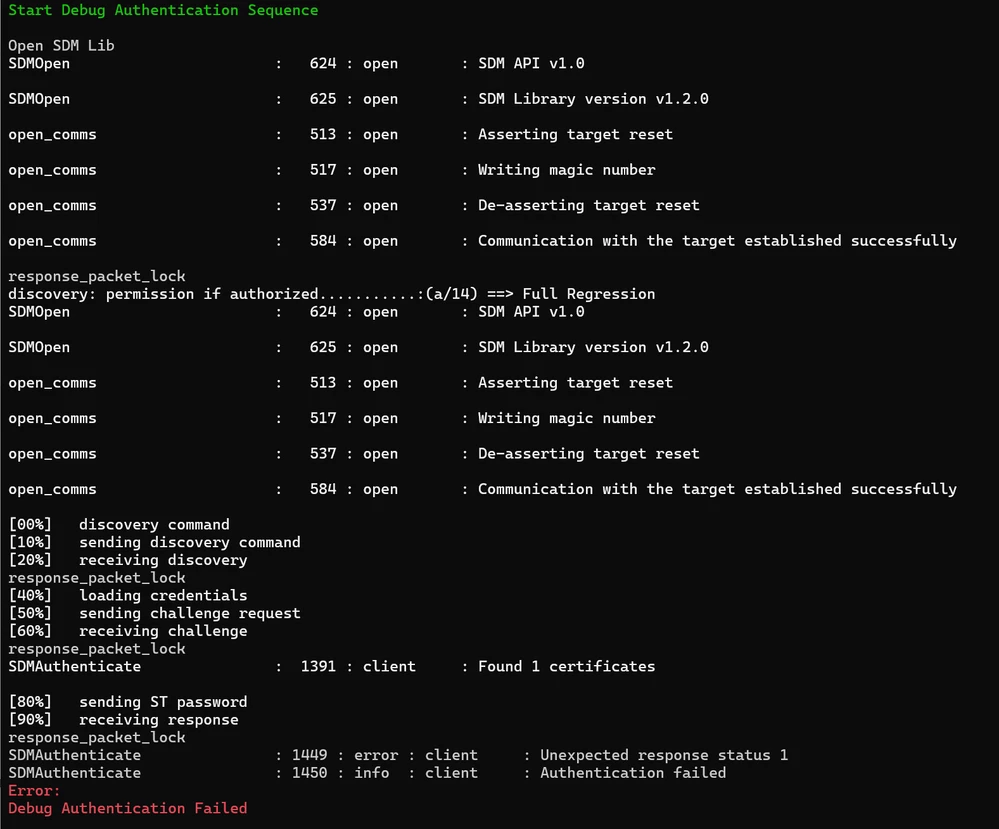
Screenshot 2025-09-17 174213.png

The default ST password from CubeProgrammer's folder is not working,

I tried to provide all-zeros and all-FF password without success.
But maybe I need to change something in the header. Or change a password length.

Konstantin_Z_0-1758116631152.png


So, 3 questions:
1. Is this device totally bricked, or I can some-how calculate a password.bin
2. How to perform debug in closed product state on STM32H563 if TZEN=0 ?
3. How to perform debug of the the secured firmware when TZEN=1

Can somebody clarify the boot/DA process when TZ=1.
As I can understand, If the TZEN=1, MCU boots from 0x0C000000. And If I want to have ability to perform a regression or debug, I need a code on this address, that can receive user credentials and open debug. Right?
Or this auth functionality is done with RSS from system memory, without touching flash?

Thanks!
Best answer by Konstantin_Z

Solution for the case where you provisioned  ConfigWithCertificate.obk, with TZEN=0 and push ProductState to Closed :

  1. Ensure, the DA Discover is working for you. (Do not forget to connect Reset Line on ST-Link)
  2. Ensure, You still have Da_root_key_pub.pem and ConfigWithCertificate.obk 
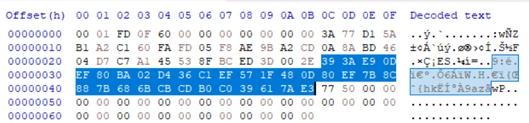
  3. Open ConfigWithCertificate.obk  with Hex Editor and take 32 bytes from 0x2C offset: hash in OBKhash in OBK
     this is a hash, stored in stm32 chip.
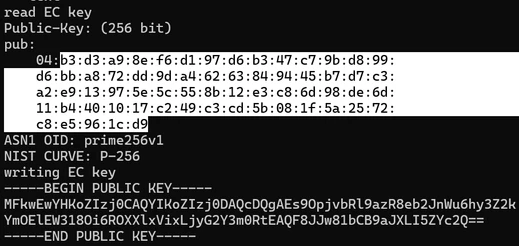
  4. run shell command openssl ec -pubin -in Da_root_key_pub.pem -textKonstantin_Z_0-1758201323813.png,
    You will see 65 bytes of the public key. We need the 64 bytes from the second byte only. Copy them to your Hex Editor and give a filename password.bin
  5. Check the SHA-256 hash of this file. Here, for example. The hash should be the same as one at the 3rd stage.
  6. Add the header "00 00 00 80 40 00 00 00" to your password.bin 
  7. Use this password.bin with the DA autentification and make a full regression. 
  8. Done! 


3 replies

Associate II
September 18, 2025

Thanks.
The problim is:
I have to use Config-password.obk, but used Config-cerificate.obk with TZEN=0;
I have password.bin I used previously, but it is not working.

Konstantin_ZAuthorBest answer
Associate II
September 18, 2025

Solution for the case where you provisioned  ConfigWithCertificate.obk, with TZEN=0 and push ProductState to Closed :

  1. Ensure, the DA Discover is working for you. (Do not forget to connect Reset Line on ST-Link)
  2. Ensure, You still have Da_root_key_pub.pem and ConfigWithCertificate.obk 
  3. Open ConfigWithCertificate.obk  with Hex Editor and take 32 bytes from 0x2C offset: hash in OBKhash in OBK
     this is a hash, stored in stm32 chip.
  4. run shell command openssl ec -pubin -in Da_root_key_pub.pem -textKonstantin_Z_0-1758201323813.png,
    You will see 65 bytes of the public key. We need the 64 bytes from the second byte only. Copy them to your Hex Editor and give a filename password.bin
  5. Check the SHA-256 hash of this file. Here, for example. The hash should be the same as one at the 3rd stage.
  6. Add the header "00 00 00 80 40 00 00 00" to your password.bin 
  7. Use this password.bin with the DA autentification and make a full regression. 
  8. Done! 


Jocelyn RICARD
ST Employee
September 18, 2025

Hi @Konstantin_Z ,

very smart solution !

If debug authentication firmware in STM32H5 support 32 bytes password it should work indeed

Best regards

Jocelyn