Associate III
June 4, 2024
Solved

PCROP Not disabled after RDP Regression, Option change not possible in RDP0

  • June 4, 2024
  • 6 replies
  • 6393 views

Hello everyone,

I'm experimenting PCROP activation on stm32h743 following this ST-tutorial: https://youtu.be/7Wr90XFA8_Q?si=tDpqUtMdin9Oyn-P

The activation works fine but i cannot disable PCROP using CubeProgrammer.
I did a RDP1 to RDP0 regression with DMWP1 checked but the PCROP is still active
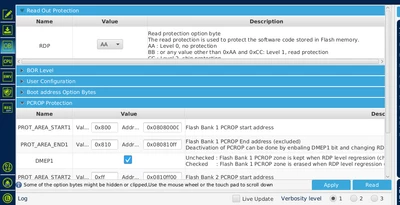
aco990_0-1717517806630.png


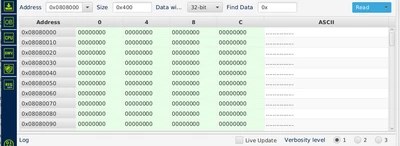
After RDP regression i can se that the unprotected flash are is erase:
aco990_1-1717517520089.png

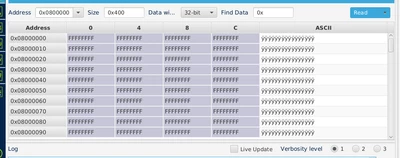
But not the protected one:

aco990_2-1717517571238.png
I can also not change the option bytes anymore, even RDP0 to RDP1 does not work
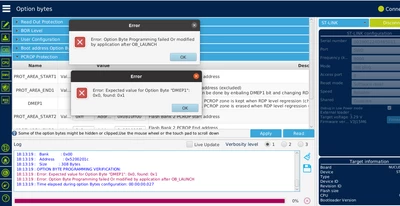
aco990_3-1717517635012.png


How can i recover from this situation ?


@Jocelyn RICARD, @Fred 

Best answer by aco990

Hi @Jocelyn RICARD ,

now PCROP is removed and the device is working fine! :)
If you encounter the same problem a "bank mass erase with automatic protection-removal" as described in the reference manual could help you:


__HAL_FLASH_CLEAR_FLAG_BANK1(FLASH_FLAG_ALL_ERRORS_BANK1);
HAL_FLASH_OB_Unlock();

SET_BIT(FLASH->PRAR_PRG1, FLASH_PRAR_DMEP);
uint32_t temp = ~((0xFFF << 0) | (0xFFF << 16));
FLASH->PRAR_PRG1 &= temp; // Clear bits 11:0 and 27:16
FLASH->PRAR_PRG1 |= (2 << 0);
FLASH->WPSN_PRG1 = 0xFF;

HAL_FLASH_Unlock();
SET_BIT(FLASH->CR1, FLASH_CR_BER);
SET_BIT(FLASH->CR1, FLASH_CR_START);
while (READ_BIT(FLASH->SR1, FLASH_SR_QW) > 0) {} // Wait for erase completion


6 replies

Jocelyn RICARD
ST Employee
June 4, 2024

Hello @aco990 ,

Try to do a power on reset (unplyg and replug the board basically) and connect under reset.

If it does not work, please dump the option bytes here using programmer CLI

Best regards

Jocelyn

aco990Author
Associate III
June 5, 2024

Thank you @Jocelyn RICARD ,
the power on reset and connection under reset doesn't work.
could you give an example on how to dump the option bytes using programmer CLI. I am not familiar with programmer CLI and don't want to brick my board.

Best regards

Jocelyn RICARD
ST Employee
June 5, 2024
STM32_Programmer_CLI.exe -c port=SWD mode=UR -ob displ
aco990Author
Associate III
June 5, 2024

@Jocelyn RICARD  here is the dump result

OPTION BYTES BANK: 0

 Read Out Protection:

 RDP : 0xAA (Level 0, no protection) 

 BOR Level:

 BOR_LEV : 0x0 (reset level is set to VBOR0) 

 User Configuration:

 IWDG1_SW : 0x1 (Independent watchdog is controlled by software) 
 NRST_STOP_D1 : 0x1 (STOP mode on Domain 1 is entering without reset) 
 NRST_STBY_D1 : 0x1 (STANDBY mode on Domain 1 is entering without reset) 
 FZ_IWDG_STOP : 0x1 (Independent watchdog is running in STOP mode) 
 FZ_IWDG_SDBY : 0x1 (Independent watchdog is running in STANDBY mode) 
 BCM7 : 0x1 (CM7 boot enabled) 
 NRST_STOP_D2 : 0x1 (STOP mode on Domain 2 is entering without reset) 
 NRST_STBY_D2 : 0x1 (STANDBY mode on Domain 2 is entering without reset) 
 SWAP_BANK : 0x0 (after boot loading, no swap for user sectors) 
 IO_HSLV : 0x0 (Product working in the full voltage range, I/O speed optimization at low-voltage disabled) 

 Boot address Option Bytes:

 BOOT_CM7_ADD0: 0x800 (0x8000000) 
 BOOT_CM7_ADD1: 0x1FF0 (0x1FF00000) 

 PCROP Protection:

 PROT_AREA_START1: 0x800 (0x8080000) 
 PROT_AREA_END1: 0x810 (0x80810FF) 
 DMEP1 : 0x1 (Flash Bank 1 PCROP zone is erased when RDP level regression (change from level 1 to 0) occurs) 
 PROT_AREA_START2: 0xFF (0x810FF00) 
 PROT_AREA_END2: 0x0 (0x81000FF) 
 DMEP2 : 0x0 (Flash Bank 2 PCROP zone is kept when RDP level regression (change from level 1 to 0) occurs) 

 DTCM RAM Protection:

 ST_RAM_SIZE : 0x0 (2 KB) 

 Write Protection:

 nWRP0 : 0x1 (Write protection not active on this sector) 
 nWRP1 : 0x1 (Write protection not active on this sector) 
 nWRP2 : 0x1 (Write protection not active on this sector) 
 nWRP3 : 0x1 (Write protection not active on this sector) 
 nWRP4 : 0x1 (Write protection not active on this sector) 
 nWRP5 : 0x1 (Write protection not active on this sector) 
 nWRP6 : 0x1 (Write protection not active on this sector) 
 nWRP7 : 0x1 (Write protection not active on this sector) 
 nWRP8 : 0x1 (Write protection not active on this sector) 
 nWRP9 : 0x1 (Write protection not active on this sector) 
 nWRP10 : 0x1 (Write protection not active on this sector) 
 nWRP11 : 0x1 (Write protection not active on this sector) 
 nWRP12 : 0x1 (Write protection not active on this sector) 
 nWRP13 : 0x1 (Write protection not active on this sector) 
 nWRP14 : 0x1 (Write protection not active on this sector) 
 nWRP15 : 0x1 (Write protection not active on this sector) 

 
Best regards

Jocelyn RICARD
ST Employee
June 5, 2024

Hello @aco990 ,

I reused exact same setting and didn't face any issue.

Could you please check you are using latest version of CubeProgrammer (2.16) and also recent version of STLink firmware (Firmware Upgrade button on right side of programmer panel)

Are you using a Nucleo board ?

Best regards

Jocelyn

aco990Author
Associate III
June 5, 2024

Hell @Jocelyn RICARD,
i am using the latest version of CubeProgrammer (v2.16.0) and just upgraded STLink to V3J13M4, but i still get the error. I'm using a Nucleo-h743zi2.

Best regards

Jocelyn RICARD
ST Employee
June 5, 2024

Hello @aco990 

Here is what I get with same board:

Setting the option bytes identical to yours:

STM32_Programmer_CLI.exe" -c port=SWD mode=UR -ob PROT_AREA_START1=0x800 PROT_AREA_END1=0x810 DMEP1=1
 -------------------------------------------------------------------
 STM32CubeProgrammer v2.16.0
 -------------------------------------------------------------------

ST-LINK SN : 001D00313438510134313939
ST-LINK FW : V3J13M4
Board : NUCLEO-H743ZI
Voltage : 3.29V
SWD freq : 8000 KHz
Connect mode: Under Reset
Reset mode : Hardware reset
Device ID : 0x450
Revision ID : Rev V
Device name : STM32H7xx
Flash size : 2 MBytes
Start Address : 8000000
Device type : MCU
Device CPU : Cortex-M7
BL Version : 0x90


UPLOADING OPTION BYTES DATA ...

 Bank : 0x00
 Address : 0x5200201c
 Size : 308 Bytes

██████████████████████████████████████████████████ 100%


PROGRAMMING OPTION BYTES AREA ...

 Bank : 0x00
 Address : 0x5200201c
 Size : 308 Bytes

██████████████████████████████████████████████████ 100%

UPLOADING OPTION BYTES DATA ...

 Bank : 0x00
 Address : 0x5200201c
 Size : 308 Bytes

██████████████████████████████████████████████████ 100%

OPTION BYTE PROGRAMMING VERIFICATION:

Option Bytes successfully programmed

Time elapsed during option Bytes configuration: 00:00:00.366


STM32_Programmer_CLI.exe" -c port=SWD mode=UR -ob displ
 -------------------------------------------------------------------
 STM32CubeProgrammer v2.16.0
 -------------------------------------------------------------------

ST-LINK SN : 001D00313438510134313939
ST-LINK FW : V3J13M4
Board : NUCLEO-H743ZI
Voltage : 3.29V
SWD freq : 8000 KHz
Connect mode: Under Reset
Reset mode : Hardware reset
Device ID : 0x450
Revision ID : Rev V
Device name : STM32H7xx
Flash size : 2 MBytes
Start Address : 8000000
Device type : MCU
Device CPU : Cortex-M7
BL Version : 0x90


UPLOADING OPTION BYTES DATA ...

 Bank : 0x00
 Address : 0x5200201c
 Size : 308 Bytes

██████████████████████████████████████████████████ 100%


OPTION BYTES BANK: 0

 Read Out Protection:

 RDP : 0xAA (Level 0, no protection)

 BOR Level:

 BOR_LEV : 0x0 (reset level is set to VBOR0)

 User Configuration:

 IWDG1_SW : 0x1 (Independent watchdog is controlled by software)
 NRST_STOP_D1 : 0x1 (STOP mode on Domain 1 is entering without reset)
 NRST_STBY_D1 : 0x1 (STANDBY mode on Domain 1 is entering without reset)
 FZ_IWDG_STOP : 0x1 (Independent watchdog is running in STOP mode)
 FZ_IWDG_SDBY : 0x1 (Independent watchdog is running in STANDBY mode)
 BCM7 : 0x1 (CM7 boot enabled)
 NRST_STOP_D2 : 0x1 (STOP mode on Domain 2 is entering without reset)
 NRST_STBY_D2 : 0x1 (STANDBY mode on Domain 2 is entering without reset)
 SWAP_BANK : 0x0 (after boot loading, no swap for user sectors)
 IO_HSLV : 0x0 (Product working in the full voltage range, I/O speed optimization at low-voltage disabled)

 Boot address Option Bytes:

 BOOT_CM7_ADD0: 0x800 (0x8000000)
 BOOT_CM7_ADD1: 0x1FF0 (0x1FF00000)

 PCROP Protection:

 PROT_AREA_START1: 0x800 (0x8080000)
 PROT_AREA_END1: 0x810 (0x80810FF)
 DMEP1 : 0x1 (Flash Bank 1 PCROP zone is erased when RDP level regression (change from level 1 to 0) occurs) 
 PROT_AREA_START2: 0xFF (0x810FF00)
 PROT_AREA_END2: 0x0 (0x81000FF)
 DMEP2 : 0x0 (Flash Bank 2 PCROP zone is kept when RDP level regression (change from level 1 to 0) occurs)

 DTCM RAM Protection:

 ST_RAM_SIZE : 0x0 (2 KB)

 Write Protection:

 nWRP0 : 0x1 (Write protection not active on this sector)
 nWRP1 : 0x1 (Write protection not active on this sector)
 nWRP2 : 0x1 (Write protection not active on this sector)
 nWRP3 : 0x1 (Write protection not active on this sector)
 nWRP4 : 0x1 (Write protection not active on this sector)
 nWRP5 : 0x1 (Write protection not active on this sector)
 nWRP6 : 0x1 (Write protection not active on this sector)
 nWRP7 : 0x1 (Write protection not active on this sector)
 nWRP8 : 0x1 (Write protection not active on this sector)
 nWRP9 : 0x1 (Write protection not active on this sector)
 nWRP10 : 0x1 (Write protection not active on this sector)
 nWRP11 : 0x1 (Write protection not active on this sector)
 nWRP12 : 0x1 (Write protection not active on this sector)
 nWRP13 : 0x1 (Write protection not active on this sector)
 nWRP14 : 0x1 (Write protection not active on this sector)
 nWRP15 : 0x1 (Write protection not active on this sector)


Then set RDP Level 1:

STM32_Programmer_CLI.exe" -c port=SWD mode=UR -ob RDP=0xBB
 -------------------------------------------------------------------
 STM32CubeProgrammer v2.16.0
 -------------------------------------------------------------------

ST-LINK SN : 001D00313438510134313939
ST-LINK FW : V3J13M4
Board : NUCLEO-H743ZI
Voltage : 3.29V
SWD freq : 8000 KHz
Connect mode: Under Reset
Reset mode : Hardware reset
Device ID : 0x450
Revision ID : Rev V
Device name : STM32H7xx
Flash size : 2 MBytes
Start Address : 8000000
Device type : MCU
Device CPU : Cortex-M7
BL Version : 0x90


UPLOADING OPTION BYTES DATA ...

 Bank : 0x00
 Address : 0x5200201c
 Size : 308 Bytes

██████████████████████████████████████████████████ 100%


PROGRAMMING OPTION BYTES AREA ...

 Bank : 0x00
 Address : 0x5200201c
 Size : 308 Bytes

██████████████████████████████████████████████████ 100%

UPLOADING OPTION BYTES DATA ...

 Bank : 0x00
 Address : 0x5200201c
 Size : 308 Bytes

██████████████████████████████████████████████████ 100%

OPTION BYTE PROGRAMMING VERIFICATION:

Option Bytes successfully programmed

Time elapsed during option Bytes configuration: 00:00:00.341


And finally the regression with PCROP disable:


STM32_Programmer_CLI.exe" -c port=SWD mode=UR -ob RDP=0xAA PROT_AREA_START1=0xFF PROT_AREA_END1=0x0 DMEP1=0
 -------------------------------------------------------------------
 STM32CubeProgrammer v2.16.0
 -------------------------------------------------------------------

ST-LINK SN : 001D00313438510134313939
ST-LINK FW : V3J13M4
Board : NUCLEO-H743ZI
Voltage : 3.29V
SWD freq : 8000 KHz
Connect mode: Under Reset
Reset mode : Hardware reset
Device ID : 0x450
Revision ID : Rev V
Device name : STM32H7xx
Flash size : 2 MBytes
Start Address : 8000000
Device type : MCU
Device CPU : Cortex-M7
BL Version : 0x90


UPLOADING OPTION BYTES DATA ...

 Bank : 0x00
 Address : 0x5200201c
 Size : 308 Bytes

██████████████████████████████████████████████████ 100%


PROGRAMMING OPTION BYTES AREA ...

 Bank : 0x00
 Address : 0x5200201c
 Size : 308 Bytes

██████████████████████████████████████████████████ 100%

UPLOADING OPTION BYTES DATA ...

 Bank : 0x00
 Address : 0x5200201c
 Size : 308 Bytes

██████████████████████████████████████████████████ 100%

OPTION BYTE PROGRAMMING VERIFICATION:

Option Bytes successfully programmed

Time elapsed during option Bytes configuration: 00:00:04.561


So, could you please try using same commands an show the traces?

Best regards

Jocelyn

aco990AuthorBest answer
Associate III
June 6, 2024

Hi @Jocelyn RICARD ,

now PCROP is removed and the device is working fine! :)
If you encounter the same problem a "bank mass erase with automatic protection-removal" as described in the reference manual could help you:


__HAL_FLASH_CLEAR_FLAG_BANK1(FLASH_FLAG_ALL_ERRORS_BANK1);
HAL_FLASH_OB_Unlock();

SET_BIT(FLASH->PRAR_PRG1, FLASH_PRAR_DMEP);
uint32_t temp = ~((0xFFF << 0) | (0xFFF << 16));
FLASH->PRAR_PRG1 &= temp; // Clear bits 11:0 and 27:16
FLASH->PRAR_PRG1 |= (2 << 0);
FLASH->WPSN_PRG1 = 0xFF;

HAL_FLASH_Unlock();
SET_BIT(FLASH->CR1, FLASH_CR_BER);
SET_BIT(FLASH->CR1, FLASH_CR_START);
while (READ_BIT(FLASH->SR1, FLASH_SR_QW) > 0) {} // Wait for erase completion


Associate III
December 7, 2024

Enable and Disable the SPRMOD check box 


ENABLE the SPRMOD: 

Step1: Connect the MCU via JTAG/SWD 

Step 2: Open the STM32CubeProgrammer or Download the STM32CubeProgram- Link: https://www.st.com/en/development-tools/stm32cubeprog.html 

Step 3: Open STM32CubeProgrammer and press the Connect button. 

Meenakshi_0-1733548444015.png

Step 4: Go to Option bytes 

Meenakshi_1-1733548444023.png

Step 5: Check the SPRMOD 

Meenakshi_2-1733548444026.png

Meenakshi_3-1733548444033.png

Step 6: Successfully Enable the flash protection 

Meenakshi_4-1733548444036.png

Disable the SPRMOD: 

Step 1: MCU has RESET switch (SW 1). Press the Switch (Hardware Reset Switch) 

Meenakshi_5-1733548444041.png

Step 2: Disconnect the ST_Link 

Meenakshi_6-1733548444043.png

Step 3: Change the Mode to Under reset and Change the Reset mode to Hardware reset. 

Meenakshi_7-1733548444046.png

Step 4: After Connect the MCU via ST_Link 

Meenakshi_8-1733548444047.png

Step 5: Change the RDP from AA to BB 

Meenakshi_9-1733548444048.png

Step 6: Click Apply 

Meenakshi_10-1733548444050.png

Step 6: Change RDP to AA and Uncheck the SPRMOD 

Meenakshi_11-1733548444053.png

Step 7: Click Apply 

Meenakshi_12-1733548444054.png

Step 8: Finally Disconnect and Connect the MCU for checking process. 

Meenakshi_13-1733548444057.png


Explorer
April 17, 2025

I have the exact same issue with STM32H745 and STM32CubeProgrammer 2.17.0.

Did anyone figure out if PCROP can be changed (to disable the protection) using STM32CubeProgrammer, or is it necessary to do this with code as the accepted solution shows?