
Associate II
September 15, 2025
Question

RDP regression from Level 1 to level 0

  • September 15, 2025
  • 8 replies
  • 1288 views

Hi teams,
CPU: STM32U0
Current RDP level: Level 1
OEM1 RDP lock: Enabled.
I had set the 128bit OEM1 key to the OEM key registers  [FLASH_OEM1KEYWyR ]accordingly, and the written OEM1 key values was verified using their CRC values by reading  OEM1KEYCRC register.
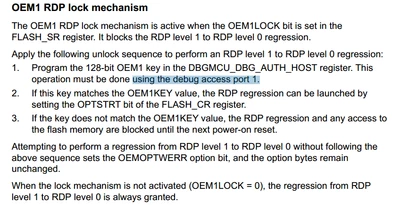
Now I am trying to make the regression from level 1 to level 0 according to the user manual description [section: 3.5.1 FLASH read protection (RDP)].
Akhil0812_1-1757927296932.png


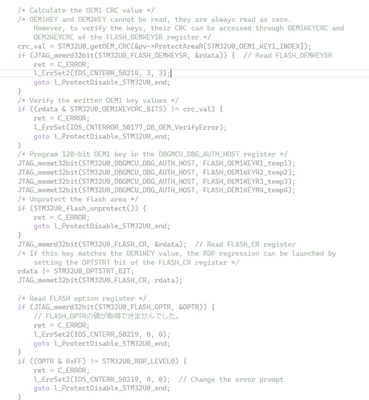
But the operation was failed using my source code. Which is attached below

#define STM32U0_DBGMCU_BASE 0x40015800 // Accessible to the software via the APB access port AP0
#define STM32U0_DBGMCU_DBG_AUTH_HOST (STM32U0_DBGMCU_BASE + 0x100) // Debug authentication mailbox host register
 

Akhil0812_0-1757927087750.png

Could you please clarify the following doubts,
1. The unlock sequence says, debug access port 1 has to be used for programming the 128-bit OEM1 key in the DBGMCU_DBG_AUTH_HOST register,

Akhil0812_2-1757927466101.png

but when I checked the  DBGMCU_DBG_AUTH_HOST register base, it says

Akhil0812_3-1757927536810.png

So, what is the base address for DBGMCU_DBG_AUTH_HOST register and which AP should be selected during OEM key write process.
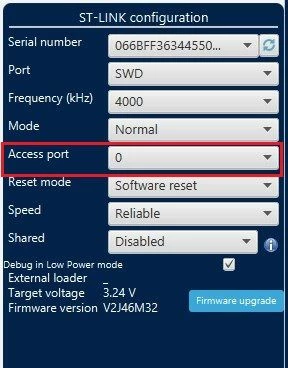
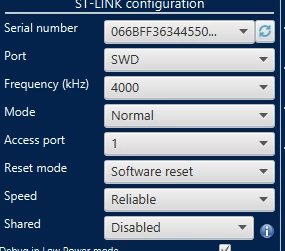
2. After connecting the target from the following settings via STM32 Cube programmer. I have tried to change RDP level using secure programming page.
Akhil0812_4-1757927751537.jpeg

Akhil0812_5-1757927905055.png

Akhil0812_6-1757927970665.jpeg

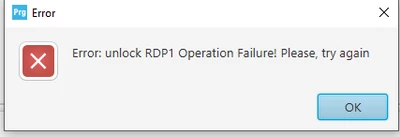
What could be the reason behind this?
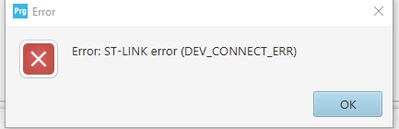
3. If I select the AP to 1, target connection is not feasible and the following error prompt was occurred.
Akhil0812_7-1757928267747.png

Akhil0812_8-1757928275201.png


Right now the flash memory is not accessible, please let me know how can I recover from this issue.

Thanks
Akhil


8 replies

Bubbles
ST Employee
September 16, 2025

Hi @Akhil0812,

I believe the problem is setting 'Mode: Normal'. Normal mode is indented for normal debugging. For regression, the connection mode should be 'Under reset'. This way the code is not executed and regression can proceed.

BR,

J

To give better visibility on the answered topics, please click on Accept as Solution on the reply which solved your issue or answered your question.
Akhil0812Author
Associate II
September 16, 2025

I had tried this method, but didn't work. In both cases, the error was same.

Andrew Neil
Super User
September 17, 2025

@Akhil0812 wrote:

I had tried this method, but didn't work. 


So why have you marked it as The Solution?

Instructions to un-mark it here.

A complex system that works is invariably found to have evolved from a simple system that worked.A complex system designed from scratch never works and cannot be patched up to make it work.
Bubbles
ST Employee
September 17, 2025

Did you try regression.bat (or regression.sh) from the Cube package?

To give better visibility on the answered topics, please click on Accept as Solution on the reply which solved your issue or answered your question.
Akhil0812Author
Associate II
September 17, 2025

1. Yes, I had tried this, but it didn't work. Probably the reason is the OEM1 lock bit.
May I know, is there any way to execute the similar .bat file, which supports with user password?
Following was the result of the execution,

OPTION BYTE PROGRAMMING VERIFICATION:

Error: Expected value for Option Byte "rdp": 0xAA, found: 0xBB
Error: Option Byte Programming failed Or modified by application after OB_LAUNCH

2. And I have tried to make the RDP regression according to the steps mentioned in the  UM2237 User manual,

Akhil0812_0-1758102358722.png

and the result is as follows,
Upon connecting to the target, the RDP level was recorded as 0. Subsequently, when I attempted to modify the OB RDP level to 0xAA immediately after writing the OEM1 key, the following error was observed.

Akhil0812_3-1758103403052.png


Akhil0812_1-1758103350414.png

Akhil0812_2-1758103379404.png


Akhil0812Author
Associate II
September 17, 2025

It was clicked by accident; I appreciate the link. I have marked it as unsolved.

Visitor II
October 3, 2025

This is also not working for me either. I have also tried "under reset" as well. I have not found a solution yet.

Visitor II
October 22, 2025

This process does work using the STM32Cubeprogrammer when all 4 32bit password fields are set the same value example 0x12345678. Note after the Unlock RDP1 and then applying OPTSTRT. The target processor is Disconnect and reconnect with Access port 0. The RDP can then be set to AA. If the password fields have different value the regression fails. Is there issue with the STM32Cube Programmer RDP Level 1 Unlock RDP1 process. 

Graduate
November 13, 2025

Hi ST team,

I'm facing the exact same problem with the same microcontroller (STM32U073MBT6)
The behavior is the same using CLI, all tools being updated to latest version.

Additionally, after clicking "Unlock RDP1", I notice that the field "The OEM1 lock mechanism is" says "not active" when connection via access port 1 but "active" through access port 0! In both cases, regression from BB to AA via OB window always leads to the same error ("Option byte programming failed Or modified by application after OB_LAUNCH"). And the application does NOT change anything regarding the OB.

The different documentations are not consistent. And the scripts given in UM2237 Rev 28, §3.2.31 don't work either.

Could ST provide quickly a feedback regarding this issue?

Many thanks!

Jocelyn RICARD
ST Employee
November 13, 2025

Hello,


I made a test on a Nucleo U083RC.

It looks like you need to use ap=1 to provide the key.

Then to set RDP=0xAA, you need to use ap=0

Providing the password:. Here ap=0 and ap=1 both work

C:\Program Files\STMicroelectronics\STM32Cube\STM32CubeProgrammer\bin>STM32_Programmer_CLI.exe -c port=SWD mode=HOTPLUG ap=0 -lockRDP1 0x12345678 0x12345678 0x12345678 0x12345678
 -------------------------------------------------------------------
 STM32CubeProgrammer v2.20.0
 -------------------------------------------------------------------

ST-LINK SN : 066FFF373857343143073059
ST-LINK FW : V2J46M31
Board : NUCLEO-U083RC
Voltage : 3.23V
SWD freq : 4000 KHz
Connect mode: Hot Plug
Reset mode : Software reset
Device ID : 0x489
Revision ID : Rev A
Device name : STM32U0xx
Flash size : 256 KBytes (default)
Device type : MCU
Device CPU : Cortex-M0+
BL Version : 0xD0
Debug in Low Power mode enabled


Lock RDP1 password successfully done

Set RDP=0xBB:

C:\Program Files\STMicroelectronics\STM32Cube\STM32CubeProgrammer\bin>STM32_Programmer_CLI.exe -c port=SWD mode=HOTPLUG -ob RDP=0xBB
 -------------------------------------------------------------------
 STM32CubeProgrammer v2.20.0
 -------------------------------------------------------------------

ST-LINK SN : 066FFF373857343143073059
ST-LINK FW : V2J46M31
Board : NUCLEO-U083RC
Voltage : 3.23V
SWD freq : 4000 KHz
Connect mode: Hot Plug
Reset mode : Software reset
Device ID : 0x489
Revision ID : Rev A
Device name : STM32U0xx
Flash size : 256 KBytes (default)
Device type : MCU
Device CPU : Cortex-M0+
BL Version : 0xD0
Debug in Low Power mode enabled


UPLOADING OPTION BYTES DATA ...

 Bank : 0x00
 Address : 0x40022020
 Size : 100 Bytes

██████████████████████████████████████████████████ 100%


PROGRAMMING OPTION BYTES AREA ...

 Bank : 0x00
 Address : 0x40022020
 Size : 100 Bytes

██████████████████████████████████████████████████ 100%


Reconnecting...
Reconnected !


UPLOADING OPTION BYTES DATA ...

 Bank : 0x00
 Address : 0x40022020
 Size : 100 Bytes

██████████████████████████████████████████████████ 100%

OPTION BYTE PROGRAMMING VERIFICATION:

Option Bytes successfully programmed
Time elapsed during option Bytes configuration: 00:00:02.215


RDP 1 unlock with ap=1:

C:\Program Files\STMicroelectronics\STM32Cube\STM32CubeProgrammer\bin>STM32_Programmer_CLI.exe -c port=SWD mode=HOTPLUG ap=1 -unlockRDP1 0x12345678 0x12345678 0x12345678 0x12345678
 -------------------------------------------------------------------
 STM32CubeProgrammer v2.20.0
 -------------------------------------------------------------------

ST-LINK SN : 066FFF373857343143073059
ST-LINK FW : V2J46M31
Board : NUCLEO-U083RC
Voltage : 3.23V
SWD freq : 4000 KHz
Connect mode: Hot Plug
Reset mode : Software reset
Device ID : 0x489
Revision ID : Rev A
ST-LINK SN : 066FFF373857343143073059
ST-LINK FW : V2J46M31
Board : NUCLEO-U083RC
Voltage : 3.23V

Unlock RDP1 password successfully done
SWD freq : 1800 KHz
Connect mode: Hot Plug
Reset mode : Software reset
Device ID : 0x489
Revision ID : Rev A
Device name : STM32U0xx
Flash size : 256 KBytes (default)
Device type : MCU
Device CPU : Cortex-M0+
BL Version : 0x0
Debug in Low Power mode enabled


Regression with ap=0 or without specifying ap:

STM32_Programmer_CLI.exe -c port=SWD mode=HOTPLUG -ob RDP=0xAA
 -------------------------------------------------------------------
 STM32CubeProgrammer v2.20.0
 -------------------------------------------------------------------

ST-LINK SN : 066FFF373857343143073059
ST-LINK FW : V2J46M31
Board : NUCLEO-U083RC
Voltage : 3.23V
SWD freq : 4000 KHz
Connect mode: Hot Plug
Reset mode : Software reset
Device ID : 0x489
Revision ID : Rev A
Device name : STM32U0xx
Flash size : 256 KBytes (default)
Device type : MCU
Device CPU : Cortex-M0+
BL Version : 0xD0
Debug in Low Power mode enabled


UPLOADING OPTION BYTES DATA ...

 Bank : 0x00
 Address : 0x40022020
 Size : 100 Bytes

██████████████████████████████████████████████████ 100%


PROGRAMMING OPTION BYTES AREA ...

 Bank : 0x00
 Address : 0x40022020
 Size : 100 Bytes

██████████████████████████████████████████████████ 100%


Reconnecting...
Reconnected !


UPLOADING OPTION BYTES DATA ...

 Bank : 0x00
 Address : 0x40022020
 Size : 100 Bytes

██████████████████████████████████████████████████ 100%

OPTION BYTE PROGRAMMING VERIFICATION:

Option Bytes successfully programmed
Time elapsed during option Bytes configuration: 00:00:02.222


I hope this will help

 Best regards

Jocelyn


Graduate
November 14, 2025

Many thanks Jocelyn for the quick feedback!

On a new board, following the steps you described is so far OK. Back at level 0, I can neither flash nor erase the board any more, even though I see "RDP=AA", "OEM1 lock not active" and the memory contents can be read out normally. Can you reproduce this on the Nucleo? This is not systematic, it also works sometimes!

Other thoughts:

- At step 3 (RDP 1 unlock with ap=1), provisioning a wrong password yields "Unlock RDP1 password successfully done". Is this normal?

- Repeating step 1 (Providing the password) to a board with "RDP=BB" also seems to work! I'd expect an error in this case. Is this normal?

- Changing level may fail (even though I executed several time the exact same script), in this case RDP=0, which seems to indicate an option byte corruption. Is there any way to save the board in this case?

The whole thing looks rather unstable to me. Does ST have for example a kind of unit test with a batch repeating the whole process (flash / verify / set PW / set RDP1 / unlock / set RDP0 / read / re-flash, etc.) ?

Thanks again!

Visitor II
November 17, 2025

Using the STM32CubeProgrammer v2.20.0 targeting the STM32U031 RDP 1 unlock with ap=1 with wrong password states command successful. Does not seem differential between correct and incorrect password.

The unlock sequence does work with correct password and applying OPTSRT.

Then disconnecting and reconnecting using Access port 0 then setting to RDP=0 "AA".

The problem relating to this is the password.

If a use for example a password of 0xAA55AA55, 0xAA55AA55, 0xAA55AA55, 0xAA55AA55 or

0x11111111, 0x22222222, 0x33333333, 0x44444444 can be unlocked successfully.

However using a more varied password 0x436F6465, 0x20456E74, 0x72207938, 0x36382031 it will not unlock successfully. I have not inspected the SWD output to determine if the password is set correctly and matching the entered password. 


Jocelyn RICARD
ST Employee
November 24, 2025

Hello,

I made one more test. What I could see:

You need to use ap=1 in the command only to provide the password when device is in RDP1.

If you use ap=1 to set the password, programmer returns ok but password is not actually set.

So, when changing the password, I would suggest first disabling the password (I used GUI Disable password) and then provide new password. You can then double check password is active with same GUI.

I didn't have issue flashing the target after regression.

I used the GPIO toggle example to check firmware was running find. So, after setting RDP1, I power on reset the board to make the led blink again.

Then I provide the password with ap=1, then -ob RDP=0xAA on another command line.

Never had any issue.

The result of -unlockRDP will always be success. You can only check password provide is the good one by performing the regression. If it works it means password was ok

Best regards

Jocelyn
