

TDJ
Senior III
March 2, 2024
Solved

Secure firmware updates from USB Stick on STM32U5 - how to? (2)

  • March 2, 2024
  • 10 replies
  • 6492 views

@Guillaume K@Jocelyn RICARD 
Since my previous question on the same topic (see here) I have reviewed probably all the MCUboot/TF-M-based solutions available for ST MCUs. There are currently four options that I am aware of:

  1. TrustedFirmware-M (TF-M) using the latest MCUboot, implements well-documented PSA-API, actively developed and maintained by community.
    Regretfully, this solution appears to be no longer actively supported by ST, STM32U5xx HAL version is 1.0, so no support for new ST MCUs.
  2. ST's TFM, described in AN5447 and UM2851, still available as a part of the STM32Cube_FW_U5_V1.4.0 package under /Projects/B-U585I-IOT02A/Applications/TFM folder, probably abandoned, removed from GitHub for this reason.
  3. Secure Boot and Secure Firmware Update (SBSFU), described in UM2262 and partially in AN5447, STM32U5G9 supported, based on relatively old TF-M 1.3 (current version is 2.0, version 2.1 to be released in 3 wks).
  4. X-Cube-Azure example aimed at B-U585I-IOT02A board, no STM32U5G9xx support yet but STM32U5A9xx seems to be handled, based on TF-M 1.3, there are many important updates since then - e.g. MCUboot upgrade to v2.0.0, see release history.

What I need to implement is a very typical real-live scenario - a device (let's imagine it is a fancy coffee machine) based on STM32U5G9 MCU which will be periodically updated by a qualified service technician from USB stick (Y-modem etc. is not considered a modern/convenient hence acceptable solution). Therefore, only the boot loader and the USB Local Loader apps require 100% secure updates (two slots) since any update failure would brick the device. As long as Local Loader is healthy, failure to update the Main App is not a problem, another attempt, e.g. using another USB stick can be easily made.

On the contrary, the Main App, which will be loaded from USB stick by Local Loader and updated the most frequently, does not require primary/secondary slot since the ability to utilize the maximize remaining flash area is way more important.

Needless to say, the Main App image has to be encrypted and signed thus Local Loader needs to be able to verify the signature of the firmware image temporarily placed in SRAM and decrypt it. I do not mind if Secure FW or Local Loader update wipes out the Main App - probably it will have to be updated anyway. Likely Main App image will have to be compressed before it is encrypted and delivered and then decrypted because otherwise it may not fit into available SRAM, unless decryption is done on-the-fly but this is less of the problem.

Conceptually, what I described above is Trusted Client scenario, defined in PSA-API, section 3.3.3.

I am afraid that only the first solution listed above (TrustedFirmware-M) guarantees that recent fixes and security updates can be quickly applied. The only downside is that probably I will have to update HAL to a recent version myself and maintain it. I already know it is not a simple task since among STM32U5xx MCUs only STM32U585 is supported and many things are hardcoded.

  1. Is it possible to implement the above-described scenario with SBSFU? Although SBSFU does not incorporate the latest TF-M and MCUboot versions, it may be the quickest way forward since SBSFU receives current ST updates the most frequently.
  2. Is there any chance SBSFU will be updated to a new TF-M version soon or ST will truly support current TrustedFirmware-M (TF-M) solution? It seems that today the choice is between either new MCUs and old TF-M or new TF-M but no recent MCUs.

Please comment/advise.
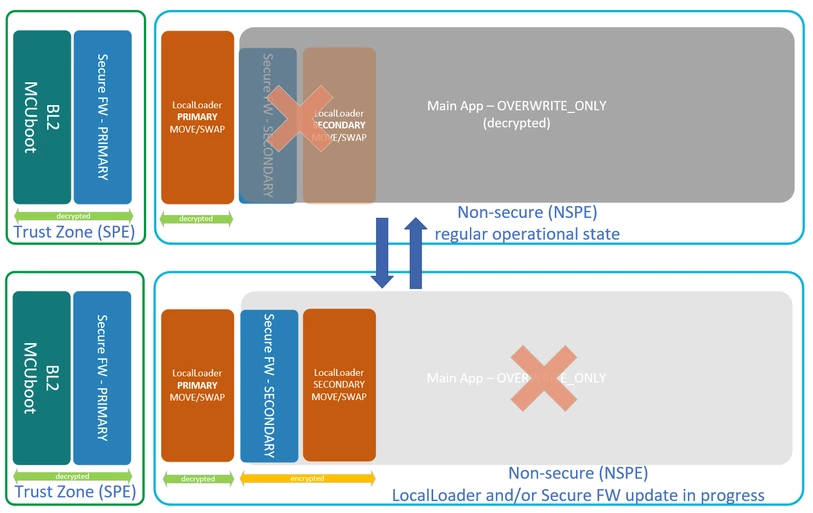
TDJ_0-1709465597599.png

This topic has been closed for replies.
Best answer by Jocelyn RICARD

Hello @TDJ ,

the secureboot solution we propose is based on the mcuboot version used in TFM 1.3, which starts to be old I agree.

This version is certified PSA-L3 and SESIP L3. This means that it is robust to board level (glitch attack). This could be obtains thanks to the adaptation made by ST to make mcuboot robust enough on the STM32U5. What is maintained by ST is this adaptation regardless of the further evolutions made inside mcuboot. I guess you can imagine the time and money needed to analyze the code, implement the necessary countermeasure to possible attacks, have all this certified. We are not here in a "feature" environment where you want to get latest evolution but rather in a controlled environment where we don't add new features if they are not needed.

You can check the history of mcuboot changes here  https://github.com/mcu-tools/mcuboot.git

The mcuboot version that was adapted is the 1.7.2

All this to say that if you need a robust sercure boot you can use the SBSFU solutioni provided in the cube:

https://github.com/STMicroelectronics/STM32CubeU5/tree/main/Projects/B-U585I-IOT02A/Applications/SBSFU

You will see it can be adapted to your target STM32U5 because all derivatives are supported (check readme.md).

For me this is the best secure boot solution you will get.

Best regards

Jocelyn

10 replies

Jocelyn RICARD
Jocelyn RICARDBest answer
ST Employee
March 4, 2024

Hello @TDJ ,

the secureboot solution we propose is based on the mcuboot version used in TFM 1.3, which starts to be old I agree.

This version is certified PSA-L3 and SESIP L3. This means that it is robust to board level (glitch attack). This could be obtains thanks to the adaptation made by ST to make mcuboot robust enough on the STM32U5. What is maintained by ST is this adaptation regardless of the further evolutions made inside mcuboot. I guess you can imagine the time and money needed to analyze the code, implement the necessary countermeasure to possible attacks, have all this certified. We are not here in a "feature" environment where you want to get latest evolution but rather in a controlled environment where we don't add new features if they are not needed.

You can check the history of mcuboot changes here  https://github.com/mcu-tools/mcuboot.git

The mcuboot version that was adapted is the 1.7.2

All this to say that if you need a robust sercure boot you can use the SBSFU solutioni provided in the cube:

https://github.com/STMicroelectronics/STM32CubeU5/tree/main/Projects/B-U585I-IOT02A/Applications/SBSFU

You will see it can be adapted to your target STM32U5 because all derivatives are supported (check readme.md).

For me this is the best secure boot solution you will get.

Best regards

Jocelyn

TDJ
TDJAuthor
Senior III
March 5, 2024

Hi @Jocelyn RICARD, Thank you, I see your point. I can only say that more transparency on STs' part like publicly available software product roadmaps would probably help to eliminate at least some of the wasted time and frustration that inevitably comes with software engineering, especially when it comes to new ST MCUs.

Jocelyn RICARD
ST Employee
March 6, 2024

Hello @TDJ ,

I gave you my advise from information you shared. From my understanding you don't need TFM, just a secure boot. If you don't use TFM services you have at least 400KB of flash that will never be used.

Besides, I don't understand your statement: " I prefer to have MCUboot as a separate image and the rest of the secure firmware updatable."

MCUBoot image is always a standalone image. This is a secure boot whatever the way you build it.

Best regards

Jocelyn

TDJ
TDJAuthor
Senior III
March 6, 2024

Hi @Jocelyn RICARD, Unless I am missing something, SBSFU consists of two applications: secure and non-secure. At least this is what docs state all over the place. Only two images: bootloader combined with secure services running in trust-zone and the main non-secure user application.

By default, TrustedFirmware-M (TF-M) uses 3 images: MCUboot (BL2) which is NOT updatable (at least not easily), updatable secure services image (runs in TZ) and the main non-secure application image. Needless to say, ability to update secure services is a very nice feature. Ofc, I may never need it but if I do and it is not an option the product has a problem. It is all about risk mitigation (e.g. currently unknown vulnerabilities) and flexibility to add new features hard to foresee initially. The product hopefully will live for many years and will continue receiving software updates.

Since my first user application (local loader) needs to be able to at least verify signature of the image it downloads in order to early report new firmware problem to the user, I need TF-M secure services very much. Otherwise, I would have to use (and store) another set of keys etc. in non-trust zone. This simply is not an option.

Jocelyn RICARD
ST Employee
March 6, 2024

Hi @TDJ ,

I feel some misunderstanding. Let me explain.

SBSFU project provides:

1) One Secure boot project called SBSFU. It is the first application running after reset and is immutable. Cannot be updated in any way. This is the root of trust.

2) A secure application that is launched by SBSFU

3) A non secure application that is launched by secure application

The important part for secure boot is ONLY the SBSFU.

The secure application is already YOUR application. Secure application is responsible for configuring the security of the platform. So, it mainly setups the split of peripherals between secure and non secure.

Secure application can also offer secure services available from non secure application through a secure API. You have an example in the code.

Then once secure application had finished the initializations, it jumps to the non secure application.

Non secure application is the main application running.

SBSFU can update secure and non secure application. Depending on configuration, you can have one binary containing both secure and non secure for the update or you have one binary for secure and another one for non secure. In this last case, you can have a different key to authenticate secure and non secure. This could be useful if secure and non secure are not owned by same entity.

On top of this basic secureboot configuration, if you add TFM, then TFM completely replaces the secure application you had before. Non secure application will then be able to call secure API through PSA API defined by TFM.

In term of update by default, the mcuboot is setup so that you will update TFM and non secure application separately.

So, both solutions are very similar except with TFM you get secure services already implemented.

If you need TFM use it, if not use SBSFU solution.


Last point, the only entity able to verify the signature is the secure boot (mcuboot) because is owns the public key used for that. The loader that transfers the new update image in the flash has not this ability (or you duplicate the key but what for ?)


I hope this clarifies things

Best regards

Jocelyn


TDJ
TDJAuthor
Senior III
March 7, 2024

Hi @Jocelyn RICARD,

Thank you for this clarification. It did not immediately occurred to me that UM2262 publication describing SFSFU solution is probably very outdated. STM32U5, Cortex-M33 with TrustZone and MCUboot are not even mentioned.

Secure TF-M app I need exactly to be (e.g.) able to verify downloaded image signature from unsecure app without access to secure keys which, of course, cannot be exposed to unsecure app. Ability to handle scenarios like the one I described, best to my knowledge, is the very reason why countless hours have been spent to build TF-M solution, although it takes extra flash space and it is not just several kB. This is the area where SBSFU clearly falls short.

SBSFU solution deserves credit for being much easier to grasp, but TrustedFirmware-M (TF-M) has the functionality I need. Actually, way more than I need which, as you rightly pointed out, does not come free. ST's TFM solution was probably intended to bridge this gap. Too bad it appears to be abandoned.

Kind regards,

Tomasz

Jocelyn RICARD
ST Employee
March 11, 2024

Hello @TDJ ,

UM2262 Title is Getting Started with the X-CUBE-SBSFU STM32Cube Expansion Package. STM32U5 is not mentioned because this package does not target this chip. This is a ST solution.

The secure boot solution we support for STM32 using ARM Cortex-M33 is based on mcuboot.

Regarding your statement: 

"Secure TF-M app I need exactly to be (e.g.) able to verify downloaded image signature from unsecure app without access to secure keys which, of course, cannot be exposed to unsecure app"

TFM provides Firmware Update PSA API that helps with new firmware installation. But TFM has no capability to check your firmware. The only entity able to check a firmware is the secure boot. This is its main purpose.

Last point, TFM is no abandoned by ST. Latest TFM 2.0 runs in 3 CM33 based STM32 : STM32L5, STM32U5 and STM32H5. 

Best regards

Jocelyn


TDJ
TDJAuthor
Senior III
March 14, 2024

Hi @Jocelyn RICARD,

I admit, initially I was quite confused. There are at least two much different SBSFU solutions for U585I-IOT02A board and two TFM solutions (community/arm driven and ST's - the one just removed from Github).
Maybe community TFM is not abandoned by ST, but it is not actively supported. Probably it never worked. ST's common postbuild.sh and TFM_UPDATE.sh scripts had syntax errors. I reported it recently and it had been fixed thanks to Ahmad El Jouaid's help.

Following your advice, I gave SBSFU another chance and, all in all, it seems to me that the version available on Github here (vs the one available from "example builder" in CubeMX) is the best option to start with. CubeIDE solution shows only the needed files which makes it incredibly easier to analyze and understand how the solution works under the hood. Actually, it is not that complicated. I was even able to build it in VS Code, the only environment I use, with my favorite cppbuild tool. Not to mention that the full build took 25s vs ~5 min for the full TFM build.

"But TFM has no capability to check your firmware" - probably it is not exactly the case. Although I have not tested it yet, I believe it can be accomplished by calling psa_fwu_start() optionally followed by psa_fwu_write() function call if no PSA_ERROR_INVALID_SIGNATURE or any other error is returned.

Thank you,

Tomasz

Jocelyn RICARD
ST Employee
March 15, 2024

Hello @TDJ ,

great, good to see you found what you were looking for!

Regarding TFM capability to check the firmware this is something that can optionally be done using the PSA Firmware Update API. This API permits different implementations.

But TFM implementation leaves this stuff to the secure boot (bl2) only.

Best regards

Jocelyn

TDJ
TDJAuthor
Senior III
March 19, 2024

Hi @Jocelyn RICARD, perhaps the last update on this story.
1. I may need modified "TFM" - secure app with access to protected keys/secrets. Probably MCUboot can apply only one update strategy configured during compile time while I need two strategies - 2nd one for the main app. However, maybe MCUboot swap (with or without scratch) can be used for the first two images (each two slots) while so-called direct-xip mode could be used for the main app taking one slot only occupying the rest of the flash space. I can imagine this being possible, this would allow for the scenario I have in mind without too much extra effort and likely without using "TFM" at all or using it only to present boot status and progress - if this is some-how supported.
2. It seems that SBSFU solution has a bug immediately apparent after flashing the board which I described here.
3. The concept of SBSFU shell scripts updating other shell scripts using python scripts for that purpose perhaps could be reevaluated.

Thank you,

Tomasz

Jocelyn RICARD
ST Employee
March 19, 2024

Hello @TDJ ,

1. I'm sorry I don't understand what you mean.

2. This is expected behaviour. By default you need to add a wire on the board between 2 GPIOs to avoid this. This is to demonstrate the feature

3. The goal is to make things easy on the first run. You don't have to care about all the option byte configuration and downloading addresses etc. If you change the mapping all the scripts are updated and scripts are still working. From this you have a working starting point from which you can build your own solution, improving things your own way.

Regarding your remark a about regression here is what is written in readme.md:

<b>2. Initialize the device</b>

 Ensure the switch SW1 (BOOT0 pin) on B-U585I-IOT02A board is on position 0 to boot from Flash.

 Depending on your toolchain, execute regression script (relying on STM32CubeProgrammer CLI tool) to easily perform device initialization
in one shot:
```
 EWARM: SBSFU_Boot\EWARM\regression.bat
 MDK-ARM: SBSFU_Boot\MDK-ARM\regression.bat
 STM32CubeIDE: SBSFU_Boot\STM32CubeIDE\regression.sh

 It will work as long a you don't activate the BOOT_LOCK I think. On my side I've never had issue using it

Best regards

Jocelyn

TDJ
TDJAuthor
Senior III
March 19, 2024

@Jocelyn RICARD Thank you, apparently I have missed this README part about anti-tamper and CN3 pins 11 & 14. More descriptive message might be helpful. It seem that regression.sh script does not reset TZEN option bit. This probably is not a regression per se, but it would be nice if script could reset it - especially since this process is not straightforward. All in all this SFSFU app example quality is well above ST's average.

Jocelyn RICARD
ST Employee
March 20, 2024

Hi @TDJ ,

yes this true. You can update the script to set TZEN to 0.

Also, there are some resources available on this subject.

Main thing to know is that you need to go through RDP Level 1 with a code executing in non secure.

Also you need to make sure no OEM1Key was previously provisioned (Keys used for regression)

So, 2 ways;

1- you have a secure / non secure application running fine: switch to RDP Level 1 and then back to RDP Level 0 + TZEN=0

2- Force boot on system bootloader thanks to option bytes. Make sure you are running in bootloader after reset. Then same procedure: RDP1 / RDP 0 + TZEN=0

Best regards

Jocelyn

TDJ
TDJAuthor
Senior III
March 23, 2024

Hi @Jocelyn RICARD,
Back to my original question and solution I need to implement - see the revised/simplified version below.
The main difference of the solution I need compared to SBSFU is that my Secure Loader must be self-updatable, hence it needs to use two slots since any update failure will brick the device. It must also be able to update the Main App using in-place decryption, which I think can be accomplished with MCUboot using MCUBOOT_PRIMARY_ONLY/MCUBOOT_OVERWRITE_ONLY/MCUBOOT_ENC_IMAGES config.
Of course, MCUboot does not support mixed update strategies so my Secure Loader will only use MCUboot pieces to decrypt Main App image in-place.
Do you think this approach is feasible?

TDJ_1-1711234885179.png


Jocelyn RICARD
ST Employee
March 27, 2024

Hello @TDJ,

Your loader will be able to download your application but it does not have access to the key to decrypt it.

So, decryption in place of the application will be done by the mcuboot after loader has reset the target.

You need to implement specific mechanism to manage your loader update from mcuboot.

I'm not sure how it can be done the way you show it using mcuboot itself as it will be setup in primary only.

I don't have simple solution in mind for that. You would need a dual slot setting for the loader and single slot setting for the application which I don't think is possible in current mcuboot implementation but I don't know all the details ...

Best regards

Jocelyn


TDJ
TDJAuthor
Senior III
March 29, 2024

Hi @Jocelyn RICARD,

I think my "secure loader" app should be able to access MCUBoot keys since they are placed at well know location - see the output linker script image below. Am I missing something? If I do, then another set of keys/secrets have to be embedded with my "secure loader". It would not be a perfect solution, but it would be acceptable.
When it comes to "secure loader" app, I am on my own and I need to put it together from scratch however borrowing large parts of MCUboot, using ThreadX/UsbX/FileX and all the HW acceleration/security config from SBSFU, but probably it is a manageable task.

Kind regards,

Tomasz

TDJ_0-1711701471030.png


Jocelyn RICARD
ST Employee
March 29, 2024

Hi @TDJ ,

Your loader can have access to the keys in mcuboot if you don't enable the temporal isolation.

You will need to disable TFM_HDP_PROTECT_ENABLE flag to avoid the activation for this protection.

This means your loader and application will have access to the keys. For firmware authentication public key this is not a problem as long as it cannot be changed. But for firmware encryption private key,  this is less secure.

One improvement could be to set the HDP limit to your loader. This way all mcuboot + loader are protected when application runs.

Best regards

Jocelyn