
Associate III
April 5, 2024
Question

STM32F769I-DISCO Not able to flash and not able to erase full chip memory

  • April 5, 2024
  • 2 replies
  • 1832 views

Hi all,

I am using STM32F769I-DISCO Board 

IDE : 1.12.1

CubeMx : 6.10.0 

ST CUBE programer version 2.15.0

I am not able to flash, I am getting following error during flash,

I tried changing SWD freq and Connect mode: Under_reset 

Log output file: C:\Users\MQSTEC~1\AppData\Local\Temp\STM32CubeProgrammer_a11412.log
ST-LINK SN : 0673FF555551847167202052
ST-LINK FW : V2J43M28
Board : 32F769IDISCOVERY
Voltage : 3.22V
SWD freq : 4000 KHz
Connect mode: Under Reset
Reset mode : Hardware reset
Device ID : 0x451
Revision ID : Rev A
Device name : STM32F76x/STM32F77x
Flash size : 2 MBytes
Device type : MCU
Device CPU : Cortex-M7
BL Version : 0x93

Memory Programming ...
Opening and parsing file: ST-LINK_GDB_server_a11412.srec
File : ST-LINK_GDB_server_a11412.srec
Size : 2.11 MB
Address : 0x08000000

Erasing memory corresponding to segment 0:
Erasing internal memory sectors [0 6]
Error: failed to erase memory


Error: failed to erase memory
Encountered Error when opening C:\ST\STM32CubeIDE_1.12.0\STM32CubeIDE\plugins\com.st.stm32cube.ide.mcu.externaltools.cubeprogrammer.win32_2.0.600.202301161003\tools\bin\STM32_Programmer_CLI.exe
Error in STM32CubeProgrammer
Shutting down...
Exit.
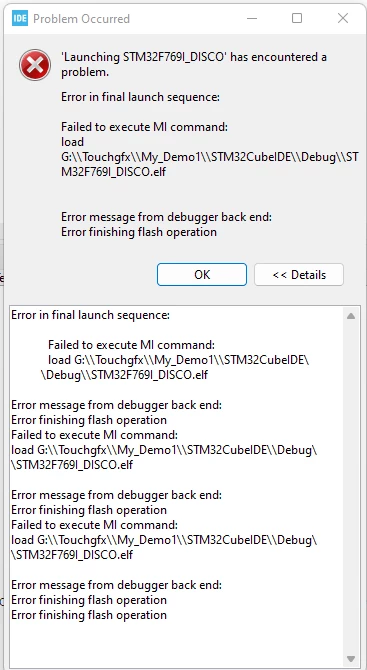
 flash protection4.png

I tried Erasing memory through STCubeProgrammer

I disabled flash protections RDP level 0Write protection disabled and nDBANK bit disabled but still not able to Erase full chip memory 

what's the state of my MCU I'm not getting how can I flash again please suggest..

@Jocelyn RICARD   @Peter BENSCH 

This topic has been closed for replies.

2 replies

Jocelyn RICARD
ST Employee
April 5, 2024

Hi @lavanya ,

You can use STM32CubeProgrammer directly to check what happens.

You can try a mass erase, sector erase, and check the flash content

Best regards

Jocelyn

lavanyaAuthor
Associate III
April 6, 2024

@Jocelyn RICARD Thank you for replay,

I tried with ST Cube Programmer but it didn't worked, later I tried with ST Utility, I Erased Chip memory. By setting option bytes

Now I am able to Flash the code. But MCU state is halted 

MCU_erase_1.png

-------------------------------------------------------------------
STM32CubeProgrammer v2.13.0
-------------------------------------------------------------------

Log output file: C:\Users\MQSTEC~1\AppData\Local\Temp\STM32CubeProgrammer_a11792.log
ST-LINK SN : 0673FF555551847167202052
ST-LINK FW : V2J43M28
Board : 32F769IDISCOVERY
Voltage : 3.22V
SWD freq : 4000 KHz
Connect mode: Under Reset
Reset mode : Hardware reset
Device ID : 0x451
Revision ID : Rev A
Device name : STM32F76x/STM32F77x
Flash size : 2 MBytes
Device type : MCU
Device CPU : Cortex-M7
BL Version : 0x93

Memory Programming ...
Opening and parsing file: ST-LINK_GDB_server_a11792.srec
File : ST-LINK_GDB_server_a11792.srec
Size : 4.54 KB
Address : 0x08000000

Erasing memory corresponding to segment 0:
Erasing internal memory sector 0
Download in Progress:

File download complete
Time elapsed during download operation: 00:00:00.357

Verifying ...

Download verified successfully

Shutting down...
Exit.

But code is not executing, I tried debug but 

MCU_debug.pngMCU_DEBUG1.png 

After flash I connected again to ST Utility to check MCU state.

MCU_Core_halt.png

PC should point to 0x80000000 it is pointing to some other address, How can i set it back ?

@Tesla DeLorean 

Tesla DeLorean
Guru
April 5, 2024

What were you doing immediately prior to this failure?

Are you connected to other external circuitry? Shorted the board out on a conductive surface?

Might have been electrically damaged, or an issue with the power supply / regulators.

Try a different board, perhaps different USB cable / port.

Tips, Buy me a coffee, or three.. PayPal VenmoUp vote any posts that you find helpful, it shows what's working..
lavanyaAuthor
Associate III
April 6, 2024

Hi @Tesla DeLorean, Thank for your replay,

a month ago, I was working on SBSFU Secure bootloader, I tried examples code given from SBSFU latest Package(v 2.6.2) 

it was working properly,

I didn't connected any external circuitry

Shorted the board out on a conductive surface? --> NO

power supply / regulators.--------------------------------> Checked Supply No issue with it.

Try a different board --------------------------------------->I have only one board.

perhaps different USB cable / port.--------------------->I tried, No use :(.

Frantz LEFRERE
ST Employee
April 8, 2024

Hi @lavanya ,

please check the option byte configuration to check which boot mode is activated and what is the boot address.
Br,

Frantz