

SMoon.2
Associate III
October 8, 2024
Solved

STM32H750 External Flash Read Protect

  • October 8, 2024
  • 2 replies
  • 1280 views

Working on setting RDP (read out protection) on STM32H750.  We are using an external loader to be able to read from/write to external flash. The internal flash only contains a bootloader.

1. Setting RDP to Level 1 doesn't prevent reading external flash. Is there a way to enable protection for external flash?

2. Setting to Level 1 and then reverting to Level 0 deletes the internal flash (bootloader).  Is there a way to extend this functionality to external flash?  
Best answer by mƎALLEm

Hello,

RDP is a feature exclusively for internal Flash.

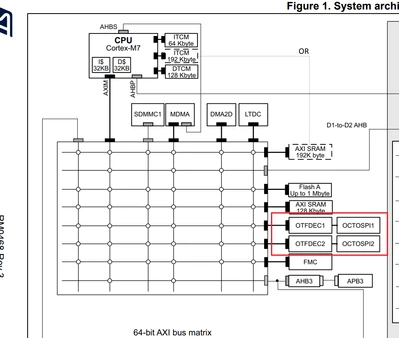
There is no mechanism to protect the external Flash for this device. Meanwhile, STM32H723/733 devices feature 

OTFDEC (On-The-Fly decryption engine) for OCTOSPI memories which allows to decrypt on-the-fly AXI traffic based on the read request address information.

SofLit_0-1728403296997.png

You can refer to RM0468 / Section  42 On-The-Fly decryption engine - AXI (OTFDEC)


2 replies

Tesla DeLorean
Guru
October 8, 2024

No

The content can be encrypted at rest, and you can move to RAM to execute, or pick the H7xx parts with 2MB of internal FLASH on die that's tested.

There are other parts in the H7 family supporting OCTOSPI, and encryption-on-the-fly, to protect/obfuscate the content of the external memory.

Tips, Buy me a coffee, or three.. PayPal VenmoUp vote any posts that you find helpful, it shows what's working..
mƎALLEm
mƎALLEmBest answer
Technical Moderator
October 8, 2024

Hello,

RDP is a feature exclusively for internal Flash.

There is no mechanism to protect the external Flash for this device. Meanwhile, STM32H723/733 devices feature 

OTFDEC (On-The-Fly decryption engine) for OCTOSPI memories which allows to decrypt on-the-fly AXI traffic based on the read request address information.

SofLit_0-1728403296997.png

You can refer to RM0468 / Section  42 On-The-Fly decryption engine - AXI (OTFDEC)


"To give better visibility on the answered topics, please click on ""Accept as Solution"" on the reply which solved your issue or answered your question."