
STM32N6 OEMuRoT modify postbuild.sh to work with CMake application
Hello,
I am having some trouble attempting to use the OEMuRoT tools/scripts to sign and encrypt my custom application built with CMake/Ninja. Application was generated using CubeMX and CMake project type was selected. Windows 11, STM32CubeProgrammer v2.19.0, though I am using Git Bash to run the scripts as I notice that e.g. there is a postbuild.sh but no postbuild.bat. I am using the -DK Discovery Kit eval board.
I copied C:\Users\myuser\STM32Cube\Repository\STM32Cube_FW_N6_V1.1.1\Projects\STM32N6570-DK\Applications\ROT\OEMuROT_Appli\STM32CubeIDE\postbuild.sh into my application folder.
I modified env.sh so that the oemurot_appli_path_project uses a relative path to my application folder:
oemurot_boot_path_project=Applications/ROT/OEMuROT_Boot
oemurot_appli_path_project=../../../../../../_hmnhwi/customer/my_customer/this_project/workspace/my_application
Then I modified the postbuild.sh script in my application so that the path to the provisioning directory is correct, with relative pathing:
cd "$project_dir/../../../../../../STM32Cube/Repository/STM32Cube_FW_N6_V1.1.1/Projects/STM32N6570-DK/ROT_Provisioning"
...
#bin_dest_dir=../../../$oemurot_appli_path_project/Binary
bin_dest_dir=$oemurot_appli_path_project/Binary
I also manually created the folder structure that is expected to be compliant, as described in "How to adapt a user application to ROT for STM32N6" and modified the bin_dest_dir path to go to the /Binary/ folder in there. I.e. I created a folder STM32CubeIDE and copied the linker script into it, and created an empty /Binary/ folder, both folders in the root of my application folder
I believe the path from the OEMuRoT_S_Code_Init_Image.xml file, relative to my Binary/ folder where rot_tz_s_app.bin is located, is correct. So postbuild.sh modifies the .xml file correctly. But when it gets to the step of invoking the CLI tool for TrustedPackageCreator, it errors out with the following:
 -------------------------------------------------------------------
 STM32 Trusted Package Creator v2.19.0
 -------------------------------------------------------------------

-pb C:/Users/my_user/STM32Cube/Repository/STM32Cube_FW_N6_V1.1.1/Projects/STM32N6570-DK/ROT_Provisioning/OEMuROT/Images/OEMuROT_S_Code_Init_Image.xml

Error: Fail to Generate Image

Imgtool :: Input file not found
Would anybody have any tips or hints on how I might go about fixing the issue? Thank you for any guidance that can be provided!
I am not currently using STM32CubeIDE to develop my application as my team is attempting to standardize on CMake-based projects. If it is strongly recommended to use CubeIDE to ease the integration of OEMuRoT and our application, then I maybe can talk to my manager and our client about switching back to CubeIDE...
P.S. I have also considered trying to use the GUI for TrustedPackageCreator and manually creating a signed and encrypted binary. However, the dropdown list of MCUs for both SFI/SFIx do not show the STM32N6 part.
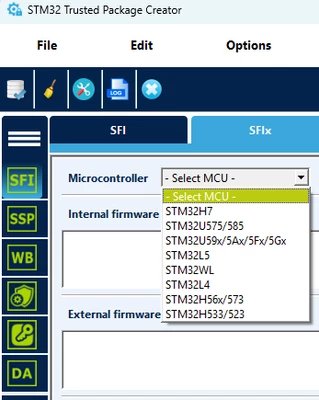
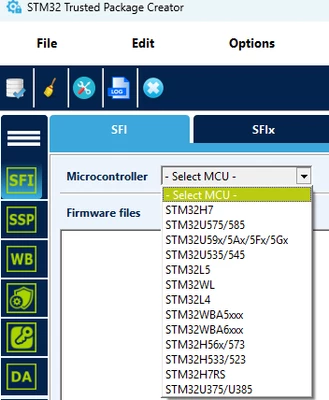
Based on this forum post I also tried to look in STM32CubeProgrammer. However, the SFI/SFIx tab is grayed out, even if connected to the on-board ST-Link.
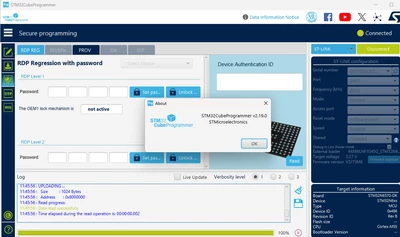
I have confirmed I am using the latest version of STM32CubeProgrammer by checking that the Release Note on the download page on ST's website is showing v2.19.0.
Thanks again.