Solved
STSAFE-A110 how to enter Hibernate
board: stm32U585 + stsafe-a110
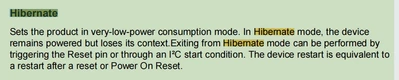
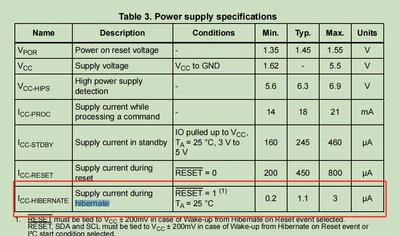
before the stm32u585 enter the low power mode ,I want to set stsafe-a110 enter the low power consumpion mode.
I can't find the methods to enter Hibernate

board: stm32U585 + stsafe-a110
before the stm32u585 enter the low power mode ,I want to set stsafe-a110 enter the low power consumpion mode.
I can't find the methods to enter Hibernate
Hi
Thanks for your interest in STSAFE-A110 solution.
The X-CUBE-SAFEA1 package offer the StSafeA_Hibernate() function to set the STSAFE-A110 in low power.
Be aware that when you are setting the STSAFE-A in hibernate mode, you have to select the wake up condition.
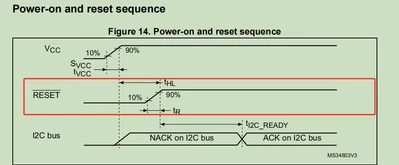
could be Reset pin only or (Reset pin or I2C Start condition)
In the case of wake up with I2C Start condition, be aware that any I2C communicate on the I2C bus will wake up the STSAFE-A.
To use the Reset pin, you need of course a layout that supports it.
Best Regards,
Benjamin
Enter your E-mail address. We'll send you an e-mail with instructions to reset your password.