
Associate III
July 25, 2024
Solved

TFM application loops in the terminal emulator instead of starting

  • July 25, 2024
  • 1 reply
  • 813 views

Hello,

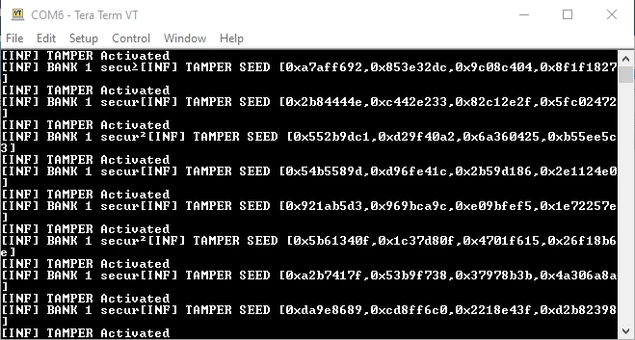
I followed the instructions provided in the UM2851 to run the TFM application contained in the latest STM32CubeU5 1.6.0 Firmware projects folder, but the application does not run, it enters an infinite loop instead.
SedCore_0-1721922095968.png

Any help please?

@Jocelyn RICARD @Guillaume K 

Best answer by Jocelyn RICARD

Hello @SedCore,

Solution is in the readme file of the TFM:

STM32Cube_FW_U5_V1.6.0\Projects\B-U585I-IOT02A\Applications\TFM\readme.html

"Additionally, the anti-tamper protection being enabled with active tamper pins usage by default, it is needed to connect TAMP_IN8 (PE4 on CN3 pin 11) and TAMP_OUT8 (PE5 on CN3 pin 14) on the B-U585I-IOT02A board, to allow the application to run. In case the tamper pins are opened or shorted, then the application is reset and blocked. It is however possible to disable the anti-tamper protection (refer to section 9)"


Best regards

Jocelyn

1 reply

Jocelyn RICARD
Jocelyn RICARDBest answer
ST Employee
July 25, 2024

Hello @SedCore,

Solution is in the readme file of the TFM:

STM32Cube_FW_U5_V1.6.0\Projects\B-U585I-IOT02A\Applications\TFM\readme.html

"Additionally, the anti-tamper protection being enabled with active tamper pins usage by default, it is needed to connect TAMP_IN8 (PE4 on CN3 pin 11) and TAMP_OUT8 (PE5 on CN3 pin 14) on the B-U585I-IOT02A board, to allow the application to run. In case the tamper pins are opened or shorted, then the application is reset and blocked. It is however possible to disable the anti-tamper protection (refer to section 9)"


Best regards

Jocelyn

SedCoreAuthor
Associate III
July 25, 2024

You are right, it worked. Thanks for your support.