

MCost.4
Associate II
May 20, 2024
Question

Trusted Firmware-M v2.1.0 - Bricked Nucleo-L552ZE-Q

  • May 20, 2024
  • 9 replies
  • 5979 views

Hello,

I followed this tutorial to add an example secure partition in TF-M ( https://tf-m-user-guide.trustedfirmware.org/integration_guide/services/tfm_secure_partition_addition.html ) and then followed these instructions to flash the application to my Nucleo-L552ZE-Q board ( https://tf-m-user-guide.trustedfirmware.org/platform/stm/common/stm32l5xx/readme.html ). However, the script regression.sh returned the error:


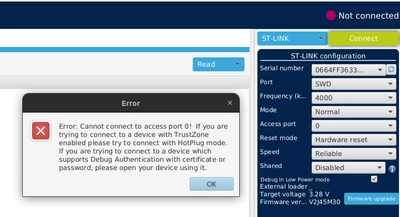
Error: Cannot connect to access port 0!
If you are trying to connect to a device with TrustZone enabled please try to connect with HotPlug mode.
If you are trying to connect to a device which supports Debug Authentication with certificate or password, please open your device using it.


After this, I am unable to connect my board STM32Cube Programmer or to flash any application using Keil MDK ARM, CubeIDE, etc. The same error is returned every time. Before I runned the regression.sh script, the board was working as expected and I was able to flash simple applications (non using TF-M) to the board. Does someone know how can I fix this problem? 

Here is the configuration I have in STM32Cube Programmer:
MCost4_0-1716225932046.png


9 replies

AScha.3
Super User
May 20, 2024

Hi,

try connect :

mode : under reset

reset : hardware

Then try to delete your "bad" settings, maybe full flash erase and set option bytes ...

"If you feel a post has answered your question, please click ""Accept as Solution""."
MCost.4
MCost.4Author
Associate II
May 20, 2024

Thanks for the quick reply. I still can not connect:

MCost4_0-1716227330971.png


AScha.3
Super User
May 20, 2024

It tells : try Hot plug mode...try.

And read rm about this trust zone settings ... before playing around with this. :)

"If you feel a post has answered your question, please click ""Accept as Solution""."
Jocelyn RICARD
ST Employee
May 21, 2024

Hello @MCost.4 ,

First, you may have issues running TFM on STM32L5 Nucleo as it is running on stm32l562e_dk

Also, the opeion "--hardRst" at line 24 of regression.sh script is not supported in latest version of STM32CubeProgrammer and associated calls are failing. So, please remove this option.

Also did you update the STLink firmware?

Best regards

Jocelyn

MCost.4
MCost.4Author
Associate II
May 21, 2024

Hello @Jocelyn RICARD 

As long as I know, the TF-M offers support for the Nucleo-L552ZE-Q platform. The TF-M filesystem have the files for the configuration of this platform under /platform/ext/target/stm/nucleo_l552ze_q and I have specified the platform in the cmake command that compiles my application: 

cmake .. -DTFM_PLATFORM=stm/nucleo_l552ze_q -DTFM_PARTITION_PRIVATE_ANN=ON -DCMAKE_BUILD_TYPE=Debug -DCONFIG_TFM_SPM_BACKEND=IPC -DTFM_TOOLCHAIN_FILE=../toolchain_GNUARM.cmake -G"Unix Makefiles"

 Regarding the second point, removing the option --hrdRst resulted in a different output.

With the option --hrdRst, the regression.sh script returns:

MCost4_0-1716313375148.png

Without --hrdRst, it returns:

MCost4_1-1716313527524.pngMCost4_2-1716313559906.png


Jocelyn RICARD
ST Employee
May 24, 2024

Hello @MCost.4 ,

well I'm afraid there is no solution to recover the board.

I will try to find time to have a look to this setup and understand what could have happen.

I would suggest next time to start your test by disabling the security protections activation in the secure boot to check everything is working fine. This will avoid the risk to brick your board.

Best regards

Jocelyn 


Jeff Tenney
Senior
May 25, 2024

@Jocelyn RICARD I can start a new thread if needed, but I just bricked a U585 IOT kit.  The last thing I remember doing is attempting a TZEN regression in CubeProgrammer. The ST-LINK can't connect over SWD anymore (various errors exactly like @MCost.4). So I figured I could use the BSL (or the secure BSL) so I set BOOT0 high (SW1) and reset. CubeProgrammer can't connect over UART and the U585 USB port doesn't enumerate -- no DFW devices.  It's as if the BSL isn't even running.  What could have happened?

I had been experimenting with TZEN, RDP Level 1, Mass Erase, SECWMx_PSTRT and SECWMx_PEND.  Is there any combination of those settings in any order that might have bricked the U585?  If so I may have done something in the wrong order, as I am experimenting.  I did successfully regress TZEN before, so I'm not sure how it could have gone wrong this time.

I am using the latest STLink fw V3J15M6 and also tried the STLink fw delivered with CubeProgrammer (V3J13M4) and have tried with and without disabling the STLink's MSC device.  Tried Hot Plug, Normal, Reset, etc. No luck.

Thank you.

Jocelyn RICARD
ST Employee
May 27, 2024

Hello @Jeff Tenney ,

What you need to understand is that one you have set RDP Level 1, you can only connect to the target with debugger if CPU runs in non secure state. And connection can only be in HOTPLUG mode.

As the Cortex-M33 boots in secure, you should have a secure code that could jump to non secure area.

In user flash it is easy to make a mistake and not being able to connect.

In this case, only way is to set BOOT0 to VDD to enable embedded system bootloader. In this case, Cortex-M33 boots in a system secure code that jumps to non secure bootloader.

If you cannot connect to system bootloader this could be related to option bytes settings:

The most likely is that nSWBoot0 is set to 0 meaning you don't use BOOT0 pin to decide to jump to bootloader but use nBoot0 option byte value. This nBoot0 should also be set to 0.

Another reason why you would not jump to system bootloader is the BOOT_LOCK option byte set.

One good practice when enabling with RDP Level 1 with TrustZone enabled is to check before:

1) That your firmware is running well and stays in non secure (A non secure firmware that constantly calls secure services can be difficult to connect)

2) Alternatively, that nSWBoot0 is set to 1. Even check before switching to RDP Leve l1 that you can enable bootloader by setting BOOT0 to VDD.

Best regards

Jocelyn

Jeff Tenney
Senior
May 27, 2024

@Jocelyn RICARD Thank you Jocelyn for those tips.

I can't connect to the system bootloader even after verifying that BOOT0 is set to VDD.  I have tried true power reset (pull JP3, wait, replace JP3) and also the reset pin (black button).  The system bootloader doesn't seem to be running.  That puts the blame squarely on option bytes, but I never changed nSWBoot0 nor BOOT_LOCK.  I was experimenting only with TZEN, RDP Level 1, SECWMx_PSTRT, and SECWMx_PEND, and I was using CubeProgrmmer to do it.  I think maybe this time I had tried setting RDP to level 1 first and then setting TZEN (not sure).  I believe the last thing I did was to use CubeProgrammer to revert TZEN and RDP together.  CubeProgrammer seemed to encounter some kind of error but I don't remember any specifics -- I got errors from CubeProgrammer regularly.

The application code I was experimenting with just before bricking the unit was a secure-only application.  It uses STOP modes heavily.  I wonder if the use of STOP modes cause connection issues with the STLink, and if CubeProgrammer misprogrammed the option bytes or left them in an inconsistent state as a result.

I would normally attempt to reproduce the error with a new IOT kit, but in this case the consequences are too permanent to support meaningful experimentation.

Jeff

Jocelyn RICARD
ST Employee
May 29, 2024

Hello @MCost.4 and @Jeff Tenney ,

I tried to reproduce your issue and couldn't brick my L5 Nucleo board.

What I can tell is that this --hardRst option must be removed from the script (line 24).

The consequence of this option is that at least 2nd and 3rd programmer commands will not work properly. 

I'm still not sure how it is possible to end-up in such situation. Normally RDP in all TFM configurations is not activated in development mode which is the default configuration. And as long as RDP is not enabled you should have issue (at least for the L5 case)

For STM32U5 case, if RDP is set the regression script will not do anything because it tries to connect under reset which is not possible once RDP is enabled. And other commands in hotplug mode have no impact when RDP Level 1 is set.

So I have no clue how you could end up in such situation

Best regards

Jocelyn


Jeff Tenney
Senior
May 29, 2024

Thank you @Jocelyn RICARD for the perspective.  It helps.

I will get another U585 IOT kit and carefully track each step I take.  If I brick it, then I'll have a record of the steps that cause it.

Jeff

Jeff Tenney
Senior
June 17, 2024

Hi @Jocelyn RICARD and @MCost.4 

I received another U585 IOT kit and did some experimenting.  It appears my specific issue is that CubeProgrammer does not handle low-power modes correctly.  Here's what it looks like after a hot-plug SWD connect to a target using low-power sleep:

JeffTenney_0-1718662610255.png

There are no error messages and no indication anything has gone wrong.  But the option bytes shown are not correct.  And the application on the U585 continues to run -- which is odd considering CubeProgrammer indicates it is "connected" to the U585.  I suspect in my experimenting a few weeks ago I didn't notice the problem and clicked "Apply" after making some minor change.  In fact I think I remember wanting to experiment with enabling TZ *after* setting RDP to level 1.  So I may have click the TZ check box and clicked "Apply".  Option bytes set this way would explain my having a bricked U585.

I would rather not try it again on my new kit ;), but I think this explanation is plausible.

Jocelyn RICARD
ST Employee
June 18, 2024

Hello @Jeff Tenney ,

I'm not sure what you wanted to achieve by enabling TZ after setting RDP Level 1. The usual sequence is to set TZEN, flash secure and non secure applications and then set RDP. You could flash secure and non secure and then set TZEN but RDP is always the last thing to change.

Now, the issue you see seems related to the connection setting in hotplug mode. I guess that with normal or under reset you get correct values of option bytes. So, to reproduce you have a software that switches to sleep mode without TZ enabled and you connect in hotplug. Right ?

Best regards

Jocelyn

Jeff Tenney
Senior
June 18, 2024

I'm not sure what you wanted to achieve by enabling TZ after setting RDP Level 1.

In a word, nothing. I'm not even on the product lifecycle yet. I'm just curious about how TZEN works and was experimenting.  But I can think we can safely ignore that part of the story as I am not very confident about precisely what I was doing when I bricked the unit.


I guess that with normal or under reset you get correct values of option bytes. So, to reproduce you have a software that switches to sleep mode without TZ enabled and you connect in hotplug. Right ?

Yes, immediately after a "normal" connect or an "under reset" connect, the option bytes are correct.  And yes, connecting in "hotplug" mode seems to be a primary culprit.  As in this example:

  1. Use CubeProgrammer to connect via SWD in "normal" mode.
  2. Set TZEN.  Click Send.
  3. Load an application that is secure only and that uses sleep mode heavily.
  4. Verify application runs (LED blinks).
  5. Next steps are working toward setting RDP to level 1.
  6. Use CubeProgrammer to connect via SWD in hotplug mode.
  7. (Notice CubeProgrammer didn't read correct option bytes but acts like it did.)
  8. Set RDP to level 1.
  9. Click Send.

I get to step 8 but am afraid to do step 9 in case CubeProgrammer actually does it.  Besides RDP, the option bytes are all zero, which (I think) would disable the TI BSL and brick the U585.

Here's a scenario without the use of hotplug:

  1. Load an application that is essentially security agnostic and that uses sleep mode heavily.  (This application runs with TZ disabled and it also runs secure only when TZ is enabled.)
  2. Verify application runs (LED blinks).
  3. Use CubeProgrammer to connect via SWD in "normal" mode.
  4. Set TZEN.  Click Send.  See the following errors:
    JeffTenney_0-1718729917272.png
    JeffTenney_1-1718729928851.png
  5. (Notice CubeProgrammer didn't read correct option bytes but remains connected and now shows all zeros for the option bytes.)
  6. Set RDP to level 1.
  7. Click Send.

Again I have not actually clicked send in this scenario in case CubeProgrammer actually does it.

Note that in all scenarios, the option to "debug in Low Power mode" is checked.

The primary issue seems to be this -- user applications that use low-power modes can really confuse CubeProgrammer.  When CubeProgrammer must allow the target to run (eg, during hotplug connect or OBL launch), the target might use low power and quietly break access to the option bytes and maybe more.  At this point I'm still only guessing that these issues allowed me to brick the 'U585.

@Jocelyn RICARD 

Jocelyn RICARD
ST Employee
June 19, 2024

Hello @Jeff Tenney ,

I tried to reproduce this behaviour.

I used SLEEP example  STM32Cube_FW_U5_V1.5.0\Projects\NUCLEO-U575ZI-Q\Examples\PWR\PWR_SLEEP\

It it blinking a LED for 5 seconds and then goes to SLEEP mode. You wake up with interrupt from user button of the Nucleo. LED blinks again 5 seconds and goes back to SLEEP.

Connecting to the target in Normal and Under reset, option bytes are visible. Connecting in HOTPLUG mode, option bytes are read to 0. This is not dependent on TZEN nor related to debug in low power mode as this only applies to STOP mode and probably STANDBY.

In hotplug the MCU is not stopped. So, to be able to read option bytes you need to go to CPU and press halt.

Reading again option bytes gives you right value.

In any case, for such scenario I would advise using connect under reset so that you make sure your device is not in SLEEP state when changing option bytes.

I tested TZEN transition which works fine.

Then set RDP Level 1. After a power-on reset the firmware runs as expected.

In this state, STM32CubeProgrammer cannot connect to the target because it stays in secure state.

To be able to regress the device you must ensure before setting RDP1 that when you connect BOOT0 to VDD, the MCU boots in the system bootloader. This can be checked using the CPU tab where PC should be at an address similar to 0xBF98462.

One you are sure you can switch to bootloader, you can enable RDP Level 1, using connect under reset !

If you want to disable TZ you need to do it at same time as RDP regression.

Best regards

Jocelyn


Jocelyn RICARD
ST Employee
June 19, 2024

Hello @Jeff Tenney ,

OK I get your point. With your application, as you use SLEEP state immediately after startup, the STM32CubeProgrammer is not able to reconnect after setting option bytes, probably because this is not an initial connection. This results in an error and option bytes are set to 0.

I will raise the point internally.


"That is good info -- but in this case the Option Bytes UI won't show the Secure Area 1 and Secure Area 2, even if it finds TZEN set to 1.  That isn't correct UI behavior."

When you are in RDP Level 1, you will never see secure related information. This is normal behavior.

This prevents from changing security related option bytes while being in RDP Level 1.

Best regards

Jocelyn


Jeff Tenney
Senior
June 19, 2024

When you are in RDP Level 1, you will never see secure related information. This is normal behavior.


I was on RDP Level 0.  I couldn't see the security related options because CubeProgrammer read the option bytes incorrectly during hotplug connect.  Halting the CPU and then getting a proper read of the option bytes does not make the security related option bytes appear, even though it probably should, because TZEN is 1.

Thanks again for all your help.