Dadigno
Associate III
February 29, 2024
Question

Blockcopy not called when fetching Extra Data in ExtFlashSection

  • February 29, 2024
  • 7 replies
  • 10719 views

I'm working on a custom STM32U5 board with TouchGFX. The board features an external NOR flash memory used for storing the ExtFlashSection (as documented here).

In my project testing, I aim to display a simple black and white image with a transparent area. Initially, I configured TouchGFX Designer to place both the "Section" and "Extra Section" within the internal flash (IntFlashSection), and everything functioned as expected. However, my application necessitates storing media files in the external memory.

To achieve this, I successfully linked the ExtFlashSection to the external NOR flash. Subsequently, I modified the positions of both the "Section" and "Extra Section" from IntFlashSection to ExtFlashSection.

Dadigno_8-1709215480676.png

after compilation this my external memory:

Dadigno_9-1709215673276.png

When running the code, a hard fault occurs. This is likely due to TouchGFX attempting to directly fetch data from external memory during the loading of the "Extra Section" data, instead of using the BlockCopy function.

This is the Trace:
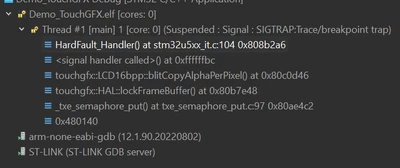
Dadigno_10-1709215803456.png

And these are the registers: 


Dadigno_11-1709215927063.png

I came across this post and suspected it might be related to a known TouchGFX bug. I decided to move only the extra data to the IntFlashSection, which initially resolved the issue. However, when I tried changing the background image from bg_1.png to bg_2.png, a hard fault occurred again....here there are trace and registers
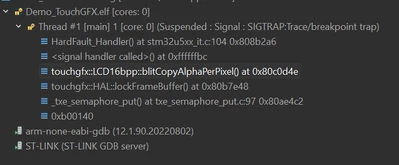
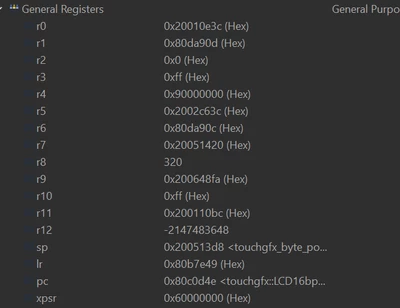
Dadigno_12-1709216891995.png

Dadigno_13-1709216917262.png

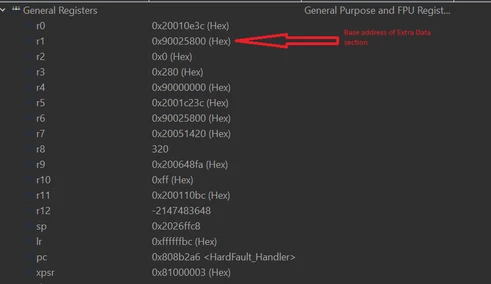
This time r1 is contains the base address for Extra Section of bg_2 in internal flash. So memory access should be ok....
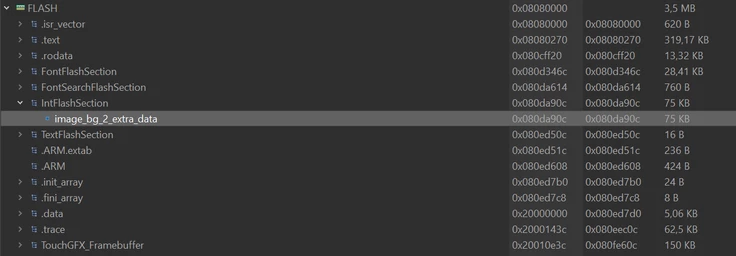
Dadigno_14-1709217178339.png

What is the difference between bg_1.png and bg_2.png that could be causing this problem?

I would appreciate any suggestions or hints to resolve my problem.

7 replies

GaetanGodart
Technical Moderator
March 5, 2024

Hello @Dadigno ,


From my understanding, SIGTRAP:Trace/breakpoint trap happens when the gdb (debugger used for embedded products) is not properly updated after using breakpoints.
Basically, you used breakpoints to debug your first problem which caused the current issue.

The solution seems to be to remove your breakpoints, disconnect the ST-Link, power off the board and reset everything.

If you restarted your computer from the time the issue happened it might have solved itself. 


Please tell me if your issue is solved.


Regards,

Dadigno
DadignoAuthor
Associate III
March 29, 2024

Hi Gaetan,

Thanks for your reply.

I understand that removing breakpoints isn't a solution since the application gets stuck even outside of debug mode.

I noticed a new release of TouchGFX (version 4.23.2) that includes a fix for "unaligned memory accesses" in cached bitmap data. This issue sounds similar to what I'm experiencing, so I'm planning to update to see if it resolves the problem.


GaetanGodart
Technical Moderator
April 2, 2024

Hello @Dadigno ,


I hope this new version fixes your problem.

I came to that conclusion based on some stackoverflow posts such as this one : stackoverflow post and this one : stackoverflow post 2 


Also, if you uses an image / media with transparency, you need to store the alpha value of that media, so RGB565 and RGB888 do not work, you need instead ARGB8888 or L8_ARGB8888 (if you use maximum 256 different colors).


Keep me updated!


Regards,

Tesla DeLorean
Guru
March 5, 2024

Probable that the External Memory is not memory-mapped properly at the time of the fault.

Check the configuration state of the QSPI. Unmapped memory will fault the processor

Tips, Buy me a coffee, or three.. PayPal VenmoUp vote any posts that you find helpful, it shows what's working..
Dadigno
DadignoAuthor
Associate III
March 29, 2024

Hi Tesla,

I'm trying to avoid memory-mapping my external memory. I've modified the block copy function to directly read from the memory using HAL, but when I set up Extra Section in ExtFlashSection region, the framework seems to bypass the block copy and use direct memory access instead. However, the "Section" region, which also resides in external memory, is still being read correctly via custom blockcopy. 


GaetanGodart
Technical Moderator
March 26, 2024

Hello @Dadigno ,


Have you been able to do what you wanted?


If one of the comment above was helpful, I invite you to select it as "Best answer" to increase the visibility and help people with the same issue as you.


Regards,

GaetanGodart
Technical Moderator
April 19, 2024

Hello @Dadigno ,


Let me summarize your issue :

1) Full black background (RGB565)
Section int | extra section int => success
Section ext | extra section ext => hardfault
Section ext | extra section int=> success

2) Black bakckground with tranparency in the middle (ARGB8888)
Section int | extra section int => success
Section ext | extra section ext => hardfault
Section ext | extra section int=> hardfault

Your images do not use L8.


If your images do not use L8, the extra section is not used. So changing the extra section location for the full black background should not have changed anything.


Can you please send use some informations :
 - linker script
 - clockCopy function
 - screenshot of your parameters in Designer :

GaetanGodart_0-1713528777295.png
 - screenshot of you x-cube-touchgfx configuration in STM32CubeMX :

GaetanGodart_1-1713528827979.png


Regards,

Dadigno
DadignoAuthor
Associate III
April 22, 2024

Hi Gaetan,  I've done even more tests to answer you, so now consider this situation:

1) Full black background (RGB565): no problems, it works both using internal memory or external flash throught my BlockCopy function.


2)  Black background with tranparency (any) (ARGB8888), as you mentioned:

  • Section int | extra section int => success
  • Section ext | extra section ext => hardfault
  • Section ext | extra section int=> hardfault


This is my block copy function:

bool TouchGFXHAL::blockCopy(void* RESTRICT dest, const void* RESTRICT src, uint32_t numBytes)
{
 if ((uint32_t)src >= 0x90000000 && (uint32_t)src < 0x94000000)
 {
 uint32_t dataOffset = (uint32_t)src - 0x90000000;
 char file_name[] = "media";
	uint32_t ret = fs_read_file(file_name, dataOffset, numBytes, ((uint8_t*)dest));
	if(ret == numBytes)
		return true;
	else{
		memset((uint8_t*)dest, 0, numBytes);
		return false;
	}
 }
 else
 {
 return TouchGFXGeneratedHAL::blockCopy(dest, src, numBytes);
 }
}

 This is my Designer configuration:

Dadigno_0-1713809219577.png

This is x-cube-touchgfx configuration in STM32CubeMX :

Dadigno_1-1713809323182.png

This is the image section:

Dadigno_2-1713809405804.png

The memory details:

Dadigno_3-1713809475413.png

The HardFault error:

Dadigno_4-1713809665088.png

Thanks again for your support

GaetanGodart
Technical Moderator
April 26, 2024

Hello @Dadigno ,


Thank you for the extra information.

I do not have the answer myself, I am currently asking colleagues.

I will come back to you as soon as I have a potential solution.


Regards,

GaetanGodart
Technical Moderator
April 29, 2024

Hello @Dadigno ,


Can you try to change your images so that the black area is a color (ex: red) instead. Because, by default, the background of a TouchGFX is black. This will help us verify that everything worked properly when it does run correctly.


The extra section should be useless if not using L8. However, for image 1, your extra section is 75Kb. Can you check what those 75Kb are, what data is in there.


In your first post, you show a hardfault at the function blitCopyAlphaPerPixel but after, the hardfault is at blitCopyARGB8888solid. This function converts a ARGB8888 image into a 16 bits bitmap and copies it into the frame buffer. However, the "solid" at the end of the functions means that no transparency have been detected.

Also, for your information, first blockcopy is called and then blitCopyARGB8888solid.


Can you try to debug your blockcopy function, try to, see what size is asked, what the data looks like, etc.


Can you try to set the image without transparency to ARGB8888 and see if it runs.

Also, see if you get hardfault at blitCopyARGB8888 or at blitCopyARGB8888solid to see if the image is considered with or without transparency.


Finally, can you check that your images are actually what you want them to be (full solid color for one and half solid color plus half transparency for the other one).


Regards,


Dadigno
DadignoAuthor
Associate III
April 30, 2024

Hi @GaetanGodart


Can you try to change your images so that the black area is a color (ex: red) instead. Because, by default, the background of a TouchGFX is black. This will help us verify that everything worked properly when it does run correctly.


I repeated the tests using colored images with and without transparency, and the results are always the same. It doesn't matter if the image is colored.


The extra section should be useless if not using L8. However, for image 1, your extra section is 75Kb. Can you check what those 75Kb are, what data is in there.

If you use an image with transparencies with the designer and set the type to RGB565, all the bytes corresponding to the transparencies are collected in the extra section. Is this expected behavior and is it then handled by the core in the rendering phase even when using external memory? Can you try it yourself?


Can you try to debug your blockcopy function, try to, see what size is asked, what the data looks like, etc.


I cannot debug the blockcopy because, in the case of images with transparencies saved in external memory, it is not called!


Can you try to set the image without transparency to ARGB8888 and see if it runs.


I've done some tests and it seems it doesn't work this way either: using the ARGB8888 type with a non-transparent image saved in the external memory generates a hardfault in the blitCopyARGB8888Solid function without the blockcopy function being called. Can you check too?


Also, see if you get hardfault at blitCopyARGB8888 or at blitCopyARGB8888solid to see if the image is considered with or without transparency.


I get an hardfault at the blitCopyARGB8888 function if the top-left image starts with at least one transparent pixel, while I get an hardfault at the blitCopyARGB8888Solid function if the image starts with colored pixels (transparency in the middle). I suppose these functions are called for a portion of the image at a time and based on whether or not they contain transparent pixels.


Regards


GaetanGodart
Technical Moderator
May 6, 2024

Hello @Dadigno ,


Using latest TouchGFX, STM32CubeIDE and STM32CubeMX.
I have created a TouchGFX project using a STM32U5G9J DK2 (16 bits image color depth and 800*480 screen resolution).
I have created an image with transparency using Gimp.
I have added that image to my TouchGFX project.
I have also added a button to go to screen 2 (empty screen) and a button on screen 2 to go back to screen 1 to try to trigger the blockcopy function when going back to screen 1 (with transparency image).
I have also added a moving box to see hardfault in case it happens.

Case 1 : When the image is in RGB565 (section and extra section in internal) it works fine but the transparent pixels are turned black, there is an extra section.

Case 2 : When the image is in ARGB8888 (section and extra section in internal) it works fine but the transparent pixels are turned black, I can see the image being 4*800*480bytes=1.46Mb in the internal flash region, no extra section.

Case 3 : When the image is in ARGB8888 (section and extra section in external) it works fine, I can see the image being 1.46Mb in the external flash region, no extra section.

Cases X : Tried the same things with your image (bg_2.png) and got the same results.

In either case I cannot reach breakpoint on blockcopy, seems like blockcopy is never called.


I repeated the tests using colored images with and without transparency, and the results are always the same. It doesn't matter if the image is colored.


Yes, It was mostly to verify the behavior visually.


If you use an image with transparencies with the designer and set the type to RGB565, all the bytes corresponding to the transparencies are collected in the extra section. Is this expected behavior and is it then handled by the core in the rendering phase even when using external memory? Can you try it yourself?


I had the same behavior. But the behavior of RGB565 is only there for debugging in our case, we only care about ARGB.
ARGB worked fine for me.


I cannot debug the blockcopy because, in the case of images with transparencies saved in external memory, it is not called!


Since it works for regular image and because we have not found anything related to the blokccopy function, we can assume here that it works fines and look for something else.


I've done some tests and it seems it doesn't work this way either: using the ARGB8888 type with a non-transparent image saved in the external memory generates a hardfault in the blitCopyARGB8888Solid function without the blockcopy function being called. Can you check too?


Here is the definition of the blitCopy function:

 /**
 * Blits a 2D source-array to the framebuffer performing alpha-blending per pixel as
 * specified. If ARGB8888 is not supported by the DMA a software blend is performed.
 *
 * @param sourceData The source-array pointer (points to the beginning of the data). The
 * sourceData must be stored as 32 bits ARGB8888 values.
 * @param source The location and dimensions of the source.
 * @param blitRect A rectangle describing what region is to be drawn.
 * @param alpha The alpha value to use for blending applied to the whole image (255 =
 * solid, no blending)
 */
 static void blitCopyARGB8888(const uint32_t* sourceData, const Rect& source, const Rect& blitRect, uint8_t alpha);

 /**
 * Blits a 2D source-array to the framebuffer never performing alpha-blending per pixel as
 * because it is assumed that all pixels in the bitmap are solid (i.e. alpha for each pixel is
 * 255).
 *
 * @param sourceData The source-array pointer (points to the beginning of the data). The
 * sourceData must be stored as 32 bits ARGB8888 values.
 * @param source The location and dimensions of the source.
 * @param blitRect A rectangle describing what region is to be drawn.
 */
 void blitCopyARGB8888Solid(const uint32_t* sourceData, const Rect& source, const Rect& blitRect) const;

Using the verb blit which means "The term "blit" is short for "block image transfer" and is a computer graphics operation in which a block of pixels is copied or moved from one area in memory to another."

So it is similar to block copy but for transparency images.


I get an hardfault at the blitCopyARGB8888 function if the top-left image starts with at least one transparent pixel, while I get an hardfault at the blitCopyARGB8888Solid function if the image starts with colored pixels (transparency in the middle). I suppose these functions are called for a portion of the image at a time and based on whether or not they contain transparent pixels.


In the description of the function they say "a 2d array" but they do not mention if it is just part of the image or the full image. Either way, at some point, it will find a pixel that has transparency completely different than the previous ones.


However, they mention 32 bits.

Can you check your linker script and make sure that your external memory is aligned for 4 bytes like so (this is the linker script of our TBS for the STM32U5G9J DK2):

 ExtFlashSection :
 {
 *(ExtFlashSection ExtFlashSection.*)
 *(.gnu.linkonce.r.*)
 . = ALIGN(0x4);
 } >EXT_FLASH
}


If that doesn't solve your problem.
Can you please tell me which version of tools you use.
Also, what MCU are you using?


Regards,

Dadigno
DadignoAuthor
Associate III
May 7, 2024

Hi @GaetanGodart ,

during your tests did you perhaps use memory-mapped mode instead of using direct memory read and therefore BlockCopy?

Align memory for 4byte do not solve my problem.


MCU: STM32U599NJH6Q

Tools: lastest version for all of them ( Designer, STM32Cube and MX )