

bootloader with simple text to lcd stm32F7
I have a custom stm32f746 project. Touchgfx main app is working. LCD is 800x480
I developed a bootloader that is also working.
Now just want minimum necessary peripherals to allow simple TEXT output to LCD to show bootloader status. Trying to keep bootloader to ~64k, so no TouchGFX.
But, I have setup FMC, MPU, and LTDC similar to the main TouchGFX app.
I am able to print 3 colored bars to the screen:
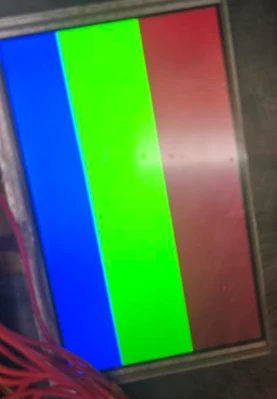
 uint16_t *fb = (uint16_t*)0xC0000000; // RGB565 view
 const int W = 800, H = 480;
 for (int y = 0; y < H; ++y) {
 uint16_t color =
 (y < H/3) ? 0xF800 : // Red
 (y < 2*H/3) ? 0x07E0 : // Green
 0x001F; // Blue
 for (int x = 0; x < W; ++x) fb[y*W + x] = color;
 }
Then when I try to print a smaller green box, it still fills across the width of the screen, distorted, and does not go from 40,320?:
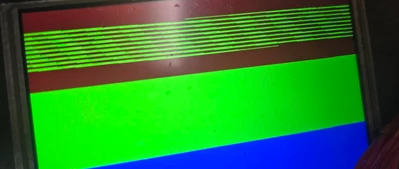
 for (int y = 40; y < 120; ++y)
 for (int x = 40; x < 320; ++x)
 fb[y*800 + x] = 0x07E0;
Then when I try to write text I get a thin fluctuating line across screen, I also tried to create a larger font to see if I could make out any characters, but it looked the same:
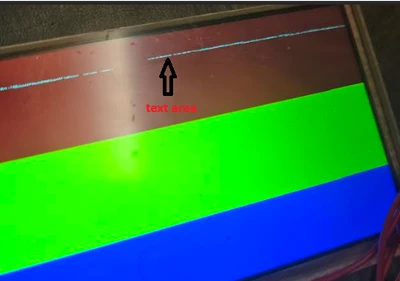
lcd_puts("BOOTLOADER LCD ONLINE.\r\n");Tried multiple iterations trying to get text to show.
Not sure if IOC file is not setup correctly. Something must be set correctly to get red,green,blue bars, just can't figure out why I can't get BOX to show or any TEXT?
I have attached my IOC file along with lcd_console.c and main.c
Appreciate any insight on what I am doing wrong!