

ksale.1
Senior II
December 3, 2025
Solved

boxProgress orientation, and circleProgress size

  • December 3, 2025
  • 1 reply
  • 84 views

Hi, In my UI project I need a vertucal boxProgress while all available backgrouds and images are horizontal while w&h are greyed out. When I create a custom background, the progress bar is not working. Same for circleProgress (size control). Can you help please.
Best answer by Osman SOYKURT

Hello @ksale.1 ,

I attempted to replicate the issue but did not encounter any problems when setting up and using a vertical BoxProgress. Please verify the following two points:

  • Ensure that the height of your background image is sufficiently large.
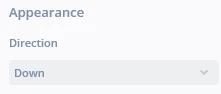
  • In the properties panel of your BoxProgress widget (on the right side), adjust the "Appearance" setting—either up or down—according to your desired orientation.
    OsmanSOYKURT_1-1764943423095.png


1 reply

Osman SOYKURT
Osman SOYKURTBest answer
Technical Moderator
December 5, 2025

Hello @ksale.1 ,

I attempted to replicate the issue but did not encounter any problems when setting up and using a vertical BoxProgress. Please verify the following two points:

  • Ensure that the height of your background image is sufficiently large.
  • In the properties panel of your BoxProgress widget (on the right side), adjust the "Appearance" setting—either up or down—according to your desired orientation.
    OsmanSOYKURT_1-1764943423095.png


Osman SOYKURTST Software Developer | TouchGFX