
Associate III
April 23, 2024
Solved

Cache memory seems to crash?

  • April 23, 2024
  • 6 replies
  • 4700 views

Gm,


I am creating a scrollable list of items, and we want have an image for each one of the items in the list, I have created a code that always prints 12 images depending on the scrollContainer.getScrolledY() value. This is for memory saving.


To display the image i use BMPFileLoader.cpp from the touchGFX documentation.

And i have created a 6MB cache in FrontedAplication.cpp which can print my image like 21 times.(I use the same image for debugging but later on they will have different images)

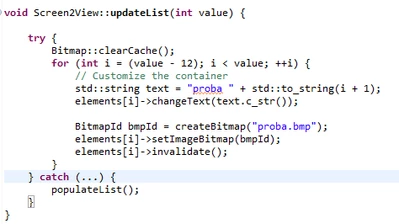
This is how I update the images:
I_ve_got_a_problem_0-1713857106438.png

I call lthis code every 50 ticks.

And everything works perfectly but once a amount of ticks has passed, this is what happens to the images:

I_ve_got_a_problem_1-1713857222208.png

They dissappear, and i don't know what is causing this. I'd like to debug or be able to see whats being stored in the cache or if clearCache() is really removing the images from the cache, but I have no way to do this right?


As I said before, this happens after an amount of ticks have happened as if i call this every 5 ticks for example, the crash happens much faster.


This topic has been closed for replies.
Best answer by GaetanGodart

Hello @I_ve_got_a_problem ,


@JTP1 have mentioned to me that you are not closing your file after reading it.
I have tried to close it in the project you sent and it does solve the problem for me.
All I did was adding 

fclose(f);

at the end of your createBitmap function.


I the solves your issue, I invite you to select this message as "best solution".


Regards,

6 replies

AScha.3
Super User
April 23, 2024

Hi,

to check , cache doing something here or not , simple way: disable (not enable) D-cache at all.

Then you see : cache problem or your code (memory overflow, ..etc.) has a problem.

(maybe then also wrong cache management..).

"If you feel a post has answered your question, please click ""Accept as Solution""."
Associate III
April 23, 2024

This is a simulator project so i don't really know how I can enable or disable D-Cache, but until I declared this in the FrontedAplication.cpp the images wouldn't show, so it must be storing them in this cache:

I_ve_got_a_problem_1-1713859942196.png

Also if I try to print all of them i only see like 20-22 of the images, and if i reduce the cache declared in there it does show less images, so it's storing them there


AScha.3
Super User
April 23, 2024

Oo, so i got it wrong. (I was thinking : real cache in a complex cpu ...)

You have a "cache" memory area, to buffer the images - right ?

So you have to free some memory, not overflow the area.

Or limit what you put in, to the available size of 6MB - or what you can use.

"If you feel a post has answered your question, please click ""Accept as Solution""."
GaetanGodart
Technical Moderator
April 30, 2024

Hello @I_ve_got_a_problem ,


What board are you using? Did you select a board when creating the TouchGFX project in Designer or did you select simulator?


Try to isolate the issue. 


Try to import your GUI into a simulator project, see if the issue still happens and share the project here.


You can disable cache in the ioc file (STM32CubeMX) here :

GaetanGodart_0-1714465267900.png
I assumes you were using a H735 as you said you used this MCU in previous posts.

Do you ever get into your catch?
What does populateList do?


What have you tried debugging?
Put a print at the end of your try to see if you finished everything you want to.
Print the address of the bitmap you are copying from so you know if you are getting out range without an error (and therefore copying only zeros).
Etc.


You issue doesn't seems to be linked to the size of your virtual cache because when increasing it you still get 18 seconds.


With your measured timings, it seems you enter your functions 43,2 times, so probably 43 or 42 times).


Try to print your bitmap ID without scrolling, you should get the same IDs since you don't change what you display.


What does "createBitmap" does? It seems to be a function that you created.


Please share a picture of the project before it stops displaying so we know what it should look like.


Regards,

Associate III
May 7, 2024

Hi!

All these was done in the simulator so far. 


The createBitmap function just creates a dynamic bitmap and then returns its id.

I_ve_got_a_problem_0-1715063067951.png

If i print the bitmapId's i can see that it creates and deletes the 12 images in every loop, basically it prints bitmap ids from 58 to 70, and when it crashes it displays bitmapId: 65535 which if i'm not wrong is just the bitmap invalid id.


When its working we can just see the images that we are telling it to load to the ram on runtime

I_ve_got_a_problem_1-1715063266209.png


Yesterday I tried adding 100 images to the cache on a separate function that is not a loop, and only draw the 12 images on the screen using the loop and it wouldnt crash(this is not a good solution for us, we want to only have 12 images in ram in every time). So it must be something related to the create bitmap action. I do Bitmap::clearCache() in every tick but i dont know if this is really reseting the cache, or if the images are leaving some leftover that ends up overflowing the cache, even though that wouldnt make much sense as the size of the cache I set doesnt affect the time it takes it to crash.


GaetanGodart
Technical Moderator
May 7, 2024

Hello @I_ve_got_a_problem ,


Since this is only a simulator project, can you share it so I can see it all?


Regards,

Associate III
May 13, 2024

Hi sorry for not replying faster

I have isolated the problem in a new project and exported the custom container to it so you can see, the behaviour of the problem is exactly the same as in my main project, 

I don't know if it's a problem with my code, or that your approach on how to cache images is not suitable for my case in which i need to load and delete images infinetly so that we can add images on runtime but always only having 12 or so in the ram.


I have attatched the project below.

GaetanGodart
Technical Moderator
May 13, 2024

Hello @I_ve_got_a_problem ,


No problem!

I have looked at your shared project.
The 43th call is having a problem, the 5 first image load work but the 6th fails.
I have tried updating only 6 images (inside updateList) at a time and by doing this, I was able to call the function 84 times successfully but fail at the 85th call.
So the 509th read always fails.

I figured that the size of the 509 call was wrong (value width and height in the getBMP24Dimensions function).
By manually changing those values to the pixel size of your image (240 x 240) I am not encountering any error anymore.

	width = 240;
	height = 240;

This is just a quick walk around that would work if all of your images are the same size.


Regards,

GaetanGodart
GaetanGodartBest answer
Technical Moderator
May 14, 2024

Hello @I_ve_got_a_problem ,


@JTP1 have mentioned to me that you are not closing your file after reading it.
I have tried to close it in the project you sent and it does solve the problem for me.
All I did was adding 

fclose(f);

at the end of your createBitmap function.


I the solves your issue, I invite you to select this message as "best solution".


Regards,

GaetanGodart
Technical Moderator
May 14, 2024

How did you debug so deeply?

I just used prints. You can print stuff with the function touchgfx_printf(); which behave just like the regular printf. To use it, you need to #include <touchgfx/utils.hpp>.

I have issue with the size previously so I knew to check that.


But I think setting the size is not the correct approach. I don't know if you seem my last message about fclose(f);.
Closing your file after reading it seem to be the correct fix and is either way good practice.


I think this is the fix that other people could benefit from so it would be nice if you could test it and if it works for you select it as best answer so that other people encountering the same issue could find the correct fix quickly.


Regards,

Associate III
May 14, 2024

You are right that did fix it, i left it running on my lunch time and got no crashes, thanks again.

GaetanGodart
Technical Moderator
May 14, 2024

My pleasure, I also learned something today! ;)