Associate III
January 9, 2024
Question

Can not Use STM32H747I-DISCO Internal RAM for Frame Buffer

  • January 9, 2024
  • 7 replies
  • 3172 views

Hello,

I have a STM32H747I-DISCO touchGFX project that has a 8-bit color depth and it is working very well, when I use external RAM for frame buffer. But when I disable external RAM and use internal RAM for the frame buffer by applying these instructions in the link below, I see partly corrupted screen.

Ref:https://support.touchgfx.com/docs/development/board-bring-up/how-to/03-display-internal
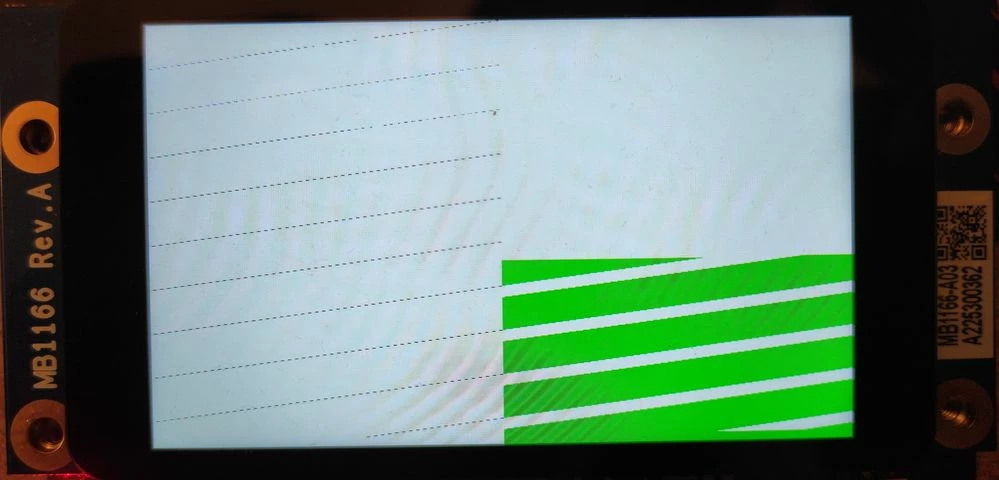
1704823407811.jpg

and this is the original screen:

Screenshot_1.png

Should I do something else that is not written in the 'Display with framebuffer in internal RAM' instruction?

Thanks for the answers

This topic has been closed for replies.

7 replies

GökhanAuthor
Associate III
January 10, 2024

Hello again,

Do you have any suggestion for this? 

MMenz.1
Associate II
January 10, 2024

Your controller has multiple internal RAM blocks. Can you try anther one? Looks like an alignment problem

GökhanAuthor
Associate III
January 10, 2024

Gkhan_0-1704891647675.png

@MMenz.1 Thank you for your reply but I can not use other RAM blocks because of frame buffer size. What do you mean with alignment problem? Can you explain? Thanks!

MMenz.1
Associate II
January 10, 2024

DMA often can only access 32bit aligned addresses. When your buffer starts at another address it may lead to shredded images.

GökhanAuthor
Associate III
January 10, 2024

By the way, this is another example.

1704892019285.jpg

Screenshot_2.png


MMenz.1
Associate II
January 10, 2024

Are you sure that you have only changed the location of the buffer? it locks a bit like your array dimensions are incorrect. I find it easier to identify when you place small squares with different colors in each corner.

GökhanAuthor
Associate III
January 10, 2024

@MMenz.1 I just set frame buffer in internal RAM in a specific address (0x240000EC) and also disabled DMA2D. Can 'Disabling the DMA2D' be the reason? If yes, I had disabled the DMA2D, when I used external RAM and it was working without any problem. Should I enable it, when I use internal RAM.

 
MMenz.1
Associate II
January 11, 2024

RAM Address appears to be fine. You could try an even more even address such as 0x24010000.

Why did you disable the DMA2D? Performance is much worse when you do that. Definitely try to enable it. It alone should not break your application however.

GökhanAuthor
Associate III
January 10, 2024

One more update... It seems the problem is not about frame buffer. I connected to the MCU with debugger to review frame buffer memory region (in internal RAM). Every byte is in correct place. But I found something else. When I comment out LCD_SetUpdateRegionLeft() in HAL_DSI_TearingEffectCallback() (TouchGFXHAL.cpp), half of the screen is working without any problem.

void HAL_DSI_TearingEffectCallback(DSI_HandleTypeDef* hdsi)
 {
 GPIO::set(GPIO::VSYNC_FREQ);

 HAL::getInstance()->vSync();
 OSWrappers::signalVSync();

 // In single buffering, only require that the system waits for display update to be finished if we
 // actually intend to update the display in this frame.
 HAL::getInstance()->lockDMAToFrontPorch(refreshRequested);

 if (refreshRequested && !displayRefreshing)
 {

 // Update region 0 = first area of display (First quarter for 16bpp, first half for 24bpp)
 updateRegion = 0;
// LCD_SetUpdateRegionLeft();

 // Transfer a quarter screen of pixel data.
 HAL_DSI_Refresh(hdsi);
 displayRefreshing = true;
 }
 else
 {
 GPIO::clear(GPIO::VSYNC_FREQ);
 }
 }

 But when I uncomment it, screen is not working. Here is the result images:

Original image (from touchGFX designer):

Screenshot_1.png


When I comment out LCD_SetUpdateRegionLeft(), right side of the screen is working without any problem:

1704921598555.jpg


When I uncomment LCD_SetUpdateRegionLeft(), screen is not working. Pixels are not at correct places:

1704922504277.jpg

What can be the possible reasons of this situation? I would be grateful if you have any suggestions. Thanks!

MMenz.1
Associate II
January 11, 2024

you are somehow passing invalid dimensions of the array to touchGfx. LCD_SetUpdateRegionLeft should update the left side of the screen but it appears that it uses wrong dimensions. Try an image with smaller and more unique shapes (as I said, small squared in the corners with unique colors and maybe more) to identify what goes where.