

COSEBE
Senior
January 5, 2025
Question

Change Alpha on each widgets of container

  • January 5, 2025
  • 6 replies
  • 2052 views

Hi,

I have a container with buttons, images and text (around 30).

I would like to change the alpha from 255 to 128 of each widget inside the container.

On the documentation, it says it it possible with container with FadeAnimator in Mixins :

COSEBE_0-1736037012973.png

https://support.touchgfx.com/docs/development/ui-development/ui-components/containers/container#properties

but I think it is a mistake in the documentation.

So, without this feature, what is the best way to change all the alpha value of each widget in a container ?

If the function forEachChild (https://support.touchgfx.com/docs/api/classes/classtouchgfx_1_1_container#function-foreachchild) is recommended, can I have a link of an exemple program using this function or a zip file with a test program with this feature ?

Regards,

Sébastien

6 replies

ferro
Lead
January 5, 2025

Hi @COSEBE ,

Step 1

class DoThisToEveryChild : public GenericCallback< Drawable & >
{
	virtual void execute ( Drawable & d ) override final
	{
		// user code here e.g.
		// d.setVisible ( false );
	}
	
	virtual bool isValid () const override final
	{
		return true;
	}
};

Step 2

DoThisToEveryChild doThis {};
 
// now 'DoThisToEveryChild::execute ()' will be called for every child
ticks.forEachChild ( & doThis );
 

https://community.st.com/t5/stm32-mcus-touchgfx-and-gui/get-each-items-in-a-container-and-change-item-attribute/m-p/155681/highlight/true#M8908


COSEBE
COSEBEAuthor
Senior
January 5, 2025

Hi ferro,

Thank you for your answer, but I already see your 2-step code in the community, but I still do not understand, because I am not professional in C++.

I do not understand where to put the step 1 code, what is "override final", what is the goal of isValid method.

In step 2 code, where ticks come from ? is it the refresh tick ? if I want to change Alpha on each widget in container, I have to call myContainer.forEachChild(& doThis); ?

Do we absolutely have to create a new class to use this function ?


ferro
Lead
January 5, 2025

"what is "override final", what is the goal of isValid method"

Have a look into \touchgfx\Callback.hpp 

https://stackoverflow.com/questions/29412412/does-final-imply-override

ferro_0-1736080258667.png


"I do not understand where to put the step 1 code."

Sorry about my previous confusing reply. Example attached using forEachChild(). But only Y position of all children of container is changing.

I see that setAlpha() is not member of Drawable. Hm.. Not sure what to do now. Seems you need to set alpha for each button individually.

ferro_1-1736080334940.png


"Do we absolutely have to create a new class to use this function ?"

I think so, yes.


GaetanGodart
Technical Moderator
January 8, 2025

Hello,

You can use the functions getFirstChild and then getNextSibling to loop through all the widgets in a container :


Regards,

ferro
Lead
January 8, 2025

Hi @GaetanGodart 

getFirstChild() returns a  * Drawable which does not provide a way to change Alpha.

GaetanGodart
Technical Moderator
January 8, 2025

You are right, I did not really think of this.


@COSEBE I have modified Ferro's example to make it so that every widget in the container is set invisible when we click on the button (find the project attached). However, as he said, since it returns a drawable, the method setAlpha is not accessible.
Could it be enough to set the whole container's alpha value instead?


"
I would like to change the alpha from 255 to 128 of each widget inside the container.
On the documentation, it says it it possible with container with FadeAnimator in Mixins :
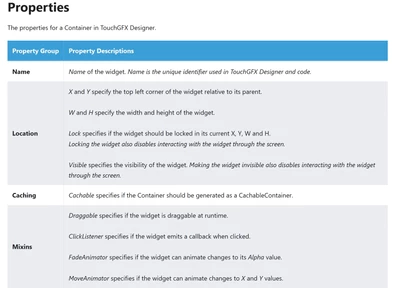
"
I think it says that you can change the alpha value of the container, not that you can change the value of all the widgets by using the mixin which is the same as doing container.setAlpha(). 
The goal of the mixin is to use it in TouchGFX Designer and to enable smooth fades.


Regards,

GaetanGodart
Technical Moderator
March 5, 2025

Hello @COSEBE ,$


We have updated the documentation and removed the mixin FadeAnimator.

Thank you for the feedback!


Regards,

ST Employee
March 6, 2025

Hello.

You can cast a Drawable to a FadeAnimator. Following @ferro's example from the first reply, you can do it like this:

class FadeEachChild : public GenericCallback< Drawable& >
{
	virtual void execute(Drawable& d) override final
	{
		if (FadeAnimator< Image >* fadeAnimatorObject = dynamic_cast<FadeAnimator< Image >*>(&d))
		{
			fadeAnimatorObject->startFadeAnimation(128, 50);
		}
		else
		{
			// d is not a FadeAnimator< Image > object
		}
	}

	virtual bool isValid() const override final
	{
		return true;
	}
};

Then, do the following when you want to use it:

FadeEachChild fadeChildren{};
container1.forEachChild(&fadeChildren);

The downside of this approach is that you need to specify the widget type. If you have both images and boxes in the container, you would need to do something like the following. However, you could probably work around this with a template function if it is important.

if (FadeAnimator< Image >* fadeAnimatorObject = dynamic_cast<FadeAnimator< Image >*>(&d))
{
	fadeAnimatorObject->startFadeAnimation(128, 50);
}
else if (FadeAnimator< Box >* fadeAnimatorObject = dynamic_cast<FadeAnimator< Box >*>(&d))
{
	fadeAnimatorObject->startFadeAnimation(128, 50);
}
else
{
	// d is not a FadeAnimator object
}


Best regards,
Johan

ferro
Lead
March 6, 2025
GMeur
Associate III
October 31, 2025

I'm facing the exact same problem and I'm a bit surprised to see that the Drawable class doesn't have a virtual setAlpha() method. Can someone explain me what's the insight behind such a weird-looking decision?

There is therefore no easy way to set a Container transparency, which is quite sad…

MM..1
Chief III
November 1, 2025

I mean use anim on every child isnt best MCU effective method... Simply place box with background color on top in or over container and change alpha only on it (ofcourse reverse)