
Associate II
May 21, 2024
Solved

Changing from LCD16bpp to LCD8bpp

  • May 21, 2024
  • 4 replies
  • 2805 views

Hello, I am facing an issue where the rendered frame buffer is printed on the display as gibberish pixels.

I'm using the Nucleo F746ZG and interfacing it (over SPI) with an external display controller that writes to a 240*320 display. I was not able to locate the exact color depth of the display in the datasheet, but the information suggests that each pixel has 2ddot. Given RGB, I assumed 6bpp is the correct format.

Initially I set up touch gfx to render a 16bpp frame buffer. With the 16bpp rendering I used the following code segment to send the rendered gibberish buffer to my display controller and get some random pixels printed.

In TouchGFXGeneratedHAL.cpp:

void TouchGFXGeneratedHAL::flushFrameBuffer(const touchgfx::Rect& rect)
{
 uint32_t ibaseaddr = (uint32_t)getClientFrameBuffer();
 uint16_t istride = lcd().framebufferStride();
 uint16_t HParam = 1;
 uint16_t WParam = 1;
 uint16_t HScale = 100*HParam;
 uint16_t WScale = 100*WParam;
 uint16_t rot = 128;//<< rotates 90 degrees
 // send frame buffer to display
 ImgCpyRotScale( 120, //Destination Window center X coordinate.
 160, //Destination Window center Y coordinate.
 ibaseaddr, //Source Window base address.
 istride, //Source Window stride.
 rect.width-1, //Source Window width.
 rect.height-1, //Source Window height.
 120, //Source Window center of transformation X coordinate.
 160, //Source Window center of transformation Y coordinate
 0xC0, rot, //Fill color (if FILL is enabled) | Rotation value
 HScale, HScale, //left scale % | right scale %
 WScale, WScale, &cpyctrl); // top scale % | bottom scale %
 WaitGfxDone();
 PanelUpdate(0, 320-1);
 WaitUpdDone();
}


I have tested the display controller SPI command and its arguments, it works as expected. But I believe the 16bpp frame buffer does not render the correct display buffer. To fix this I made the necessary changes in CubeMX and ported over the changes manually. The main change was inside TouchGFXConfiguration.cpp.

The display object changed from:

static LCD16bpp display;

to

static LCD8bpp_RGBA2222 display;


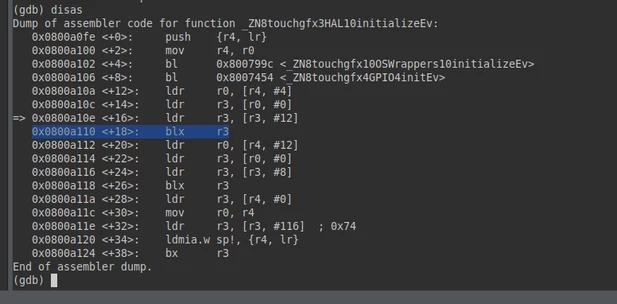
This causes a problem where during touch gfx initialization, hal.initialize() fails 4 instructions after returning from touchgfx GPIO init.
bornamm_0-1716256740120.png

Since the source code for HAL initialize is inside the compiled library, I am not able to debug why zero (0x0) is copied to the r3 register through this instruction.

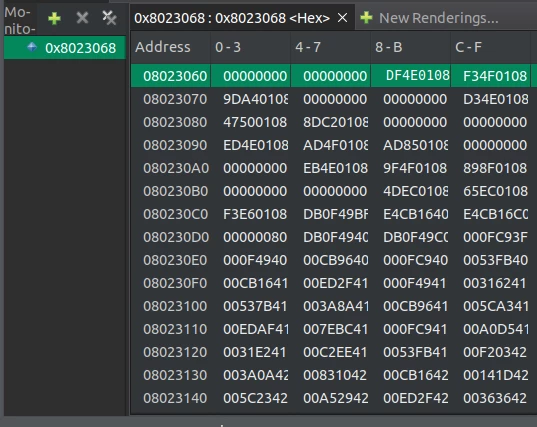
ldr r3,[r3,#12] // copies zero to r3

r3 Memory address at the time of ldr instruction:
bornamm_1-1716257064226.png

resulting in a hard fault when branching the r3 register

blx r3


Best answer by MM..1

I mean your display have own memory , then best is switch TouchGFX to partial buffer mode and write own func instead 

ImgCpyRotScale

but you can leave full single buffer mode when flush is quick . Format choiced L8 based on mode for bits ARGB RGBA ... before send to display require convert optimaly line by line to display format.

4 replies

Tesla DeLorean
Guru
May 21, 2024

Ok, but what's the fault and registers

What call back is at 0x08014FF2 ?

Tips, Buy me a coffee, or three.. PayPal VenmoUp vote any posts that you find helpful, it shows what's working..
MM..1
Chief III
May 21, 2024

Your showed info is irelevant. Show display ID or controller ID.

bornammAuthor
Associate II
May 21, 2024

I wouldn't say it is entirely irrelevant, I covered all the points I thought are useful for debugging touch gfx.

This page has specs for the display I'm using. I haven't had much luck with datasheets for this product.

I experimented with the display controller before and was able to print bitmap images, that were located in the F7 internal flash, to the display. I'm using similar functionality by pointing to the frame buffer address instead of bitmap images. In an ideal world, the correct frame buffer would be rendered through touch gfx, and I can just get the address and pass it to the display controller. My suspicion is that some configuration settings for touch gfx is causing it to render the frame buffer incorrectly.

I spent a good amount of time researching the color depth I need for this display. The display size is 240*320 pixels. Seems like each rgb pixel has a set of MSB and LSB bits, for each color. The MSB Pixel block occupies 2/3 of the sub pixels of each pixel. And LSB occupies 1/3. Each pixle has 9 (3x3) sub pixels, and the colors are divided by columns. The top and bottom row of pixels are regarded as MSB, and middle row is LSB. Like this:

bornamm_1-1716314924272.png

Is LCD8bpp_RGBA2222 the correct selection for my use case? What are your thoughts on this?

MM..1
Chief III
May 21, 2024

I mean no maybe. LCD8 is palete format in buffer stored index and to display send RBG888 value. But your func can convert this. For this i ask LCD info, because more flexible is use hw based management as sw rotations usw.

bornammAuthor
Associate II
May 21, 2024

@Tesla DeLorean  This operation results in a hard fault, because r3 will get populated with the address 0x0 and:

blx r3

is an invalid instruction @ 0x0 .

To answer your second question, the disassembly returns the following for 0x08014FF2:

bornamm_1-1716310662804.png

I tried manually modifying the assembly instruction results:

=> 0x0800a10e <+16>: ldr r3, [r3, #12]

Above instruction, returned 0x0 to r3. Instead, I copied the value I expected r3 to be populated with (found it by looking at the memory):

bornamm_2-1716311149298.png

bornamm_3-1716311195355.png

After manually populating that address to r3 and stepping once it resolved to this function:

"touchgfx LCD16bpp TextureMapper RGB565 NonOpaque Bilinear Interpolation NoGAD"

bornamm_4-1716311512293.png

I'm not sure if that's the correct function that needs to be called. I wonder if there are further manual changes needed to have touch gfx use the correct function calls to render for 8bpp.

bornammAuthor
Associate II
November 22, 2024

The issue was that the rendered frame buffer had to be transformed before being sent to the display controller.


Ideally I should I have configured the correct orientation within touch gfx or setup of the display controller. But after reading display controller datasheet I realized the display controller expects the data row by row. I created a transform function to re construct the correct frame buffer byte order after it is produced by touch gfx.