

dave2012
Associate III
April 26, 2025
Solved

Corrupted TouchGFX text

  • April 26, 2025
  • 3 replies
  • 753 views

I have a TouchGFX application where Flex Button text is sometimes being corrupted as are TextArea widgets (both with and without Wildcards). Images remain unaffected. The processor is a STM32U599, display type is RGB888 LTDC based and no external FLASH graphic storage is used.

The corruption cannot be cleared with a processor hard reset, only power cycling clears it.

From the attached image, the two 't' characters in the corrupted "Start" text are the same so it appears that a RAM based font bitmap cache is being corrupted. If so, any ideas where to find the name of this structure/buffer and is it managed exclusively by the TouchGFX library code?

Thanks
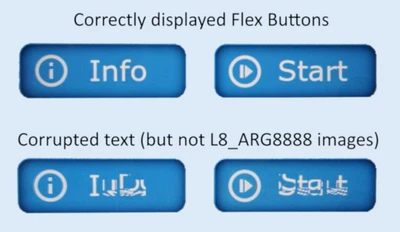
TouchGFX Text Corruption.png

Best answer by dave2012

If anyone else comes across this issue, it's caused by old data in DCACHE2 not being properly invalidated at startup. ST support came up with a fix to add to main.c (or dcache.c if generated code is split into multiple files):

/* USER CODE BEGIN DCACHE2_Init 2 */
// Ensure that GPU2D texture cache does not hold any out-dated data from previous application
__HAL_RCC_GPU2D_CLK_ENABLE();
HAL_DCACHE_Invalidate(&hdcache2);
/* USER CODE END DCACHE2_Init 2 */

3 replies

MM..1
Chief III
April 26, 2025

Is your issue after flash programming? I have same issues, but seems after power off - on all works. 

Yes affected is fonts seems all types, vector too, reported on other thread.


GaetanGodart
Technical Moderator
April 28, 2025

Hello @dave2012 ,


Is it a custom board or is it the STM32U599J-DK?

Where is your font stored? In internal memory?

Once you do the power cycling reset, it always works? So the issue only happens after flashing?


Regards,

dave2012
dave2012Author
Associate III
April 28, 2025

Hello Gaetan,

Yes, it's a custom board and the font is stored in internal FLASH.

The text corrution seems to happen in 2 scenarios:

1. While debugging in the IDE
2. After a firmware update which is done via a custom bootloader. The bootloader implements a simple single screen GUI with 8-bit colour which transfers execution to the newly programmed UI application (multiple screens, 24-bit).

So far, power cycling always resolves the issue but pressing reset in the IDE doesn't. I'm using the ST-LInk GDB server which I assume implements a hardware reset but maybe you could confirm?

Thanks
Dave

dave2012
dave2012AuthorBest answer
Associate III
September 13, 2025

If anyone else comes across this issue, it's caused by old data in DCACHE2 not being properly invalidated at startup. ST support came up with a fix to add to main.c (or dcache.c if generated code is split into multiple files):

/* USER CODE BEGIN DCACHE2_Init 2 */
// Ensure that GPU2D texture cache does not hold any out-dated data from previous application
__HAL_RCC_GPU2D_CLK_ENABLE();
HAL_DCACHE_Invalidate(&hdcache2);
/* USER CODE END DCACHE2_Init 2 */