Associate
October 14, 2024
Solved

create a custom widget using code in stm32cubeide

  • October 14, 2024
  • 1 reply
  • 753 views

Is it possible to create a custom widget in touchgfx using code, specifically in stm32cubeide? I would like to start with a blank screen and add a custom widget that I design through code. What are the steps involved in achieving this, including creating the widget class, integrating it into the screen, and ensuring it functions correctly?
Best answer by GaetanGodart

Hello @Ismails and welcome to the community!


To create a custom widget, the simplest way is to open TouchGFX Designer, create a new project.
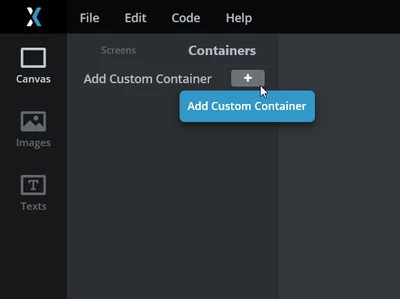
Then, on your application, just go to the "Containers" tab and click on the "+" icon :

GaetanGodart_0-1728910047333.png

Then, you can add shapes, images, etc that you will need for your custom widget.

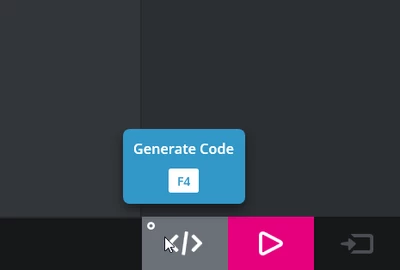
Then, click on "Generate code":

GaetanGodart_2-1728910181792.png

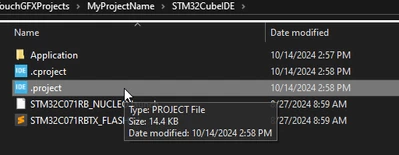
Then you can open the folder where your project is inside your favorite text editor or IDE (in that case, STM32CubeIDE):

GaetanGodart_4-1728910729358.png

The custom container code will be under TouchGFX => gui => source => container.

From there you can code custom behavior.


I hope this help!
If this comment answers your question, I invite you to select it as "best answer". :smiling_face_with_smiling_eyes:


Regards,


1 reply

GaetanGodart
GaetanGodartBest answer
Technical Moderator
October 14, 2024

Hello @Ismails and welcome to the community!


To create a custom widget, the simplest way is to open TouchGFX Designer, create a new project.
Then, on your application, just go to the "Containers" tab and click on the "+" icon :

GaetanGodart_0-1728910047333.png

Then, you can add shapes, images, etc that you will need for your custom widget.

Then, click on "Generate code":

GaetanGodart_2-1728910181792.png

Then you can open the folder where your project is inside your favorite text editor or IDE (in that case, STM32CubeIDE):

GaetanGodart_4-1728910729358.png

The custom container code will be under TouchGFX => gui => source => container.

From there you can code custom behavior.


I hope this help!
If this comment answers your question, I invite you to select it as "best answer". :smiling_face_with_smiling_eyes:


Regards,