
Associate II
December 4, 2024
Solved

Debug and Terminate Problem
  • December 4, 2024
  • 1 reply
  • 696 views

hamzatamer_0-1733317823828.png

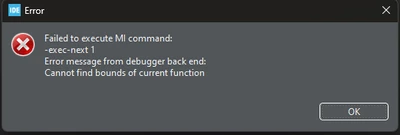
Hello, I am working with the stm32h7s board. I am developing an interface via Touchgfx designer and embedding it on this board. If I generate via Touchgx designer and upload to the program, I see my design on my LCD screen and my codes are working, but when I try to debug the same project via stm32cube ide, I get this error and when I terminate it, it doesn't work.

Do I need to make a separate setting to debug? Can't I open the code created by gfx designer and debug it in stm32cube?
Thanks.

Best answer by GaetanGodart

Hello @hamzatamer ,


When you want to run your project, do you first build then flash the boot part and then do the same for the appli part.

When debugging the appli part, it is normal to get a breakpoint. You need to manually reset the board or click on the "reset and relaunch" button in the debugger.


Regards,

1 reply

mƎALLEm
Technical Moderator
December 4, 2024

Hello @hamzatamer and welcome to the community.

Need to give more details about the board you are using: ST or custom board. stm32h7s is a microcontroller not a board. Do you mean STM32H7S78-DK board?


@hamzatamer wrote:

If I generate via Touchgx designer and upload to the program, I see my design on my LCD screen and my codes are working,


-> Do you mean this button in TouchGFX designer? 

SofLit_0-1733322865693.png

How did you start your project? from board template in TouchGFX designer?


"To give better visibility on the answered topics, please click on ""Accept as Solution"" on the reply which solved your issue or answered your question."
Associate II
December 5, 2024

Yes, I am using the board you mentioned. When starting a project, I select my board from the board section. For example, let's say I add a simple button to a project. I want to generate this project in TouchGFX Designer and debug it in STM32CubeIDE. Although the debug console says "Download verified successfully" when I start debugging, I cannot debug the project.

hamzatamer_0-1733373011701.png

I set breakpoints, but the resume functionality doesn’t work, and the "Step Into" and "Step Over" options don’t function either. When I press Step Into, an error occurs, showing a message like "Error message from debugger," similar to the one in Image 2.

hamzatamer_1-1733373025288.png


GaetanGodart
GaetanGodartBest answer
Technical Moderator
December 5, 2024

Hello @hamzatamer ,


When you want to run your project, do you first build then flash the boot part and then do the same for the appli part.

When debugging the appli part, it is normal to get a breakpoint. You need to manually reset the board or click on the "reset and relaunch" button in the debugger.


Regards,