Visitor II
March 25, 2025
Solved

Debug issue - my TouchGFX GUI to the STM32f767ZI Dev Board

  • March 25, 2025
  • 2 replies
  • 305 views

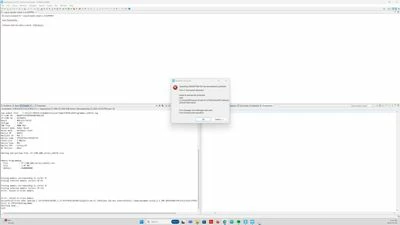
I created my first UI using the TouchGFX software but after when I opened the file in CubeIDE, Build the project and try to Debug it. I am getting this Issue

Problem Occured Win.jpg

Iam New to STM32. Can someone help me?

I used this youtube video from ST as reference

(2194) How to TouchGFX: Creating my first GUI with TouchGFX Designer for STM32 GUI applications - YouTube

Best answer by GaetanGodart

Hello @jackie04 and welcome to the community!


The video you show is only to create a GUI, it does not specify the hardware. To be able to flash, you need to know the hardware.

If you are new, it would take a bit of time to create your own TouchGFX Board Setup (TBS) to tell the MCU how to behave to be able to control the display and memory and make your GUI work.
So one solution could be to use a TBS that we have created.
When opening TouchGFX Designer, you can click on "Create new" to see all the available TBS (you need to be connected to internet).
I would recommend one of the new one such as The STM32U5G9-DK2, the STM32H7S78-DK or the STM32C071RB + RVA15MD display.

If you want to create your own TBS, here is the documentation .


If however, you did create a TBS, the error states that the flashing failed (could not finish flashing).
Can you try to flash you board another way such as taking the executable and flashing it by using STM32CubeProgrammer?


Regards,

2 replies

GaetanGodart
GaetanGodartBest answer
Technical Moderator
March 26, 2025

Hello @jackie04 and welcome to the community!


The video you show is only to create a GUI, it does not specify the hardware. To be able to flash, you need to know the hardware.

If you are new, it would take a bit of time to create your own TouchGFX Board Setup (TBS) to tell the MCU how to behave to be able to control the display and memory and make your GUI work.
So one solution could be to use a TBS that we have created.
When opening TouchGFX Designer, you can click on "Create new" to see all the available TBS (you need to be connected to internet).
I would recommend one of the new one such as The STM32U5G9-DK2, the STM32H7S78-DK or the STM32C071RB + RVA15MD display.

If you want to create your own TBS, here is the documentation .


If however, you did create a TBS, the error states that the flashing failed (could not finish flashing).
Can you try to flash you board another way such as taking the executable and flashing it by using STM32CubeProgrammer?


Regards,
GaetanGodart
Technical Moderator
April 4, 2025

Hello @jackie04 ,


Have you been able to move forward on your project?


Regards,